It should be shipping in the upcoming weeks.
Did not see the demo … thanks for sharing. Looks nice and can’t wait to combine the world of both of these.
I received my Unfolded Circle Remote 3 2 weeks ago and succeeded to program all my devices into it. It is a premium remote that requires some persistence to set up, but no programming knowledge required.
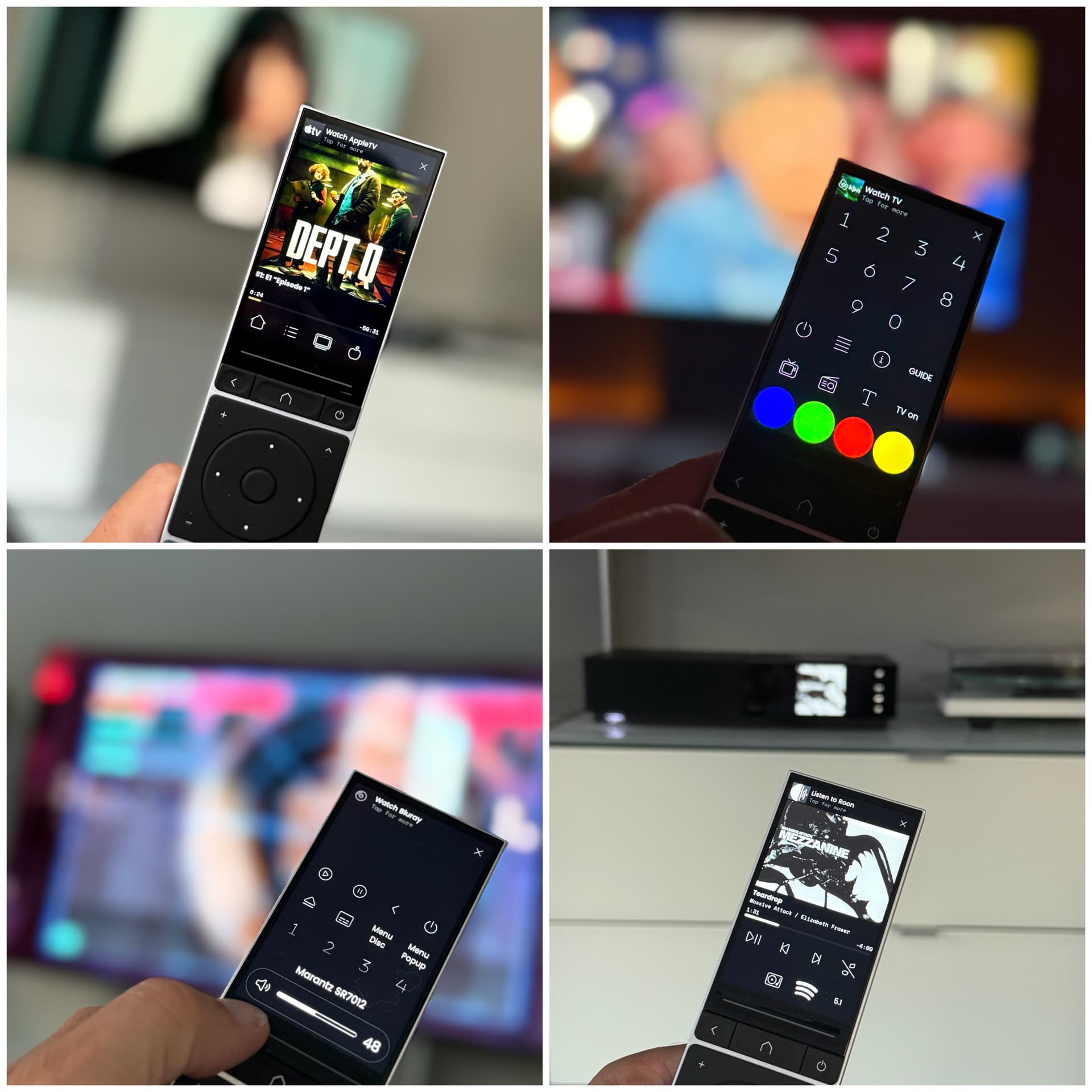
I’m controlling my LG tv, Marantz amp + Naim Uniti, Apple TV, Panasonic bluray, Arcadyan settop box and Philips Hue, Roon and Homey with it.
With regards to the Homey app: this opens up a whole new world of opportunities:
The Homey integration appears automatically on the remote once you installed the Unfolded Circle app on Homey. Most devices controlled by Homey are visible as ‘entities’ on the remote.
Furthermore, advanced flows made using the “When”-card with Unfolded Circle app on Homey will also be visible as entities, allowing the user to trigger a flow via the remote. This is a great feature that opens up a lot of options: I created a page to control my Roborock robot vacuum with the remote via Homey.

WAF status achieved!
Looking forward to control my home automation even more with the Remote 3 and Homey.
What kind of devices are not visible on the remote?
Please share your experiences with the remote and Homey the next weeks.
So far, I can see all my Hue lights, my Smart switches, my media players (via the Roon, Spotify and Chromecast apps).
I do not see my smart devices like Miele Oven, Samsung washing machine directly as entities yet. Neither are my Daikin heatpump, Roborock vacuum, Solaredge inverter visible. But… I can run any flow with these devices by making an advanced flow that is visible as a trigger entity on the remote. This allows you to virtually control all of your homey devices (like the Roborock example in my post above).
The only thing I cannot do (yet), is to display data from Homey, like images from my Unifi G4 security cam, the data of my weather station etc.
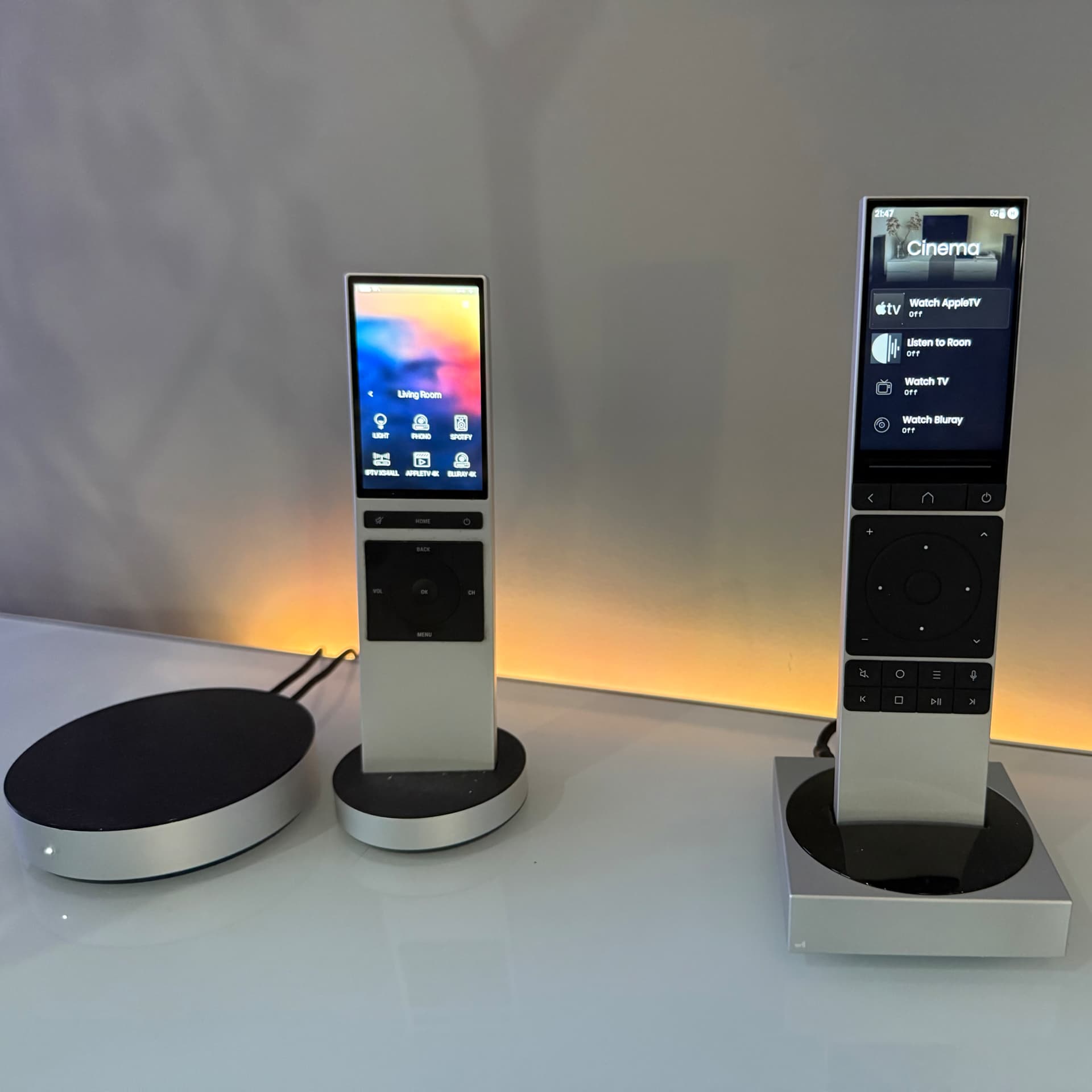
The Remote 3 (right) compared to the NEEO (left)
So far I’m pretty inpressed with the remote. I’ve been living with a NEEO remote for 8 years now and I’m ready to withdraw that one in the drawer.
Installing integrations from GitHub is fairly easy by uploading the *.tar.gz file from the GitHub repository in the web configurator of the remote.
There are a few small issues so far:
- charging via the dock has some bugs that are being worked on. It sometimes refuses to charge until you restart the dock.
- Battery life is approx 1 dag, much less compared to the NEEO. It needs to be in its charger overnight.
- Quite a few integrations are available e.g. for Roon, http GET/PUT commands, Sonos, AppleTV etc but it’s still work in progress. The Panasonic bluray and LG tv integrations didn’t work for me. The remote comes with a few built-in predefined IR packages, including the LG tv and Panasonic bluray - so it was easy to use those instead of the integrations.
- Some IR-codes are not included (for me it was the Arcadyan set top box), but those codes can be downloaded manually from the Global Caché database like I described here. It requires some manual copy/paste work. Doable for one device.
As you can see, programming the remote is not for the general audience yet - but if you can work with a Homey you should be able to succeed with the remote 3 as well.
First of thanks for sharing. Looks as sleek as I hoped wit would turn out.
Im still waiting as im;
Backer number 2945
Shipping number: 3027
But all in all cant wait to get to start using it.
Hi guys 
I have been a proud owner of a Remote 3 for a week now. I have already tried and set up quite a lot and am very satisfied with it.
Unfortunately, I am having trouble integrating it with Homey. I have two Homey Pro devices and have installed the UC app on both. Both Homey devices are recognized and displayed on the Remote 3.
However, I always receive the message, “Service is currently not available, please try later.”
Can someone help me and let me know where I might be going wrong?
Thank you very much.
Mauri
Do you get this message when you try to configure the Homey integration on the remote 3 or when you try to retrieve and install the entities (devices and trigger-flows) from Homey? Do you see any entities at all when the integration is installed?

Maybe try to install 1 Homey first? I assume your homeys are on the same subnet as your remote.
It seems that there is a bug with simple flows currently (they are not displayed as trigger-entities). But Advanced flows created via the webbrowser do work.
There are no specific settings to configure on Homey in the Unfolded Circle app. You might want to create a test Advanced Flow via the webbrowser (https://flow.homey.app). Create a “when” trigger using the UC app card (just give it a random name) and a “then” trigger activating a flow (via the flow card, specify a predefined flow eg “turn on all lights” / “Roborock controls”). This created flow should be visible in the Homey integrations page (click (+) entities) and needs to be selected to be imported as an entity to be used on the remote.


I was also facing this issue on the Remote 3, as far as I know they have a bug in their wifi driver that’s currently being worked on.
Ah, I see - troubles connecting the integration.
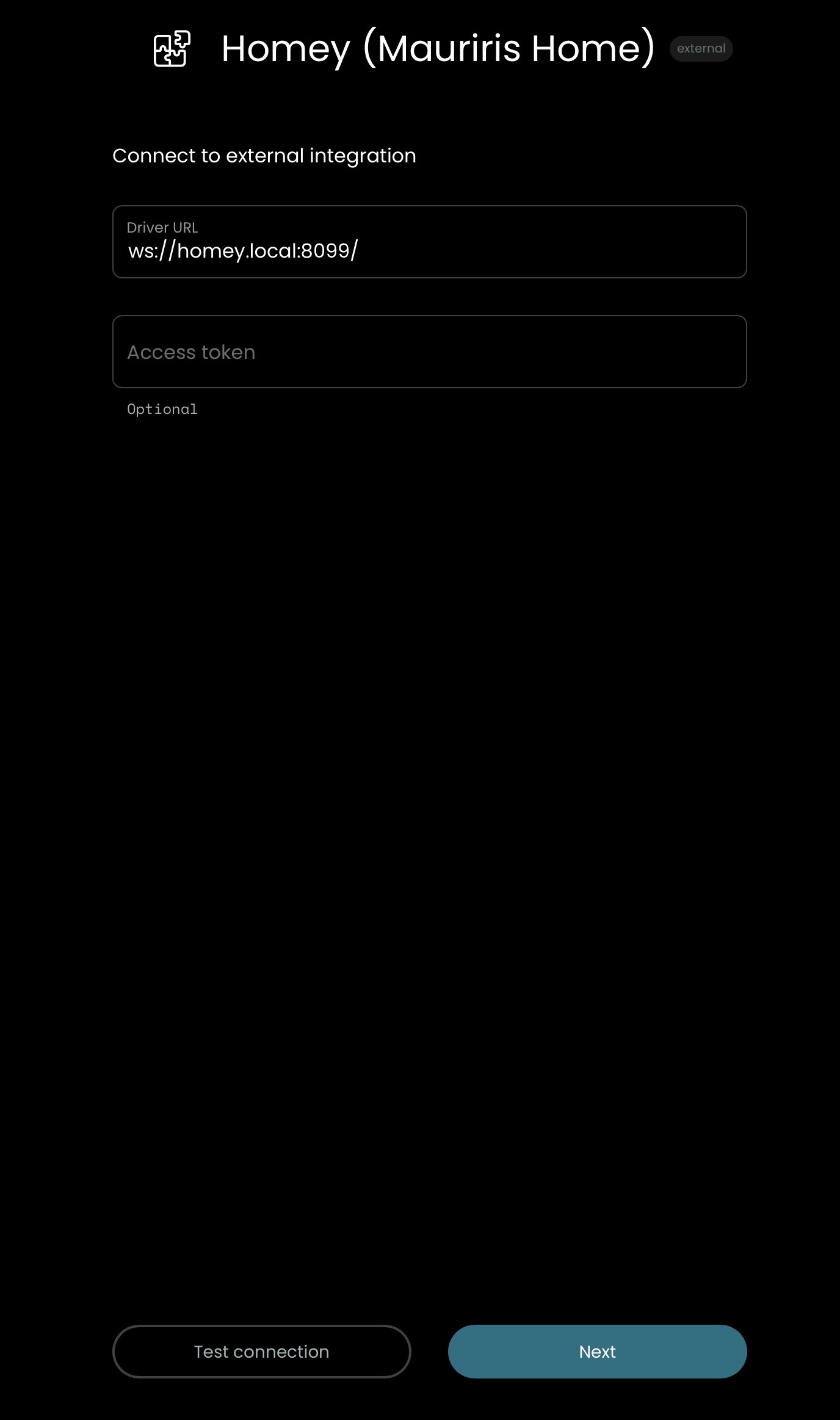
First of all, a token is not required on the Remote 3.
My homey integration driver url address is displayed as ws://homey-[homey-id number].local:8099
It seems your Homey-id is not present in the driver url.
Your Homey-id can be found in the Homey settings >System/General>Cloud/Homey-id.
You could try to manually add the Homey-id to the driver url on the remote 3:
ws://homey-xxxxxxxxxxxxxxxx.local:8099
If that does not work, you could try to change the driver url to ws://[homey ip address]:8099 ? Maybe this will help to connect?
I assume you have installed v1.2.1 of the Unfolded Circle app on Homey?
Edit - my remote 3 is connected to a 5 Ghz Unifi network without issues. The dock is hardwired to ethernet.
Hi zigvespa
Thanks for your help!
I’m not sure what happened, but I tried again today, and it works now! Maybe they changed something or resolved the issue. I did send a support call to them last week about the problem.
Thanks anyway!
Best
Mauri
Hi Doekse
Thanks for your help!
I’m not sure what happened, but I tried again today, and it works now! Maybe they changed something or resolved the issue. I did send a support call to them last week about the problem.
Thanks anyway!
Best
Mauri
Quick question, how did you get the Marantz amp integrated - as IR device ? thx for any insight

I’m using this integration for some time already (been one of first bakers).
My feedback - it happens quite often that integration disconnects and remote is not able to reconnect to Homey. Only possible solution - restart of Unfolded app on Homey.
Thermostat - target_temperature is mismatched - in Homey there is target set to 20 but in remote it shows 20.5 (or sometimes total random values)
Then there are few devices not yet integrated - like blinds or any ‘motor’ related devices, or simple temperature/humidity sensors.
I’ll appreciate if we could be able to share variables via this integration.
Is there any GitHub page for this app - wasn’t able to find it on unfolded circle git.
Got the invoice, shipping details for UPS just yet.
Backer number 2945
Shipping number: 3027
Should be arriving here in the Netherlands next Monday.
I received the Remote 3 this week and am still very much in the exploration phase  .
.
One thing I ran into with the Homey integration, is that the remote did not reconnect with my Homey after it woke up from sleep or was restarted. It kept searching infinitely for the Homey. I had to restart the Unfolded Circle app on my Homey to get it working again.
I found out that changing the homey.local part of the URL in the Driver connection setting to my Homey’s IP, solved this issue. Now the remote reconnects quickly after emerging from sleep/restarting.

Thanks for sharing such info, always appreciated 
Thanks to all here noting the Advanced Flow requirement for starting a Homey Flow.
Never expected that to be the cause for it not showing up.
My first impressions;
Hardware-side; Nice love the remote itself. Wifi seems a bit spotty every now and again. But besides that no real issues on my end.
Software-side; Well … it has a bit of a steep learning curve for sure and some things are not that intuitive. But once you get that down (the first hour or 2 can be a bit of trial and error) you have a real flexible remote. I have setup normal integrations, learned it some specific remotes that where not in the database and have been able to make it run Homey actions.
Accessibility-wise; I do wish they had made the subtle moving elements on the remote so that you could determine a background for the current item. I can tell them correctly but some people really seem to have a hard time distinguishing where they are on the remote.
More or less im running it as beta now here with the Harmony Elite still being around.
Ok let me share some insights I gathered today, with the hope it can help others with the learning curve of the Unfolded Circle remotes/API etc.
The following took a bit of puzzling/trial and error, but I hope it helps someone.
Officially there’s a full API with API keys, bearer tokens, etc. But you can also do it with simple authentication.
– List configured activities to fetch their entity_id:
curl http://IP-OF-REMOTE/api/activities -u web-configurator:PINHERE
– List configured macros to fetch their entity_id:
curl http://IP-OF-REMOTE/api/macros -u web-configurator:PINHERE
– Or fetch them one by one without curl via the web configurator after opening an activity/macro/entity, just copy the URL.
Example:
http://IP-OF-REMOTE/configurator/#/activity/uc.main.7fa6cb74-aabc-48f6-a201-c3e9c92b886b?category=activity
uc.main.7fa6cb74-aabc-48f6-a201-c3e9c92b886b is the entity_id in this case.
– Start an activity with curl:
curl -X PUT http://IP-OF-REMOTE/api/entities/THE_ENTITY_ID/command \
  -u web-configurator:PINHERE \
  -H "Content-Type: application/json" \
  -d '{"cmd_id": "activity.start"}'
– Stop an activity with curl:
curl -X PUT http://IP-OF-REMOTE/api/entities/THE_ENTITY_ID/command \
  -u web-configurator:PINHERE \
  -H "Content-Type: application/json" \
  -d '{"cmd_id": "activity.off"}'
Always check which features an activity/macro/entity has. By default there may be .start / .on / .end / .off. Macros seem to only have macro.run
– A curl-style request via Homey
Find the flow card: Logic – Make a Method request to URL with headers (Headers and body).
-
Method: PUT
-
URL:
http://web-configurator:PINHERE@IP-OF-REMOTE/api/entities/THE_ENTITY_ID/command -
Headers:
Content-Type: application/json -
Body (example):
{"cmd_id": "activity.start"}
This way you can use it in both Advanced and normal flows to start something via the Unfolded Circle remote.
PS: The PIN does not change unless you force it (as far as I understand). Alternatively, in Homey you could make this a variable.
– Starting flows from the remote
This is probably generally known, but for future reference:
Start a flow from the Remote using the trigger card from the Unfolded Circle Homey App. Note: These only work from an Advanced Flow (not entirely sure why).
In short:
-
Create an Advanced Flow that starts with your Unfolded Circle trigger.
-
About 10 minutes after creating it, go to Integrations and rerun Setup to add the new trigger as an entity.
-
Then assign it to a button, activity, or macro.
