@robertklep would it be possible to add an “and card” to check if a transition is running or not?
@Sre check the current test version: Transitions | Homey
You rock! Will test it
I am trying to use this APP: Transitions App for Homey | Homey
My goal is to set a time and to incrementally increase my Lights Brightness (DIM). After it reaches the end value it should turn the light off.
How the hell can I use the current_value of the Transition Flow inside “Dim to”. This should be intuitiv but it isnt. Also when trying to play it it executes the “Dim to” only once


I would appreciate any help


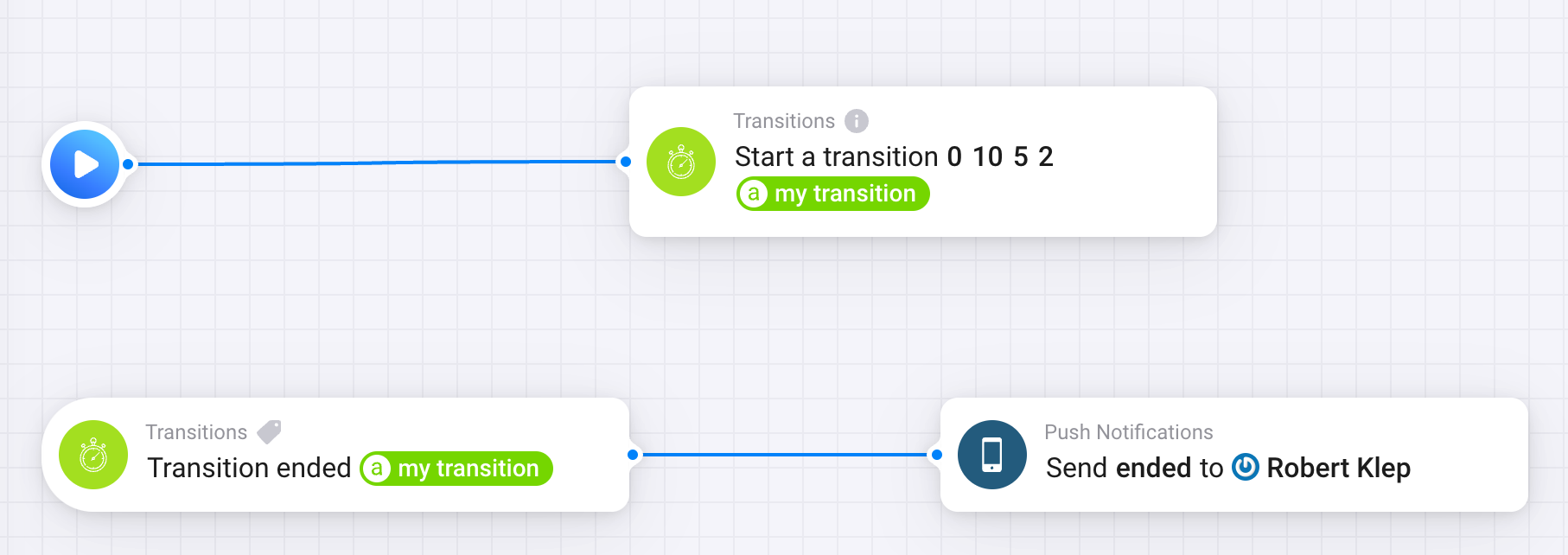
Hey thanks for your help. Sorry, im a real newbie at this. How can I use the calculated transition value, whats the variable for this? how do I use it.


Make sure dim value is between 0.01 and 1.00
tnx let mee see if i get the wanted result with it.
I’m trying to use this app to have my yeelight led strip go from 0% dimmed to 100% (full brightness).
To do this is first set it to the required colour (orange) and dim 0%, then start the transition from 0-1.
What happens is:
The strip is indeed dimmed to 0%, then it becomes bright orange, then turns off, then back on in blue, then turns off, then back on to blue and after that it continues getting brighter (as it should). But why on earth does it start with flashing and turning to blue while it was orange?? I really can’t figure it out… When slowly moving the brightness slider manually the led strip has no issues at all. Any ideas?
What does the actual flow look like?


That’s the way to go, Kaspar. However, your flow shows these in the opposite order!

For certain lights setting a color doesn’t work when the light is dimmed to 0% ( == light turned off).
Sometimes you even need to turn on a light (dim a light to, like, 1%) to have it accept color changes.
Next,
in this case the first transition value should not be zero imho, but 0.02 →
this keeps the light turned on & gets dimmed from 1% to 2%, and it should stick to the orange color.
My guess is the same as @Peter_Kawa, namely that not all lights handle dimming to 0% properly, and/or changing their color while they are fully dimmed.
With a lot of experimenting i found out that isn’t the issue… The yeelight apparently shows bright blue whenever it gets a value it can’t process. And 0% dimmed is in fact the value 0.06, not 0. So I changed the start of the transition to 0.06, and it works!
Turning colour and dimming around would also destroy the entire effect btw, ut would show bright orange and then dim. Not exactly the sunrise effect in going for 
Now trying to also have it change colour together with the dimming. That one is rather complicated. (side note: Wish dat Homey could directly control yeelight through its API. Getting this effect is quite simple that way).
Sortof true, I found out. Yeelight can handle it, but the numeric value of it is 0.06, not actually 0. That was the issue. Any value for dimming below 0.06 leads to the bright blue which seems to be yeelights way of showing an internal error.
Good find, Kaspar.
Offtopic, But how does this Yeelight only start working well with dim value 0.06 (6%) and up, instead of 0.01 (1%) and up. That’s not how it’s supposed to work.
Maybe the dim range isn’t defined according to this particular Yeelight model’s specs.
Running test with the onboard flow card “Dim to x%”, with values from 1% to 5% should result in the same odd behaviour?
Maybe you can discuss with the app dev.
