After my Homey Pro 2023 auto-updates, I have to manually restart the Shelly app for some of those devices to work again. This also happens to Sonoff devices. Is it possible to make a flow so the various apps restart automatically after a Homey update? Greatings / Göran


 Thank you very much, Peter. I will look into those possibilities right away!
YW!
In case the Shelly and Sonoff devices are wifi based, make sure to use reserved IP addresses for those, as well as for Homey.
(Using DHCP can cause IP addresses to change, which Homey often can’t handle.
When that’s already in place, don’t hesitate to inform the app developers and Athom. So possible bugs can be fixed.
IP info:
https://duckduckgo.com/?q=how+to+reserve+ip+address+on+router
https://duckduckgo.com/?q=how+to+bind+mac+to+ip+address+on+router
Thanks! All the Shelly devices are since long ago on fixed IP’s, aswell as the Homey. I think all Sonoff devices use Zigbee.
When I searched for Flow commands, it looked a little different on my side, see the image. Under System, I found "Then / Restart Homey and Send Infrared [-] Command”.

Under Apps, I found “ Then / Activate App [_], Inactivate App and Restart App. I used the Restart option =”Starta om” in swedish.

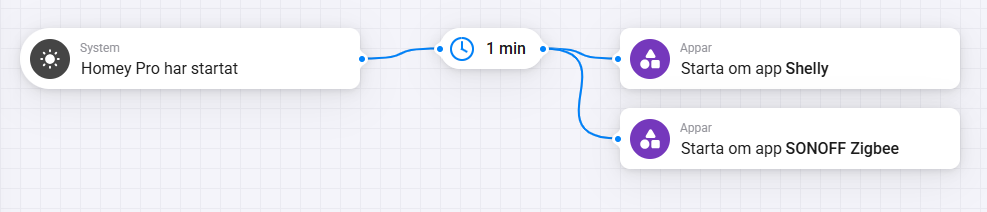
We’ll see if it works 
Ah, the cards are a bit shuffled @ Pro 2023!
(I use 2019 models)
Some thoughts:
When the “when Homey is started” card has triggered, this does not mean each app is started as well > It doesn’t make sense to use a 1 minute delay imho.
To be sure, you can measure how long it takes for all apps to be running after a restart. That should be your delay time, added by several minutes.
The sysInternals is perfect to do this for you

Also don’t start several apps at once, add a 1 or 2 minute delay to the Sonoff card as well.
