Hi, I’m new to Homey and at the moment I’m testing with Homey Cloud Premium. I wonder if the following is possible in a flow:
I created a flow to send a push notification when motion is detected on a Philips Hue Motion sensor. So far this works, but what I would like is that I set a threshold or some kind of timer to stall for example for 10 minutus before the next notification (now I sometimes get 10 push notifications in one minute).
I have never used the Homey Cloud version, but I think it should be possible this way.
Flow 1
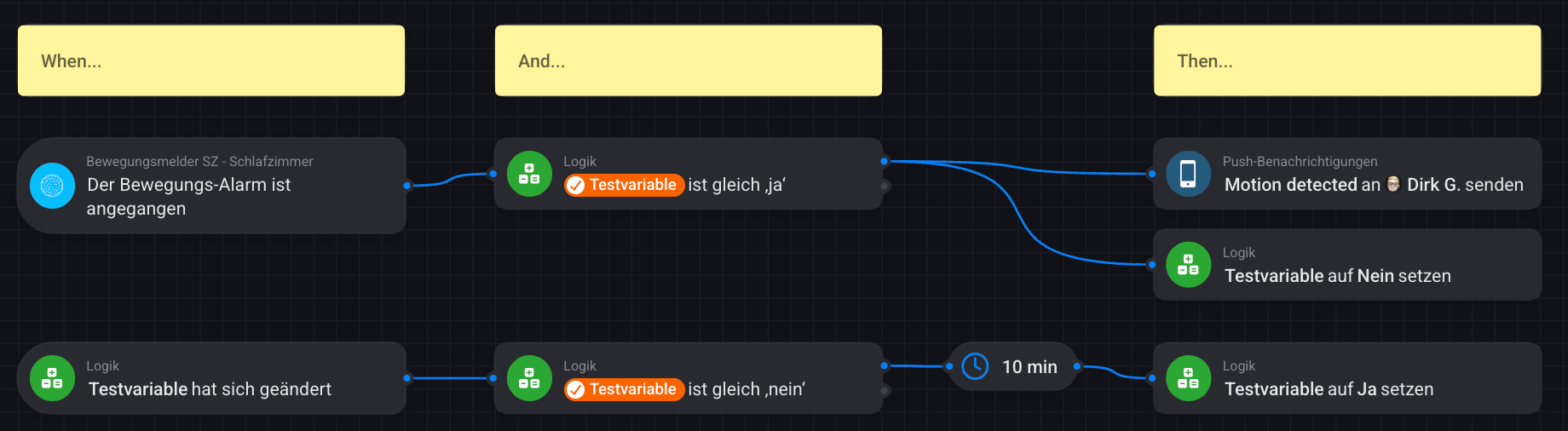
When motion is detected and a self-created variable is set to Yes, the push notification is sent and the variable is changed to No
Flow 2
The change of the variable from Yes to No is registered by the second flow, which starts a 10 minute delay card. After the delay card is expired, the variable will be set again to No, which means that another push notification can be sent. And so on, and so on…
hey @Mario_Willart ,
please also see my tutorial about how to setup a nice framework for working with motion sensors. As your flows will become more elaborate, you might find it useful. It also covers a solution for your current use-case.