Ok, that tells me the new doorbell differs a lot from the previous models, thus the current code can’t handle it as predicted in my earlier reply.
I’ll send you a PM later today to get some more information.
OK. Although my old doorbell also seems to have stopped working. Not picking up motion alarms.
I have removed authorised devices and re-authenticated. On my old doorbell and my new doorbell I now get live video. But I do not get motion alarms. I didnt test the doorbell as it is getting very late here now. Will do more testing tomorrow.
Just noticed that I;m not getting Ring motion alarms either. Let me sort this out with Ring and I’ll get back to you.
Hello, first of all thanks for the App. Using it a few months now.
Since yesterday I dont get any Motion Alerts. It’s like the App and Ring is not talking to each other anymore. Already reinstalled and reconnected everything but still nothing. Anything else I can try ?
Motion alert on original Ring App is working btw. Just no notifications/alert anymore on Homey.
Thanks in advance.
Please see the FAQ, it’s the second post in this topic.
Ok, all working correctly. After re-authentication all came good, including live video in dashboard. So the new Gen 3 doorbell seems to be totally compatible.
That’s good news, thanks for reporting back!
Athom has released firmware 12.9.0 for both Homey Pro 2016-2019 and Homey Pro 2023 (and Homey Pro mini). This is very good news as this brings Nodes v22 to the sandbox in which applications run.
Why is this such good news?
Well, it was getting harder and harder maintaining this app for Homey Pro 2016-2019 due to the old version of Nodejs it was using.. Also, due to the differences and the patchwork for the older Homeys all changes to the app had to be tested on both platforms, which costs almost double the time!
This app has already been prepared for this new firmware and was awaiting its release. But due to the fact I don’t want to do a change on change, to keep troubleshooting in case of problems easier, I will wait at least until the end of this week with releasing the new version.
Changelog for Homey Pro 2016-2019
Changelog for Homey Pro 2023 & Homey Pro mini
For people who can’t wait, here’s the test version: Ring | Homey
and this is the changelog.
Hello,
I am using the Ring Intercom Video device, which is visible and fully functional in the official Ring app. However, when I log in to the Homey Ring App with the same credentials (including my Passkey), I receive a message stating that no devices are found.
Is there a way to locate and add my Ring Intercom Video device to the Homey Ring App? I would appreciate any guidance or troubleshooting steps you can provide.
Thank you for your support.
Best regards, Christian
Please read some of the previous posts, your answer is there.
Thanks a lot. I run on my homey pro (early 2023) 12.9.0 &
Ring v2.14.11. Now I can find the device “intercom Video” 
Danee,
Thanks for all your work but I have a question.
In the Ring Base station you can choose for Away, Off and Home but for Off the inverse function does not appear in the text.
Another question. Is it possible the make a function Base Station is switch On or Base Station is switched Off. Where On is Home or Away and Off is just Off.
Regards Rein
Hi Rein,
I’m not sure what you mean with the inverse function for Off, could you elaborate?
That would be possible, but would require adding an on/off capability which in itself would add additional stuff such as flow cards and such and would also most likely cause confusion as users may thing their Basestation is disabled or switched off so I don’t want to add that.
I would advise you to create a Virtual Device with an on/off capability and use that to represent the mode. If you wan’t that for displaying the status on a dashboard, I’m pretty sure someone posted such a thing some time ago on this forum.
New version published
Version: 2.14.11
- Added Ring Alarm Basestation
- Added Ring Intercom Video
This version brings the Ring Alarm Basestation and the Ring Intercom Video to your Homey.
After adding the Basestation to your Homey you will be able to see the following capabilities:
- Burglar Alarm
- Fire Alarm
- Medical Alarm
- Panic Alarm
- Tamper Alarm
- Power Source
- Communication type
and you will be able to make flows based on the status of the different alarms.
Obviously you will also be able to set the Surveillance Mode from the device itself and from flows!
And this version brings support for the Ring Intercom Video. For now only the Ring function is implemented, a future version may add support for Live Video, not ETA however.
Important: Homey firmware 12.9.0 required!
Danee, thanks for your reply.
I used the inverse function of “Uitgeschakeld”, dus “niet Uitgeschakeld” en dat werkt maar “Niet” verschijnt niet in de tekst. (zie attachement).
I was already using a Virtual Device for the Ring Alarm system but I was hoping that I could replace it by a real device
Thanks again.

Ah, I see what you mean, that’s not even a bug, that’s something I simply did wrong when adding that card.
Thanks for reporting, will be fixed in the next release!
The fix is applied, the new release is awaiting approval by Athom.
And thanks for your donation! Much appreciated!
New version published
Version: 2.14.12
- Fixed inversion text for “Mode is …” Basestation flow card
Thanks for reporting @Rein_Blaauw!
Hello Danee,
Thank you for adding the base station. This opens up many long-awaited possibilities.
However, I have one question: in the Ring app, the cameras recognize the difference between movement, a person, and a vehicle. Is it possible to use this distinction in flow cards as well?
I would like to lower the blinds when certain cameras detect a person. Unfortunately, the system also triggers when cats are present. This is more annoying than helpful.
Thank you in advance for your response.
Danee,
I have a problem I do not understand.
I wrote 4 simple programs
1,2,3,4 zie attachments
Program 1 and 2 are working correct
Using my Ring Keyboard or via possiblties of de Ring Basestation
So I can switch The Ring Alarmsytem On and Off


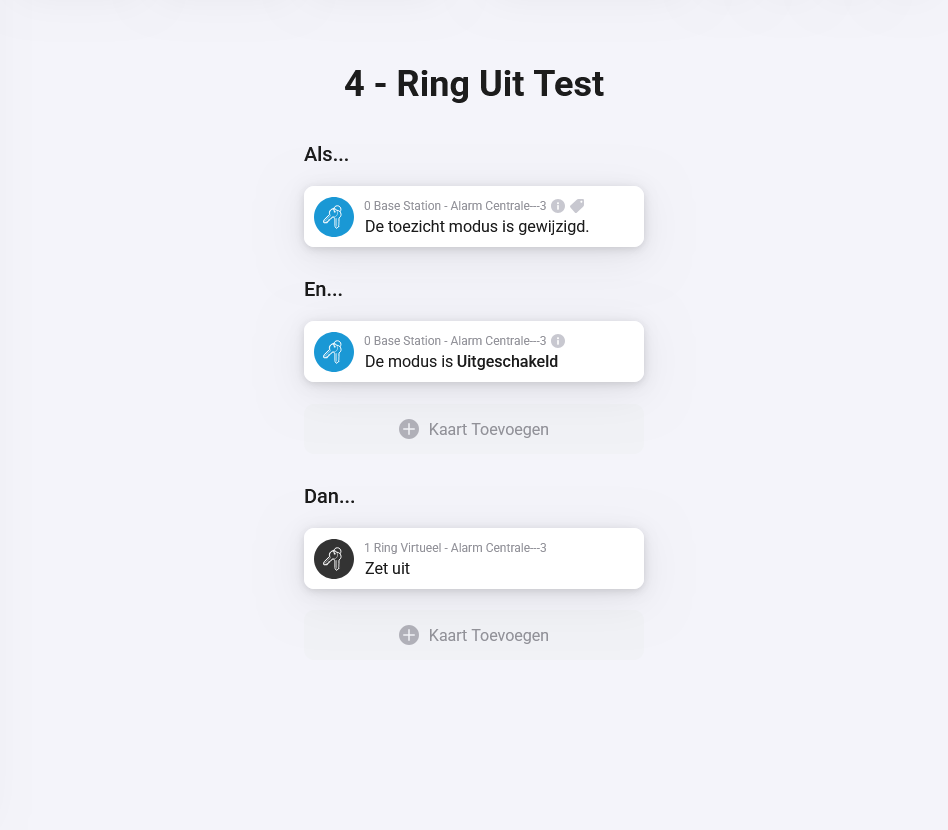
By using programs 3 and 4
I can switch The Ring Alarmsystem On and Off by using The Ring Base station.
But via the Ring Keyboard it does not work.
What I am doing wrong or I do not understand?
Regards
Rein
