Now I was able to download version 2.14.0, and I can add cameras, crime, and the doorbell. However, everything connected to the alarm system is not working, including contact sensors, keypad, and motion sensors. It also doesn’t work when trying to set the system to home or away mode. I have Homey Pro 2023
I don’t think the problems you are experiencing are related to the API change as you are having these problems longer and you Homey seems to be doing strange stuff such as rolling back installed apps.
Right nie I have no solution for you and I’ll be focussing on the problems that are caused by the API change en crashes in the new version with the fix for the API change.
I also have problem with crashed app after latest update.
Report created: ec3a936c-3ab0-4775-b931-c265dd39a814
Gladly.. Sorry..
Homey Pro (Early 2019) - v 12.4.2
Web app: 1.11.31
Ring app 12.4.0
Ring product: Ring Battery Video Doorbell Gen 2
(Have been working almost flawlwssly in a year or so)
Only this one product registred in the app..
I tried to restart app now, and it returns: “crashed during loading”
Diagnose report: 59131a19-b8b7-4689-ab76-5416cacba4a0
And then I’ve tried to remove, and re-install the app, which results in this never ending I assume (6-8 minutes passed)

Let me know if I can do anything else to support you in helping us 
Kind regards
Dennis
Thanks!
By your post and the fact Athom published a new firmware version for Homey Pro Early 2023 so the version numbers between the old and new Homey are different I was able to figure out the crashes happen on old Homeys and not the newer.
Unfortunately Homey (Pro) before the Homey Pro Early 2023 uses a (very) old nodejs version* on which the fix I applied for the API changes can not run due to missing components. I’ve tried adding these components, but failed as this nodejs version is just too old.
So I changed the app so it dynamically loads the needed node modules based on what your Homey supports. This means the fix for the API change is loaded on new Homey but CAN NOT be loaded on older Homey resulting in the fact Ring Alarm System devices can not be used on older Homeys.
I’ve decided to publish a new test version as soon as possible so users experiencing the crashes can get their app running again.
I may try to get the Ring Alarm System devices working on older Homeys again, but I can’t and won’t make any promises.
* Homey (Pro) pre 2023 uses Node v16 (04-2021), Homey Pro Early 2023 uses Node v18 (04-2022). Both Node v16 and Node v18 have reached End of Life and more and more node modules are dropping support for older Node versions.
Node v22 (04-2024) is the latest Long Term Support (LTS) version while Node v24 (05-2025) is the latest and greatest with all new functionality
Hi Danee.
For information I have installed your new test version on my old homey and everything seems to work again. A big thanks to you.
Fafois
Here with the test version (V2.14.1), also working again on the old Homey.
Homey Pro (Early 2019) - v12.4.8
4x Wireless Camera
2x Doorbell (1 wired, 1 wireless)
1 Chime pro
How do I get hold of the test version?
Found it… And it works on my Early 2019, v12.4.8
Can also confirm: Test version works on my Homey Pro (Early 2019)
Version
12.4.8
Unfortunately i spoke a little bit too fast, everything works again except the change of the alarm’s modes (network request failed) 
Unfortunately that’s expected for now. The changes I had to make to be able to get the Ring Alarm System (Devices) working in the app can not be applied to Homey (Pro) pre 2023 due to it using an old nodejs version.
Please see my previous post on this subject.
Ok, sorry and thanks for your help.
Hopping you will find a way.
To all people sending me Private Messages, this topic is for support, I will NOT respond to PMs.
For those like me, who have a 2019 Homey and cannot arm/disarm their Ring alarm with it anymore, i found a workaround through the Alexa app (again ;)) by sending a command to my Alexa device (from Homey) telling to “Put Ring device in Away mode”, or “Disarm Ring alarm with PIN …” (and to make it work i had to write the pin code in letters). Hopping this will help.
Hello. I have problems to add my new camera Ring Outdoor Camera Plus 2K. (This is the new version)
I got this error:
«Something went wrong, please try again
TypeError: Cannot convert null value to object
in AddDeviceSettingsltem
in RCTView
in Unknown
in AnimatedComponent(View)
in Unknown
Try again»
I have homey 2023 early with software 12.4.9 and ring app is experimental v2.14.1.

Hi Bjornar,
Could you please stop the Ring app, start it again and wait abit. Next add your doorbell, and when it fails, send a Diagnostics Report so I can look into it.
As always, thank you for the support! Everything is working again. 
Might be time to consider upgrading my ancient 2016 Homey…
Thanks for the feedback. I disabled the app, then enabled it again. Then I restarted the app, and added the camera again. I also created a diagnostic report.
Here is the code.“8d302118-e6b2-47a9-9c66-e1eec64983d9”
EDIT: I deleted all my cameras and added them again after the restart, and now it worked without an error message
Hi.
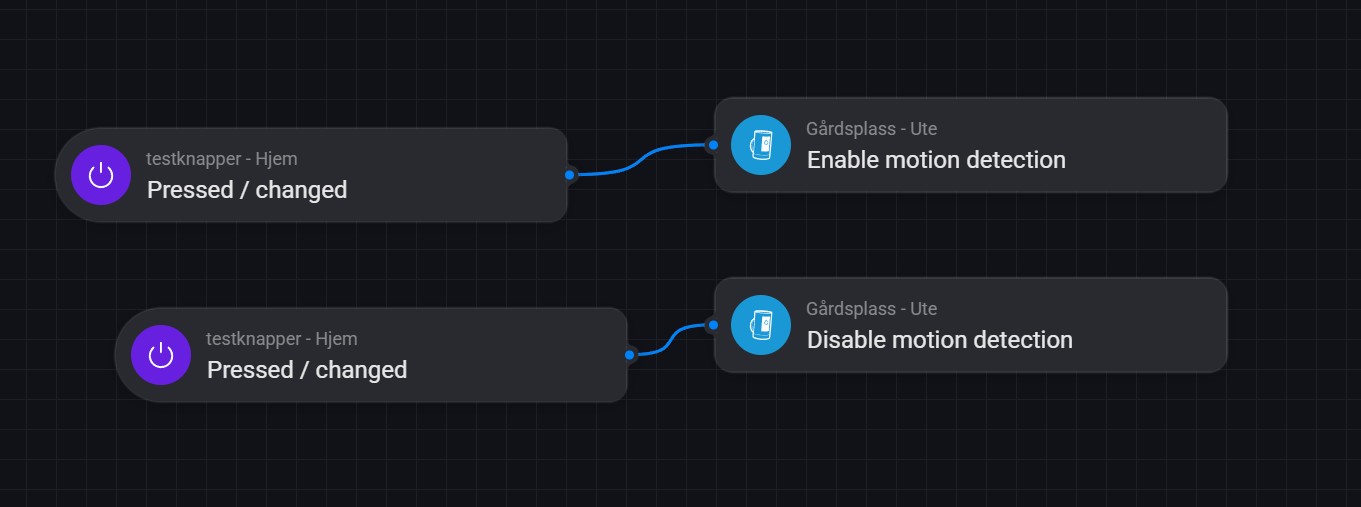
Is it possible to control the motion alarm with flow on the Ring stick up cam (2K version with cable) that has live 24/7 recording? When I make a flow to enable or disable motion detection, it only turns on/off the recording, and not the motion sensor
Because I want 24/7 recording, but want to turn motion on/off along with home/away mode
Do you think it you will be able to get mode change (home, away, etc) working again?
