So if I am understanding this correctly, custom lists aren’t able to have the “Real field and Flowcards” so you can’t have the list selector like I previously used:
Right now: Indeed (that And card is a default Homey flowcard belonging to the media-input-picker, i have no control over that card).
For right now, this is the only solution yeah.
Yes, but this would only work when you would override real default Homey Capabilities.
Thats why im gonna make an “And” flowcards for lists, which will work just like the current “Then” cards (an autocomplete instead of a real dropdown field, but its kinda the same).
It will be included in the app before i release it to production.
Would it be possible to get 2 pickerlistst side by side in one view? I would like to make an AVD with one ‘screen’ with one pickerlist 1 to 24 for hours and one pickerlist in the same view 00-10-20-30-40-50 for minutes.
Something like this:
As far as I am aware the interface elements of devices in Homey are fixed. So a picker is a single-list element.
You could create a flow that switches on the heating at a fixed time every day, or create a manually triggered flow that switches on the heating and automatically switches off the heating after a predefined timer completes (e.g, using the Chronograph app). Not sure which scenario you are trying to implement.
Thanks for your quick response. I did think of something like that. Just hoped for the possibility to see both pickers at once, which would be a bit neater. But this will work.
Hi Peter, one short Q. I am trying to get this working, but I cannot find a way to use the pickerlist-setting Hours and Minutes to a time-format that I can use in flows. Both numbers remain seperate. After some searching I am afraid that I have to use BLL for that.
Is that so?
OR do you have a tip where to find a more simple way to do this?
(Would be a bummer for me. BLL is far beyond my (potential) knowlegde).
Sure. One way to accomplish that is by adding a text field to the AVD, and as it’s value, we combine the two picker values by using this Calculation BLL expression (this requires the Better Logic app installed):
$values.join(':')
Like this:
(with my example AVD called “Custom list”)
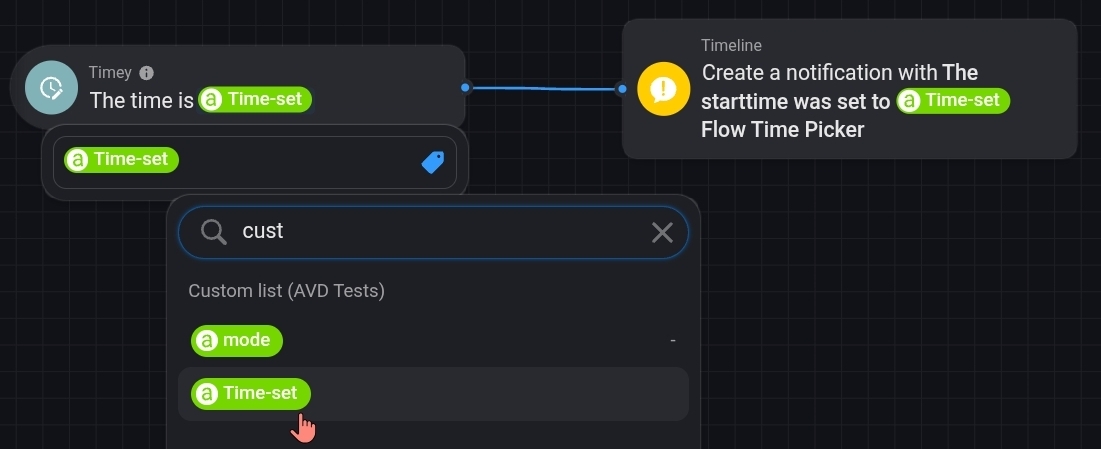
With the Timey app installed, we can use the value of the aforementioned text field as timestamp for the Timey app’s triggercard (as far as I know there’s no other triggercard taking a user-created timestamp as input).
The textfield tag can be found as part of the AVD we use for this purpose, in my example called “Custom list”:
GREAT, thanks!! Very happy with this..
To be honest, after Peter Kawa helped so kindly to get me started (and that works) I ran into the next Better Logic issue. I stalled my flow-idea because I don’t want to bother you guys with every single step. (Wish there was a Better Logic (for Homey) for Dummies or something like that.) So that’s why I will be very thankfull when you can pull this off in a more simple way.