hey, for my flows, I made a script that just counts the number of people at home, the number of people asleep, and the number of people at home and asleep on the fly and creates tags for them to be used in your flows. I used to work with variables which I updated on every presence event, but I found it to be unreliable and I much rather just calculate the values directly before I need them, so I know they are always correct.
To set it up, just go into the scripts section and create a script called Calculate Presence(.js). Then paste this script:
const users = await Homey.users.getUsers();
const userArray = Object.values(users);
await Promise.all([
  tag('Persons At Home', userArray.filter(({present}) => present).length),
  tag('Persons Asleep', userArray.filter(({asleep}) => asleep).length),
  tag('Persons Asleep At Home', userArray.filter(({present, asleep}) => present && asleep).length)
]);
here’s how I use the script in my flows:
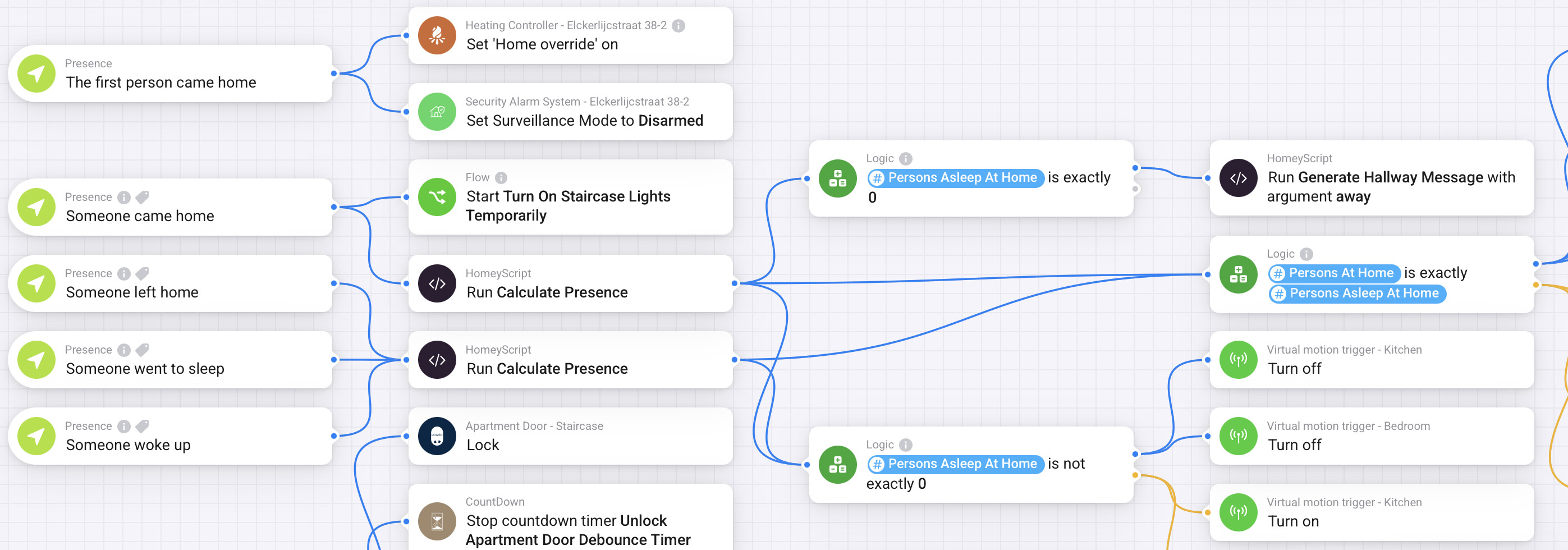

The great advantage of this script is that people can just mark them selves asleep and awake, and at home or away independently. So people can be asleep while they are not at home, or asleep while they are home and it wouldn’t impact for the flows that depend on “Persons Asleep At Home”. So the automation regarding presence can be kept super simple. Just mark someone at home when they arrive home, mark someone away when they leave, mark someone asleep when sleep mode is enabled, and mark someone awake when sleep mode is disabled. No need to perform any other difficult checks there.
You came home after your phone already went into sleep mode? No problem.
You left the home but the phone is still in sleep mode? Not a problem.
You go on holiday but the phone keeps marking you asleep and awake? Also, not a problem.
You already left your parental house, but occasionally stay over? Again, not a problem.
I wrote a full tutorial on how I Implemented presence detection using iPhones shortcuts app in Homey. You can read it here:
I’ve also written a full tutorial on how I implemented motion sensors in my house and connected them to Virtual motion sensors to gain full control over the timeout values, and the ability to turn the whole sensor on and off. In this tutorial I use the Circadian app for my lighting schedules. The Circadian app has the ability to switch between manual, automatic and night modes, which might be useful in your use case as well. But you can also just as easily use the above setup without the Circadian app if that’s not what you need. You can read the full tutorial here.
Maybe this setup combined with the script can also help you out.
