Request:
Notes that can be added in the Flows and that can contain the values of the defined variables and the device parameters.
This would make it al lot easier to test out flows.
The whole community thanks you 
Johan
Request:
Notes that can be added in the Flows and that can contain the values of the defined variables and the device parameters.
This would make it al lot easier to test out flows.
The whole community thanks you
Johan
Not sure if I completely understand your request.
But I made this app to add notes to your flows.
But it can only contain plain text, not variable values..
I don’t think it fulfills my needs.
Suppose I have a yes/no variable. Well, whenever I look at the flow page, I want to see, in some comment, the exact status of my variable, so Yes or No
Another example. Whenever a motion sensor detects movement, I increment a number variable by 1. Now, at any time, when I’m on the flow page, I want to see the exact number this sensor has already detected motion.
I hope this clarifies what my request.
J  han
han
Just start the flow manually and hover over the cards.
Nope, sorry, that doesn’t give the correct answer.
Besides, I want to see the value change dynamically, on the fly…
As far as I know, the “devices” view is dynamic.
The flows page is not dynamic (only semi-dynamic behaviour is: running it as a test. That will show the values of all attributes used.
(But is not dynamic like you describe)
To make everything clear what I need:
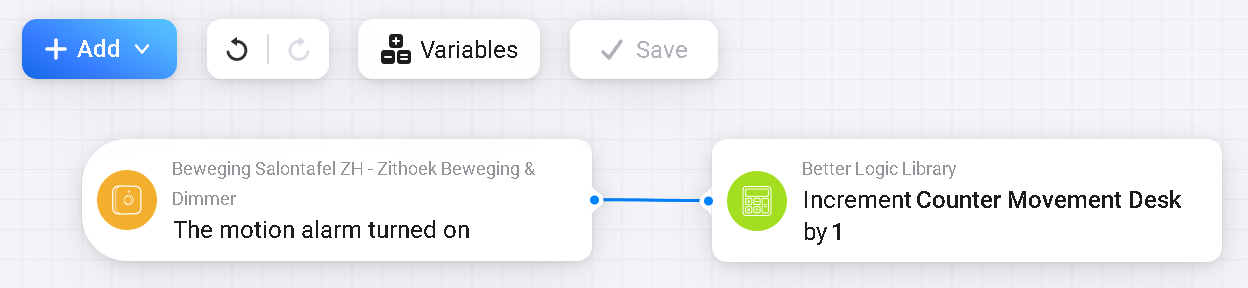
This is an example of a flow:
When there is a motion alarm => Then the variable “Counter Movement Desk” is incremented by 1.
Now, who can tell me what the value is of “Counter Movement Desk” without checking the configuration page of the Better Logic Library app, which uses this variable.
So, I would like to have like a note with the value of this parameter.
Something like this for instance, with a dynamic result, meaning that when there is a new movement, I would see 318 immediately, on the spot…
J  han
han
Hi @JST1963 ,
I don’t think that someone will do that. As far as I understand there is no way to change the flow by a flow. The flow is just like an edited file, which you can edit somehow and any changes are valid , when you enter SAVE.
But when you put your smartphone at side you or open another window, you can see any changes of device properties immediately. I did not check, if it also works if you check variables, but if not you can create a virtual device which you van follow on the fly.
Do you have examples, where you can follow variable changes ion the program code? Then you can propose this to Athom because that means significant changes of the editor, and perhaps even of the system.
And don’t show normal debuggers. They show changes in another window as I mentioned.