The Chinese company Zemismart Technology Limited provided me with the Zigbee Human Presence Sensor ZPS-Z1 free of charge so that I could test it and share my personal impressions, which is what I’d like to do in this post.
Unboxing
The sensor apparently didn’t have an easy journey from China to Germany, as the shipping box had sustained some damage. However, I couldn’t find any damage to the sensor itself:

The package includes the sensor itself with a pre-installed CR2450 coin cell battery, a magnetic mount equipped with double-sided tape for attaching it to a wall or ceiling, and a small user manual, which mainly provides information on how to use the sensor with a Tuya Zigbee Bridge:

Visually, the presence sensor looks more like typical PIR motion sensors from Fibaro or NEO Coolcam, rather than, for example, the FP300 presence sensor from Aqara or the LWR01 presence sensor from Lafaer. Here’s a comparison image as well:

(Left: Aqara FP300 | Center: Zemismart ZPS-Z1 | Right: Lafaer LWR01)
Pairing process with a Homey Pro 2026
To pair the sensor with a Homey, you first need to twist open the casing to access the pairing button (pls. see picture). You mustn’t have sweaty hands when doing this. 
Then the button must be held down until a red indicator LED starts to flash.
To put a new sensor into pairing mode, simply remove the battery protection strip:
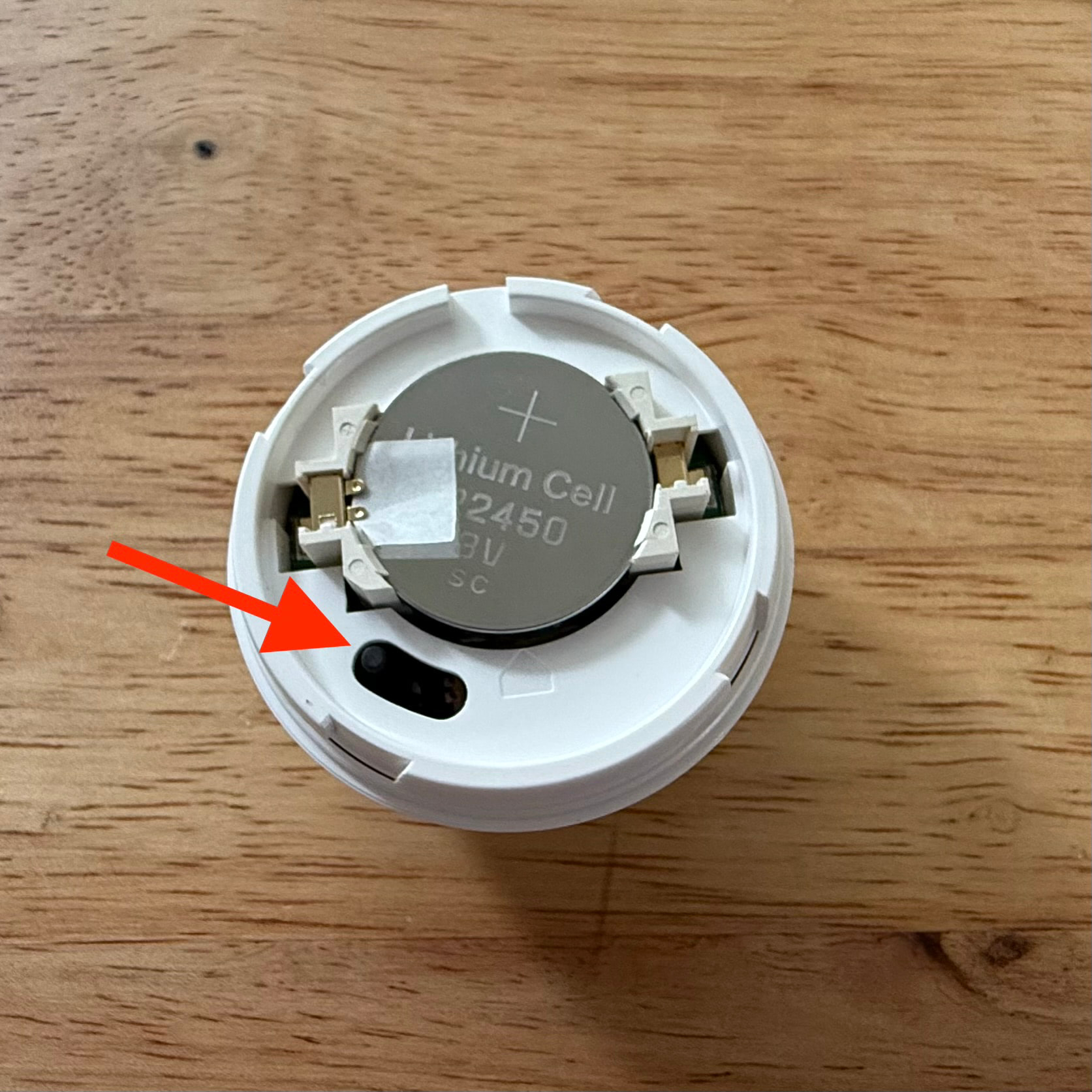
Here is a video showing the pairing process on a smartphone:

So the pairing process went completely smoothly as expected.
But as you can see in the video, it appears that the device icon was simply copied from another sensor.
Features and configuration options
In addition to motion and/or presence detection, the Zemismart ZPS-Z1 also measures ambient light intensity.
When you open the device tile, you’ll also see two buttons labeled “Start Calibration” and “Cancel Calibration.” It seems the calibration feature was simply copied “blindly” from the Tuya integration (see the information on the product page) without considering whether or how it could actually be implemented with a Homey. Since I couldn’t find any information about what these do or what steps might be required, I didn’t pay any further attention to them:

Surprisingly, there is no battery indicator at all… 
Unlike the Aqara FP300 presence sensor, the Zemismart ZPS-Z1 sensor doesn’t distinguish between motion and presence. In my opinion, it isn’t absolutely necessary to distinguish between motion and presence, but since the primary function of this sensor is presence detection, I think the capability alarm_presence should be used instead of alarm_motion.
In the advanced settings, you can configure the following:
– Detection range: 0-500 cm, in 50 cm steps
– Presence clear down: 2-60 s, in 1 s steps
– Sensitivity preset: High / Medium / Low / Custom
– LED Indicator: Yes / No
What bothers me a bit about the advanced settings is that you have to set the detection range between 0 and 500 in 50 cm steps, i.e., 100, 200, 350 cm.
What happens if, for example, you enter the value 225? 
I personally would prefer to be able to enter the detection distance between 0 and 50 in 1 steps, with a corresponding explanation that one step corresponds to a distance of 50 cm. In my opinion, this reduces the risk of entering an incorrect value.
Another point is the “Custom” setting for sensitivity preset. This setting may be related to the calibration function. But since there is no further information available, it would come down to trial and error.
Real-world test
The Zemismart ZPS-Z1 has been in use in our living room for almost a week now. It reliably detects whether anyone is present on the sofa and in the area around of the sofa. So when that area is cleared, the lights in that area turn off when they were switched on before.
Thanks to its mounting base and magnetic attachment, the Zemismart ZPS-Z1 can be mounted on a wall or ceiling, or even placed on a table or sideboard. For me, this is the gold standard when it comes to alignment options for motion and/or presence detectors. 
Subjectively speaking, the response time is comparable to that of my other two motion and presence sensors. However, I haven’t conducted a direct head-to-head comparison. The same applies to the range.
I can’t say anything about the battery life yet because I haven’t used it long enough and there’s no way to check the remaining charge.
Configuration during this real-world test:
– Detection range: 0
– Presence clear down: 10 s
– Sensitivity preset: Medium
Pros and Cons
– Reliability in presence detection
– Compact design
– Standard CR2450 coin cell battery
– Extremely flexible alignment options
– Missing and incorrect capabilities (measure_battery and/or measure_battery, alarm_presence) 
– There is no explanation about the calibration function; it may not even be usable
– The mounting base can only be attached with tape; it cannot be screwed on
– Wrong device icon
Conclusion
In my opinion, the Zemismart ZPS-Z1 presence sensor is a good product overall, especially at its current discounted price of around €25.
But @Zemismart_Official should be able to fix or improve the incorrect or missing device capabilities, the missing device icon, and the part with the calibration function, which would eliminate a few drawbacks.
