The last week my HomeyPro 2023 has some strange behavior:
goes offline repeatedly: the HP app shows a message my HP is offline, which means it is not reachable from within the app and the flows don’t function anymore.
the used memory rises enormously: 1,9 of 2 GB used. I didn’t install any new apps or something like that. With hardly any free memory, the HP203 becomes wobbly, is not stable.
The only thing I changed is installing the new, latest, firmware. I’ve got the idea that that is quite heavy for the hardware. Anyone else experiencing the same issue?
I keep disabling apps, the ones I hardly ever use, so the used memory has to decrease. It decreases at first, but not for long.
This shouldn’t be the case, keep on removing or disabling. It limits the use of the HP2023.
Of course I restarted the Homey, but with no difference. If so, the used memory rises again till about 1,8 GB.
Restarting in 2 ways: using the command in the app, and by PTP. I’m not sure weather the last method is useful with the HP2023. Only with the HP2019.
The “funny” part: after rebooting not all apps will start. Sometimes the HP has less memory to restart an app!
Anybody any idea what’s going on? Does the latest firmware causes this kind of issues? Bad memory management, not freeing unused memory. If so, can I go back to a previous one?
Anyone any other idea??
I have my HP23 restarting multiple times a day. Once even just freeze with no indication of crash to red led circle.
This started happening sinve the v12.8.0 firmware.
Please, use version numbers instead of “latest”.
Also very important, is it an RC or is it a live version?
This is also shown by the version number, like the firmware page shows.
And which RC version significant as well.
Thanks!
Thanks.
Yeah but the nodejs v22.20.0 update might be influencing stuff as well.
In case you want to revert to stable firmware, that’s quite straightforward:
According to your picture I can go back to 12.8.2, the last stable version.
I don’t have offline backup, as far as I understand your post correctly, that’s necessary, a condition, to go back to the previous, stable, release (without rc’s). Or am I wrong concerning the offline backup?
The offline (or cloud) backup is only needed in case something is not going right:
When you have no backup at all, I’d create a local backup ASAP if I were you.
For whatever (other) reasons things can go wrong at some point, and a backup of the current state puts your Homey back online with little effort.
But, again, installing the v12.8.2 software update does not affect any user setting.
I see. An offline backup is a 1:1 copy of your system at some point in time: imho the easiest way to revert to some earlier state, including the firmware version and non-app store apps.
Cloud backups only saves & restores your personal stuff, but when restoring it downloads the current firmware version and only downloads the apps you had installed, from the app store (CLI / communitystore apps need to be installed manually, ‘luckily’ all related devices and settings are restored).
I can’t say, only Athom or firmware experts could imho.
On my Pro 2019’s a few apps started to use 5 - 15 MB more RAM. System load doesn’t seem affected.
But Pro 2023 is different and might respond in a different way.
Unfortunately yes…Even with the latest firmware installed (and backups completely disabled) memory drain keeps going. The only sign that Homey seems to “lose touch with reality” without even reporting it is the uptime shown in the about section. From what I have observed the system eats up around 200 MB per day, which in my case means 3 to 4 days before it presumably reboots itself (no warnings, no offline message, nothing)
I am also tracking high memory usage (especially with Homey PID which uses approx. 30% of the memory) despite being ruthless with limiting apps, my HP23 is only 12 months old, so didn’t want to ditch just yet for new 4GB (8GB would be nice) model. Unfortunately many of my top 5 apps are around 60MB each and certainly this is environment related.
Anyway I wanted to compare notes with others especially with comparing Homey PID and top 5 consumers. I invested in Homey Bridge (mainly for Zigbee, Zwave & BTE extension) this week to replace beloved H19 sphere. HomeyLink will give me back about 50MB and maybe some system memory back. .. yes I am desperate.
Interesting my UI doesn’t highlight swap even though I have had several apps crash with memory issues.
Thanks for sharing @Peter_Kawa, that is a heavy hitter list of apps. Interestingly our Homey resident memory aren’t too different.
For me another 1GB would be sweet but I need to sweat out my HP23 investment! Bring on modular expansion for HP28! Still considering SHS now with Bridge on the way.

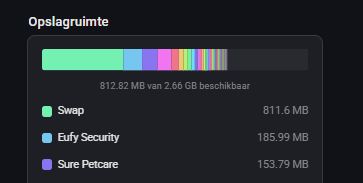

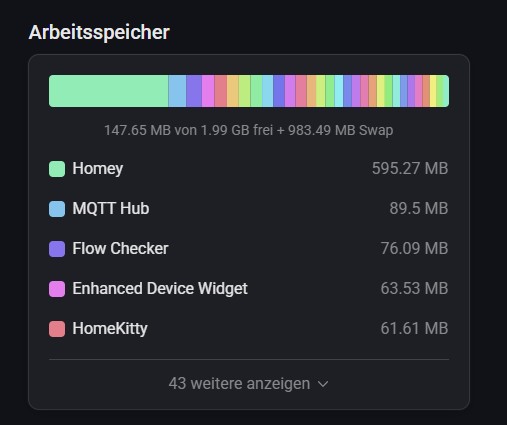
 .. yes I am desperate.

