Hello,
I have sunscreens on my windows, and I’d like to make them smart.
I just have no idea how to do this.
Does anyone have any ideas on how to make it smart?
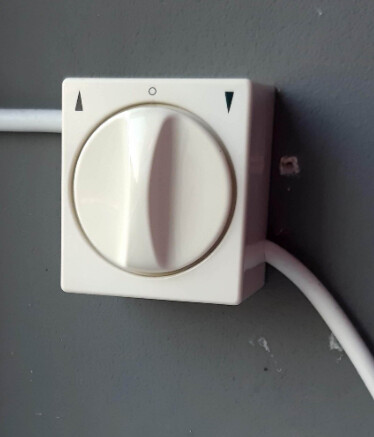
I’m currently operating it manually with this button:
Hi Rembo,
you do not describe your start position, please supply more data like kind of Homey device, the sunscreens equipment, like only motorized and not smart prepared.
so we know your screens are already motorized (Wall Switch)
Install an inline roller shutter relay behind the switch to control up/down on the tubular motor.
Like:
Shelly 2.5 or Plus 2PM (WiFi, metering power use—fits your Shelly interest).
Z-Wave alternatives like older Fibaro Roller Shutter 3 (avoid v4, limited Homey support).
Add this switch and pair this switch with your Homey, use flows and/or scripts to operate your screens.
I have a little more information. It’s a motorizes screen that sits in front of the window and can be raised and lowered. You hold the button until it’s raised or lowered, so you can also set the screen halfway by releasing it earlier.
I’m looking for a solution that’s easy to connect and affordable. And, of course, supported by Homey Pro.
If you need more information, feel free to ask. I can’t figure out how to make the screens smart myself.
Thanks Rembo, the suggestion I made with the Shelly example should work. Check everything before you buy things and start your project. The wiring, the voltage—everything needs to be suitable for the task (is there enough space in the switch, or are you replacing the switch, etc.). Also consider the protocol (Wi-Fi, Z-Wave, Zigbee) you want to use, possibly with other projects you have in mind. You could prepare a simple test setup with just a smart switch connected to the mains and a simple Homey integration before implementing everything. In that case, the screens will go up/down/down as desired without any surprises.
@Ruurd_van_der_Noord
Sorry for the late reply, something came up.
Thanks for looking into it and helping me. I’ll save it and try to install it when I have time.