Got the new version yesterday and now everything is so slow, taking up to 30 sec and more to turn on a light .
Installed version 13.0.0 and that fixed my problem!
Got the new version yesterday and now everything is so slow, taking up to 30 sec and more to turn on a light .
Installed version 13.0.0 and that fixed my problem!
Btw not sure if it would help, but I also noticed and reported also to Athom (which I don’t think they will do anything about that), that some of the sockets were sending it’s updates to other devices (you can check after interviewing routers in the Bindings).
Eg. on the example below the HOOD socket was informing Aquarium light (socket as well) about it’s data etc.
Why this binding was created, I have no idea but could be specific to my device - two sockets type lumi.plug.maeu01, two nonsense “between zigbee devices” bindings. Those could have been created and existing long time already but thanks to the new functionalities, we can now see those weird bindings.
Anyway, maybe worth to check ? Unless you did it intentionally, all data shall be sent to Zigbee coordinator, which is Homey (not expert here)
I wasn’t even aware there was a new version 
The issues seem to have gone for me as well. Not sure if it is because of this new version or because I have installed a custom version of the Tuya Zigbee app. Will know soon enough as I have to revert to the previous custom version as this one seems to have crippled my metering updates.
Isn’t this just the mesh that you see? And that the aquaium socket then connects with the Homey Pro?
Still I am not sure if I need to be concerned about all these TX/RX messages that are sent around.
Nope, it’s binding - Zigbee supports binding, allowing devices to directly control each other without the intervention of coordinator. It’s implemented on device level but finally with the new version, we can even see it.
Ok, clear! Perhaps this can be helpful
Ok, I think I am kind of screwed…
My updated Tuya Zigbee app has changed some settings on the power plugs, but now they’re not reporting any power usage anymore.
Even worse: after reverting to the previous version they still don’t
And I deleted one of the smart plugs, but I cannot add it anymore. After a lot of tinkering I was able to add it again. But still this is not running as smooth as it should! I am struggling a lot to get the Tuya Zigbee data to report again.
I am aware this may be regarded as cross posting. Wanted to get back to this issue. Things seem to be back to normal. My Zigbee devices are responsive again and after installing the last stable version I opted out of the experimental updates. So far, so good.
What I still notice is that at least the TX values (and I think the RX values too) for all of the Tuya Zigbee devices increase rapidly!
It doesn’t matter if polling is set to 5 minutes or an hour: every second or few seconds the TX/RX number increases.
Are more people still seeing this? My main concern here is that although it is not directly noticeable I think it may be clogging up the network or my 2.4Ghz band.
You’d best add a link to the other post for clearity.
But, it’s not needed now:
I encountered this post right after I replied to the other post.
I’m still facing the same problem with slow (15-30 sec delay ) Zigbee responses.
Is I the only one? Can not find any other topics on it!
I have connected 1 shelly 1PM mini Gen4 as Zigbee, If I switch it on and off from the Shelly app the light that is connected goes on and off immediately and it is also shows immediately in the Homey app. But if I switch on and off in Homey app I get this delay and often timeout error notification!
So something must be wrong with the “switching” in Homey, because it is reflected in Homey as soon as I do anything from the Shelly app so there is no problem with the mesh network like devices to far away from each other.
Add router devices to minimise range issues.
Do you use (many) Matter-over-Thread devices as well? If so, choose zigbee OR choose Matter-over-Thread (as almost the only one, Homey uses Multiprotocol (MultiPAN) technology. This technology turned out to be a bad idea:
Zigbee & also Thread needs to be tuned carefully, it uses the same frequency band as wifi 2.4GHz:
https://community.homey.app/t/advanced-zigbee-troubleshooting-on-homey/115930
Yes, I am also still facing these issues. I have a sh*t load of powered Zigbee devices (actually most of them are powered), so there are more than enough routers! So, my conclusion is as well that physically there can be nothing wrong with the mesh network. Devices are not too far away from each other.
My 2.4Ghz WiFi and Zigbee are on different non adjacent channels, so that can also not be an issue.
I know it is a Zigbee issue, because when I enter the bathroom downstairs, my Z-Wave multisensor notices movement and the Zigbee light gets the signal to switch on. This can take up to a few minutes to switch on. It does eventually, but it takes quite long. The light is triggered immediately in Homey. This room is immediately next to the technical room where my Homey is!
If I enter the bathroom upstairs, the Z-Wave multisensor also notices movement and the two 2.4Ghz Tuya WiFi lights switch on immediately and the Zigbee light in the same room can take a while.
I have no Matter (over Thread) devices.
I still think the solution for this issue lies with Athom and they should do a proper investigation. However, since it is an intermittent issue, this is very hard!
I have been in contact with the support and we actually found the problem that causing my delay.
I as you have a lot of Zigbee devices and a handfull of them is season devices like Christas tree light, and in the garden, turning on/off car heater and so on around 10 devices, many of them is routers.
After the season is over I remove them from the outlets (need to make room for other stuff) and that is when the problem starts, all devices is powered of but Homey does not know this (and NO setting in Homey to tell it to “Do not try to communicate with this devices” ) so Homey is trying to talk to those devices that is not answering and that will slow down the Zigbee network.
There is only 2 things to do to fix it,
Or
2. Make a giant socket bord and plugg them in so Homey can communicate with them or if possible let them be connected.
I removed them from Homey and that fixed my motion censor and light switch delay.
So next Christmas season I need to add them again, but after I probably will find a solution to have them plugged in some how.
Another reason to stop using Homey’s Zigbee 
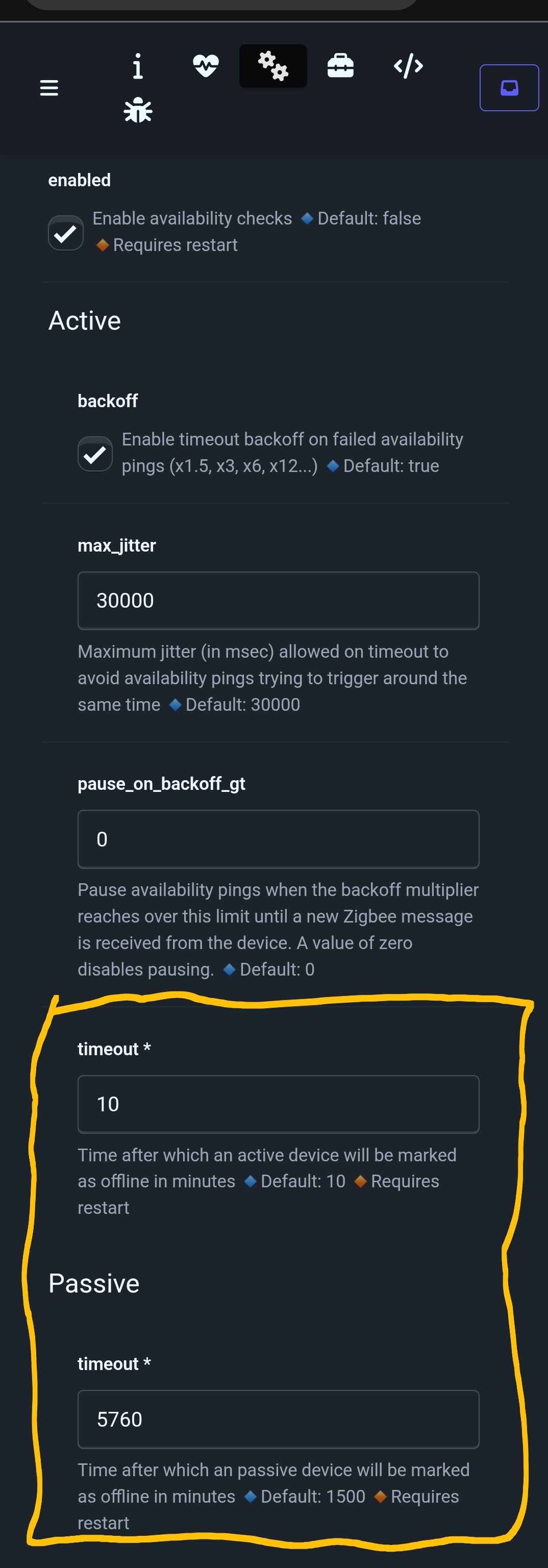
You’re not supposed to “just” power off zigbee routers @ Homey. It just lacks the monitoring tools;
Idk why the zigbee checks and settings are so limited @ Homey
I moved to zigbee2mqtt quite a while ago, just out of curiosity, and it’s an excellent controller. It’s here to stay.
The settings you need are there:
Yes, this seems to be a “solution”. Of course it sucks, because it is not a real solution.
My wife and I went to a festival and my father in law was in our house keeping an eye on the children. A grumpy old man who is very eager to point out how all this “smart stuff is not saving on electricity at all!” (That’s not the main goal, dude…)
When we arrived at our vacation destination I noticed my wife took a smart plug along with the power strip that was attached to it. And yes… “Well, the lights turn on as soon as I exit the bathroom!”