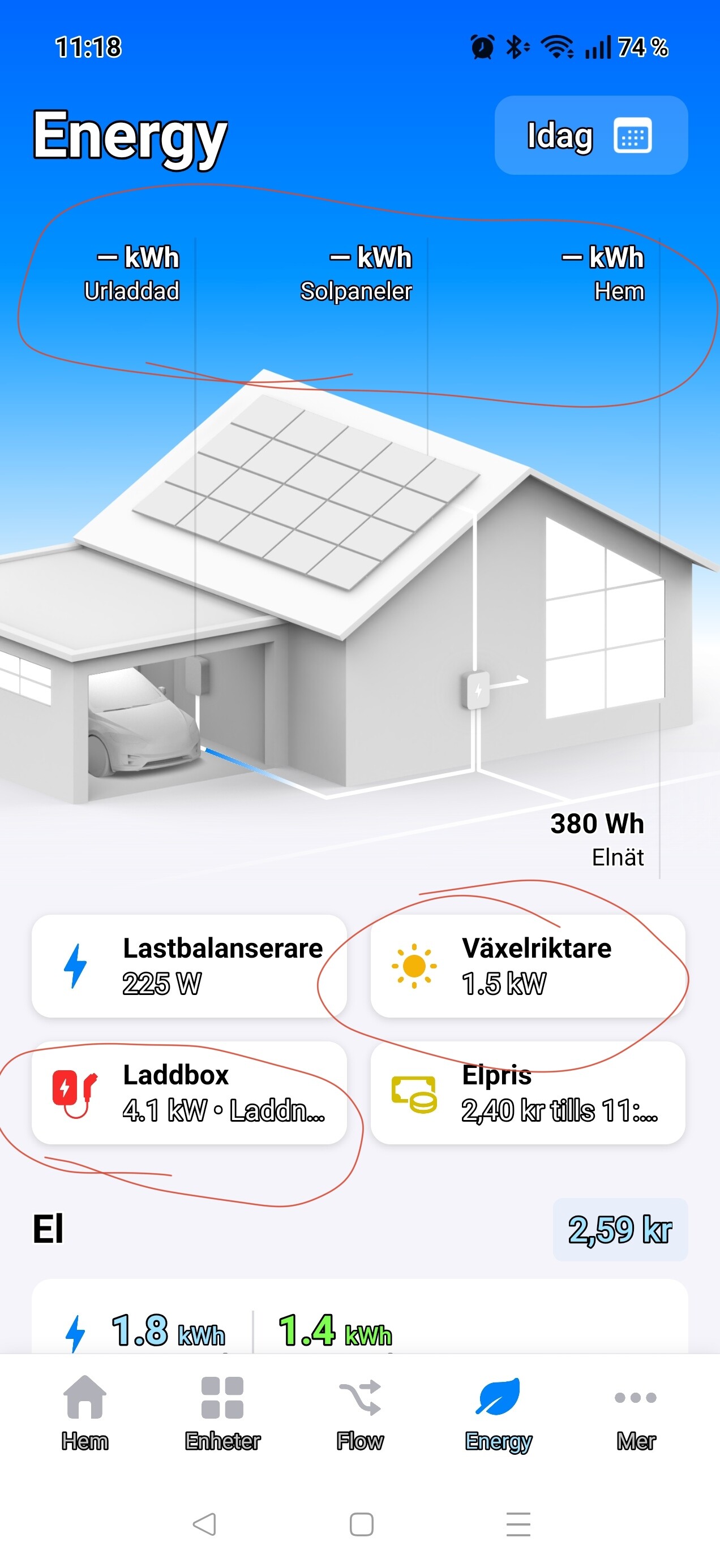
Please add the possibility to force the energy tab to stay on Today. Every midnight it should automatically change Today to current day. Its annoying to manually tap Today every morning.
I can’t relate: while it was just before midnight here, I had the E tab focused;
At 0:00h the values jumped back to zero, and ‘Today’ stayed ‘Today’.
(using the Android app on a tablet).
I just opened the Android phone app, and selected the E tab view. Same situation: values resetted, and Today is today.

you know what is a bit strange.. if i return energy the amount of $$$ is not declining where i should receive money back according to my contract. 
Is there any update on the potential for different price for electricity per time in the US? Or can we have a flow card to access the price and I can change it automatically based on the time?


This is a notification of the Homewizard app, introduced 3 months ago, Ricardo.

Check the app icon to trace unknown timeline notifications 

→ In case you don’t want/need it: This notification can be turned off per Homewizard device settings:

The Spy Who Nearly Came In From The Cold…
So here are all the poor old Brits, left out in the cold rather than being enfolded in the warm embrace of the Homey Energy Tab. No P1 meters for us… Must be Brexit, or something.
Well not quite so much any more. The Kraken energy app that supports Octopus customers in the UK now integrates (well, real soon now, anyway) into the Homey Energy Tab as a Cumulative device (monitoring total import and export to the grid). Here’s how it has looked since I finished wiring it all up this morning (running on my Chromebook):

To keep things simple while I did the integration, I have excluded all other devices from Energy - so it’s a really simple picture (I like simple).
Still Out In The Cold Though…
It’s really annoying that dynamic pricing is not supported in a logical way in the Energy Tab. The result is that the UK is excluded from using price data in the Energy Tab (because the energy market here looks different from much of the rest of Europe).
What’s a logical way? Well you configure your Homey device to say “hey this capability is an energy measure” or “this capability is a power measure” - with bells and whistles around the role the device plays in the Energy-verse. So why can’t I say “hey this capability is a money measure it represents the kWh price” or “this capability represents a fixed charge made every day”?
In the Kraken app, the Tariff devices all fully define the pricing for the tariff (simple, fixed-multiple, periodic, or tracker). The devices calculate the value of energy consumed or exported. It’s not exactly rocket science (though Intelligent Octopus Go with it’s Smart Dispatches is certainly more of a challenge…).
Come on Athom, pull your collective finger out and do something rational about pricing in the energy tab.
Oh, yes, why isn’t the Energy tab in the web app? Now where have I seen that question before?
Maybe it’s time to install the exquisite example app of the Energy tab: Power by the Hour.
You can choose between three UK price markets:

Thanks @Peter_Kawa an experiment for another day…
Does PBTH answer the need of getting prices into the Energy Tab? Pardon my ignorance and too little time to dig deeper right now. If not then Kraken is doing the job for me as an Octopus customer. PBTH might add some nice bells and whistles, though.
@tommyb Hi Tommy,
I’m also considering to go the Homey energy dongle route, via my kampstrup meter. But before I get too carried away, have you gotten it to work?
And if so, what type of HAN-RJ12 converter/connector did you buy for your Kampstrup (omni?)meter?
And can this supply enough power for the Homey energy dongle?
My problem is that I don’t have any power outlets nearby, as my meter is in an outdoor cabinet outside the house, and I don’t have the option of getting 5v usb power for the dongle.
Thanks in advance
Hi @David_Piper Just picking up on the UK / Octopus Energy angle here.
I’ve now submitted an Octopus Energy app for Homey:
A lot of what you called out here is exactly the problem space I’m trying to work around.
The app brings Octopus electricity, gas and export data into Homey, including cumulative import/export for Homey Energy, current unit rates, standing charges, usage, cost, account balance and a set of Flow cards around dynamic pricing.
Where it gets interesting is the 30-minute tariff data. I’m now using that to drive automations — price changed, price below threshold, negative/plunge pricing, cheapest half-hour, cheapest charging window, export rate above threshold, and so on.
For example, tomorrow I’ve got a number of negative pricing periods, so I can now have Homey react to those windows and change routines automatically rather than treating energy pricing as static.
It doesn’t solve the wider point that Homey Energy should really understand dynamic pricing, kWh price, standing charges and export rates as first-class concepts. I completely agree with that. But it does start to make the UK Octopus use case much more usable today, especially for Agile, Go, export, battery charging/discharging and general load shifting.
Shame we didn’t meet earlier. About a year ago I released the first version of this:
Maybe it’s worth having a discussion on bringing the two apps together and gaining the benefits of both?
always happy to… drop me a note and we can see what we can put our brains together to smash out…
Homey Energy : I’ve mentioned in a message before. Sorry, I still don’t get it. I have so many things, I have solar, I have home batterij, I have power plugs, I have a car-charger. ALL of these devices are integrated into my Homey. But my Homey-Energy really shows… strange and different things. I can’t get my charger to show up correctly. I can’t get my solar shown correctly, I can’t get my home-batterij to be shown in Energy, … I have a Dongle but not a Homey one…
I do see things in Homey Energy but they are faulty and I can’t tune them. There is no energy going to my Car. It shows wrong energy flow coming from the sun, it shows wrong energy flow to the grid ( and nothing at all to/from my batterij. Or I don’t know, Or I am missing out the triggers to be able to do that. All the correct values are visible/available into Homey. I can get them on my Dashboard but Homey-Energy : Well, simply not usable. Why does it not show the correct things? If I could trigger myself ( state what data is Solar, what data is my Car-Charger, what data is my injection at the Digital Meter, what data flows to/from my home batterij…
Were do I not understand this. Why is this kind of a fixed thing that HOMEY decides what to take in and not. I know I can for example exclude some power-plugs or so.
Trying again to understand. Please tell me : should I give up since I will not be able to get it right or what am I doing wrong and what can I tweak to make it show the correct flow from Energy?
Thanks. Walter
While waiting, try Power by the Hour
Hi Walter,
Always annoying when you can’t figure out what is the case. But maybe good to start with; What kind of Dongle do you use. This gives some background. Same goes for your charger.
Furthermore, it is good to know that you can toggle via switch if you want you device to be taken in to account. You can find them on oyu device settings > advanced (see screenshots, in Dutch, below)


If not deselected this can result in double stacking on the engerd tab from Homey. (Especially if you have multiple P1 dongles like I do). This might explain some of you deviations. Hopefully this gives you a path forward.
Hello again, The toggle-switch I have found but that doesn’t help me out here according to me. I have already several things that I’ve excluded. I have a Smappee ( Belgium ) P1 dongle and that data I have into Homey. But that one I’m not really using activ. I have an SMA Home Manage 2.0 that is the main measuring tool in my house. This GRID value I see, I can use in flows, calculate with it and so on. I have my SMA Solar measurements from my invertors. Also they provide LIFE data and als that, I can use without any problem into flows. My Home Battery manager, also SMA, same story. My charging station is currently defect and unfortunately can’t be repaired, so I awaiting a replacement soon, than I have again clear EV-charging figures. My previous ( will do the same with the replacement… ) charging station I could control just FINE from out of Homey and my car was charging nicely, purely solar-power at my programmed method and/or Grid power from my Dynamic Tarif ( winter - times ) . All data is nicely available. But the Homey-Energy : That nice little icon at the bottom right into the Homey-App : That one shows a nice house, solar panels, an EV-charger ( with car ) in the Garage, a home battery and then some flows from energy. But these flows are simply … totally wrong. So what suits this button in the app? I can’t tweake it. And yes, possibly I have different tools to measure then what Homey wants me to use but who cares. Homey is just there to try and integrate all different things and then with for example a flow, to do something special simply because you have so many variables to control and to use. Into FLOWs, that works very well. But that ENERGY button is just something, … , well sorry but for me, it is rubbish. I know it has been added by Homey for all, its always there but at least in my case, it suits nothing. On the contrary, I want to to go away. If I could turn it OFF, I would since now I SEE constantly that button but when I press, then I get frustrated about it.
I really don’t understand that I have no free setting-capabilities that allow me to indicate the VARIABLE that Homey should use to know my Solar-production, The variable that would allow me to indicate my GRID connection situation, the variable to indicate my car-charger status/situation and the same for my home battery. That is all it takes but no, … that is not selectable…
I remain un-satisfied about this and don’t understand that I seem to be the only one.
Power-by-the-Hour I know and have been using but that does not fill this Energy-ICON capability.
Am I really the only one who really DIS-likes that Energy ICON in Homey?
Still hope for an HOMEY - Engineer who will make a solution for this.
Thanks for the understanding.
Walter
After reading your post I think what you are asking for is a Homey setting to hide the Energy tab (icon) from the Homey mobile app. Do I understand you correctly? If so, maybe an intermediate solution is for you to try ignoring the icon, or place a small sticker on your phone’s screen where the icon sits.
FYI: I might one day create a dashboard for Power by the Hour that mimics the Homey energy screen. Would that be helpful for you?
Hello Gruijter

Great answer. Well, in my situation, if the Homey-Team who made this Energy topic as part from the standard Homey-App ( and I remember a video where they claimed to have a reason to NOT allow us, users to tweake this … ) really sticks to their FIXED approach, an approach for what they will have reasons but who doesn’t meet the final goal according to me : YES, a solution for me was indeed a key to get rid of this Energy Icon into the APP. That would at least for me, take away my current frustration.
Please understand that today, lots of apps have this kind of view. I am using the SMA-app and that one has an identical view with a house, solar, battery … . I am using the SolarEdge - app for a friend to advise him, same thing. I am using the Enphase en ShinePhone ( Growatt ) apps also for others since I am here in Belgium , … an ENERGY-Buddy for many people ( Free of charge, in my free time… ) . I do advise them on Energy things and have received by that already a lot of credits ( Joy/Appreciation for them and for myself, saved them already an extra amount of money… ) . I believe to say, that I am a real and good user ( I dislike the word “FAN” but I’m close… ) from HOMEY, I spread this knowledge, I spread these vibes…
BUT : I am very, very disappointed to always see that Energy ICON at the bottom and everytime I show this to others, I have to say : Well, this looks nice but it’s … rubbish since it simply can’t be adjusted to become correct. So totally un-usable for me.
Sorry to the HOMEY people but this is my personal POV on this subject.
For the rest : I love you 
Power by the Hour : Probably something from you Gruijter. I have been using it, I remember but this is a while ago. Don’t even remember why I’ve left it. My age … ( 62  ) possibly.
But I will give it a retry…
To end up : I have done already amazing things with Homey. So I remain happy with it. I have scripts running, I have lots of Advanced flows, in fact, unbelievable what I can do with this device, what I’ve integrated with each other. As an Engineer ( on retirement… ) I am playing with this thing like hell. I am working with AI and achieve things that for 5 years I would have only achieved after consulting several other colleague Engineers but now : Me, my Computer ( with … AI ) and my Homey : TOGETHER WE ARE STRONG.
Kind regards and I wish all, lots of JOY, … much of success with their goal and path to self-development in this wonderfull world of Home-Automation ( Here naturally HOMEY ) Walter