On first glance that looks ok.
Can you repeat the steps you have to take and send me a Diagnostics Report from the app?
On first glance that looks ok.
Can you repeat the steps you have to take and send me a Diagnostics Report from the app?
Yes of course.
TO activate no worries : I use the badge, press locked and during timer bip and red light flashing. at the end one bip and red light stays few seconds and the alarm is activated.
To desactivate : Motion sensor is detected, alarm delay is running so I have to badge and press unlock first time : stop on going alarm, red light is red again like I activate alarm and I have to do it again to disable the alarm.
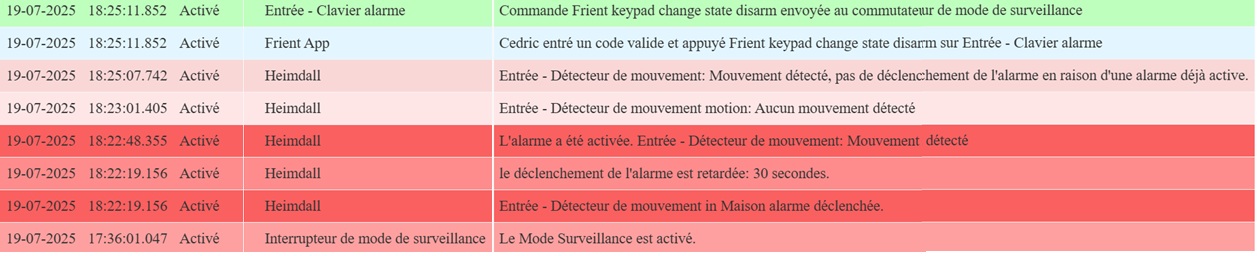
See diag below :
Sorry, just can´t find the answer or the right spot: I just assed a new Eufy Cam to Homey and would like to include it with Heimdall, of course. Bit it´s not listed on the Heimdall config page.
Any advice? Thanks!
It probably doesn’t have the right capabilities, please read the first few posts of this topic, how Heimdall works and which capabilities it needs is explained there.
Its the same type of camera that is already running under Heimdall, so that would be surprising…
Found it - well hidden camera config menu… 
Hi all,
first, thank you Danee for all your effort put in this app!
I wanted to point out the following problem I have encountered when setting up Heimdall.
Cannot find whether this is a known issue/behaviour.
I want to change the set of sensors for the partially armed surveillance mode. I have two configurations in mind.
So I set up two flows where I add and remove the proper sensors, 16 action cards each
When I run each one I have a mixed situation: the right sensor(s) are not added or removed properly.
The workaround I found is to put an increasing delay in each action card in the flow adding/removing the sensor.
It looks like Heimdall looses some add/remove operation when it is given a bunch of those at the same time.
I’m afraid that’s not Heimdall that’s Homey acting up.
Understood!
Thank you for the reply.
Hi Danee,
I come back to you. Last week my Homey Pro crashed and I reinstalled everything and I have the same issue. I’ve got time to make a readble picture and I really understood where is wrong.
I use a frient keypad set up with Heimdall. It works fine to activate any mode but my problem is to desactivate.
So when I came back home, I open the door and I have a motion sensor. The door is excluded in “full mode”. The motion sensor detect me during the time to remove surveillance with the frient keyboard. The alarm is not activated before the tempo but I have use twice the keyboard to desactivate the surveillance mode. It’s the same with partial mode.
It looks like the keyboard is in “pre-alarm” and the first time is to stop this “pre-alarm” and the second one to disable the surveillance mode.
I’ll let you see the picture below. The keyboard is blinking slowly (+ bip) in yellow (in the right) during the tempo and when alarm is activated is bliking fastly in red (in the right).
Thanks a lot.
Cédric.
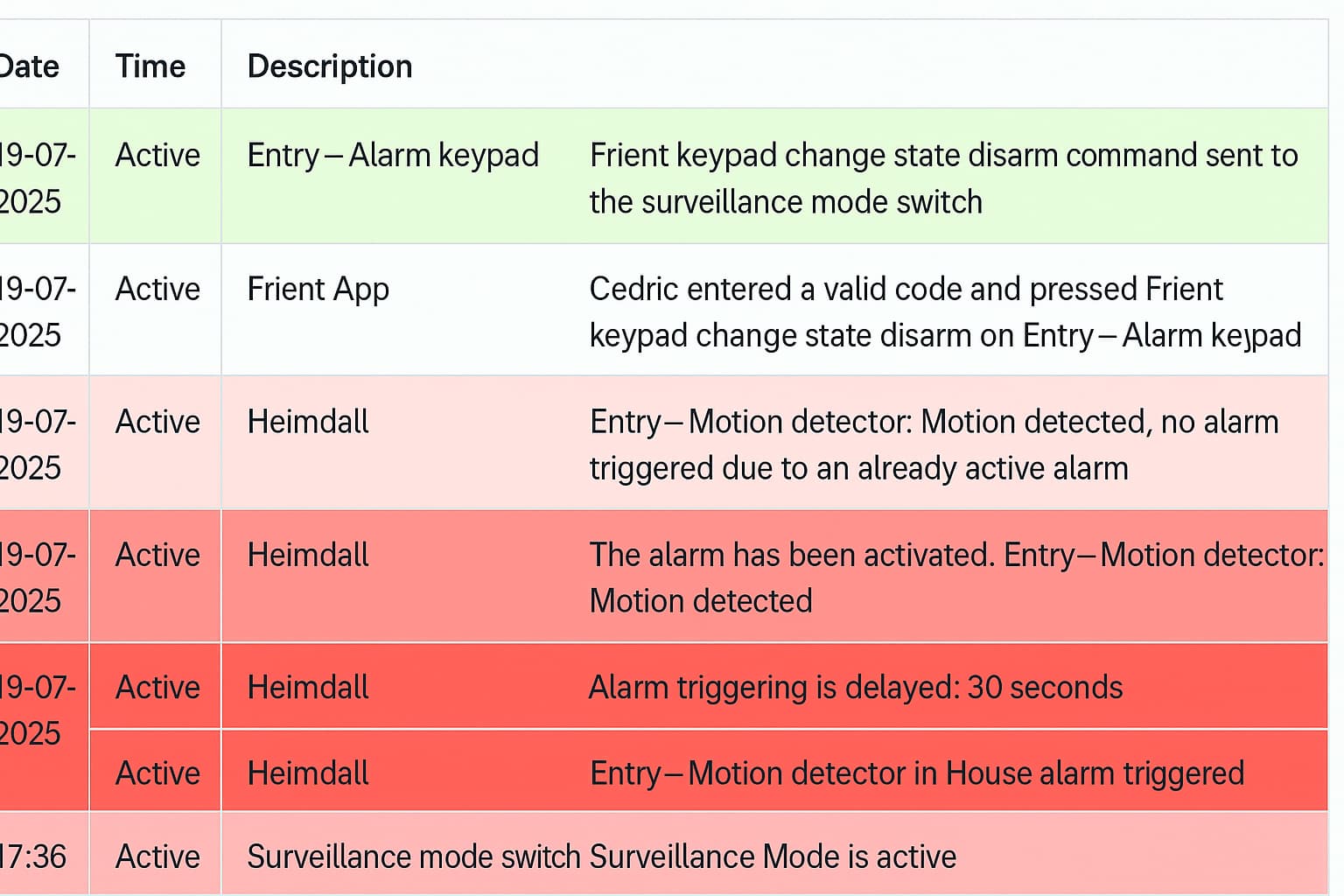
There is no “pre-alarm”, but there is an Alarm Delay I’m not sure if you’re using that as I don’t speak French. Could you please translate the lines from the log for me, one by one?
@DaneedeKruyff did you find something ? thanks
Has anyone here found a reliable way to get a Heimdall alarm notification on an iPhone while it’s in Sleep Focus mode?
Standard Homey push notifications (and even Telegram messages) are silenced during Focus, so I’m specifically looking for something that can send critical alerts (iOS “Critical Alerts”) so the alarm will always sound, even at night.
I’ve been looking into solutions like Pushcut (with Automation Server Extended) or Pushover (P2/Emergency priority), but I’m curious if anyone here has a proven setup with Heimdall + iPhone where the alert always comes through during Focus.
Context / technical note:
Pushcut can send Critical Alerts, but requires Pro + Automation Server Extended to work in the background.
Pushover supports “Emergency” priority (P2) messages that override Focus and repeat until acknowledged.
Other options could involve Homey → IFTTT → service with critical notifications.
What apps, flows, or configurations are you using to guarantee the alert reaches you in Sleep Focus mode?
[Heimdall in Homey]
│
▼
(Alarm Triggered)
│
▼
[Homey Flow sends Webhook]
│
├── Option 1: Pushcut
│ - Pro + Automation Server Extended
│ - Critical Alert notification
│ - Always plays sound (even in Sleep Focus)
│
└── Option 2: Pushover
I hope someone can put me on the right track.
Thanks in advance.
Wilfried
Athom has implemented “critical notifications” in homey:
You can set the Notifications in the homey app to allow critical
If you do that the notification will come through in sleep (with sound)
That would be great thanks.
The only thing is that I don’t see the critical warning as a choice. I have the latest Homey version (9.5.0) and the latest IOS 18.6.
How can I force this.
On Android I use Pushover to do that for me, more levels of warnings possible. Have it on iOS also, but did not play with sounds on that device (tablet which is mostly not near me).
I found it, i had to enable it in the homey settings as well.
Hi Cedric,
I completely missed your reply, sorry. What I can see from the log lines is only one communication from the keypad, so it looks ok from Heimdall’s point of view.
What happens in such conditions when you use the Surveillance Mode Switch in the Homey app?
The thing is that i want to make sure there is no falsh alarm during alarm status. The IKEA Vallhorn motion sensor can be triggered sometimes by my neighbor but its so so rare. So i got a few eufy s340 and installed only 2 motion sensors right now. Can somebody check my advanced flow? I want to make it sure there is no falsh alarm and the eufy cams cooperates with motion sensors.
Which advanced flow is more trustable and safe? I made 3 different ones with alarm state so idk.. maybe no need to add my cameras as well.. or no person detection but rather motion detection. I dont know.. help me pls.
2nd version
3nd version