If you want to use Advanced Flows, why don’t you make it exactly as the “normal” flows?
And try it again.
Well, I tried…but it went wrong somewhere… 
I would prefer to have all my flows in the advanced mode…but I need to educate myself more first.
If you use the same cards then it should work as with the normal flows.
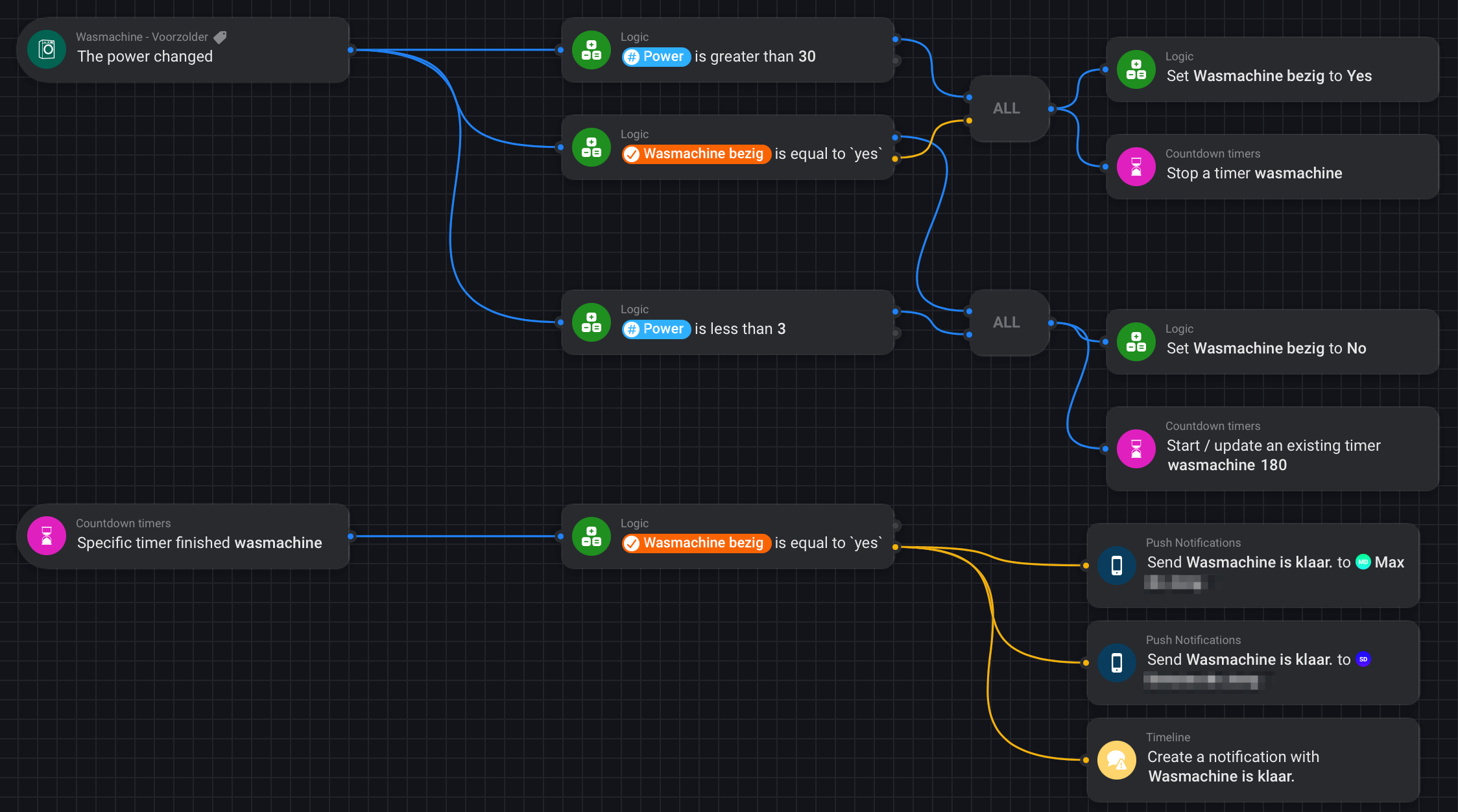
I’ve been using this advanced flow for the past 2 months. Works flawless for me. Maybe you can try to built something similar? It is based on the tutorial from the original post.
What kind of plug you guys use for a dryer
I use a NOUS A1Z Zigbee plug, 16A.
Tuya Zigbee, 16A, https://www.amazon.de/gp/product/B09SG3DYL4/ref=ppx_yo_dt_b_search_asin_title?ie=UTF8&psc=1
strong reception with zigbee and though cheap.
Qubino smart plug 16A
Fibaro Walli Outlet
Aeotec Smart Switch 6 (up to 3.000 watt, 13A)
Shelly Plug 16A
Haha… 
6 answers, 6 different devices.
@Mark1541, now it’s your turn… 
However, I guess you have actually bigger problems right now (keyword: HP23) than finding an outlet/plug for a “washing machine is ready” notification, right? 
Indeed  but many thanks for suggestions
What I just don’t understand: why is there not simply a flow like: “IF power is below value x for y minutes, THEN”. This would solve all this unnecessarily complicated stuff.
As in Homey you create all your Flows yourself.
And every Wasching machine as different “characteristics” even every Program differs. ( or even on the loading and intelligence of a machine)
(Tip: Buy a Smart Washing machine, it reports automatically, independent of program )
That works really well.

The power characteristics are different per washing machine, but the principle is the same. You just have to adjust the specific thresholds. That would work for every washing machine/dryer imo.
Will check, thanks!
You asked for “simply a flow like:”
But there are no build-in / default flows, you have to build them yourself.
Maybe you wanted a Trigger, Peter showed you, it is in an App that does some complexity for you.
The above Device Capability trigger can welp with it,
but you first need to create a state (Appliance is Stopped / Running)
You need a flow / trigger to set it from stopped to running,
after that the trigger for the ̶s̶t̶o̶p̶p̶p̶e̶d̶ ̶finished characteristics need te be determined.
The socket needs to measure and report accurately enough to determine a finished state.
The appliance should not have some sort of wrinkle-free program (after it has ended continuing to rotate slowly for some time) as that could make it difficult or impossible to determine the end of the program. (fe with a dryer, but maybe also with washing machines)
still a lot to do and test, (and probably fail often if minor things change that just where outside the determined characteristics.)
