Hi all, I hope I can place this question here and find some help.
I am trying to add some fibaro rgbw led controller 2 to my network but I am unable to succeed. The inclusion process does not start when pressing the b button 3 times. Actually when pressing the b button 3 times a green led starts blinking on the controller. Pressing another 3 times a steady red led starts on the controller. In the meantime nothing is happening within the Fibaro app on homey pro.
The controller is connected to a 24v power supply and a w led strip, including a switch.
Anybody an idea why the controller is not adding to my network? Am I doing some wrong here?
I tried 3 different controllers, all the same result.
I have tried both ways, with Z-wave and Fibaro app, but both have failed. I have added multiple other devices without issue, e.g. Fibaro dimmer 2. Following the same way of working for the controller 2 apparently is not working for me. Maybe there is another step required for the RGBW controller 2 I am not aware of?
Have you ever restarted your Homey or even better, did a PTP?
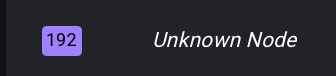
Have you checked in Developer Tools → Z-Wave if you have any unknown nodes? If so, try removing them first.
Have you checked in Tools to see if you have any unknown nodes like this one?
If so, try to remove them first, restart your Homey, I think a software restart is enough, and then try to add the controller again.
If it still doesn’t work, include the controller in close proximity to Homey, at a maximum distance of approximately 2 meters.