ChatGPT MCP integration fails

Hi, has anyone got the ChatGPT MCP integration working?

I get through authentication and confirmation “Homey is now connected“. But Homey is not listed in the Connectors nor can I control Homey with a prompt.

  • Homey Pro is up to date
  • I tested several browsers

Thanks!

1 Like

You enabled dev mode? Then if you click on the + on the left hand side of the text box and then click on More do you see something?

1 Like

Hi, thanks. Yes, I am in dev mode and under ‘More’ it just says ‘Web search’ and ‘canvas’..

It seems the connector is not properly added? (Despite confirmation it was added successfully)

If you go to Settings, Apps and Connectors, do you see Homey?

No, it’s not listed there either.

Everything was working perfectly for me, but starting today it disappeared on its own from the ChatGPT options. I tried adding https://mcp.athom.com again, but no luck even though it shows the green checkmark, the device won’t connect. Just another issue to add to the problems with the Echo devices. What a great weekend this is turning out to be…

1 Like

ok - sounds like a broader issue then

I had the same issue from the start. I did literally every step in the description but the connector was never properly added.

Exactly the same for my situation. Just tried to add it, following the instructions but the connector is not shown in ChatGTP.

1 Like

Same here. Added it twice following the instructions exactly. No joy… :disappointed_face:

1 Like

Same here…

Now I get this message:

I do have a paid subscription.

1 Like

Paied ChatGPT account. Not working for me with the same error . Before there was an error with unsafe connection.

1 Like

same here.. does not show Homey as choice in the prompt.

1 Like

Same error for me….

1 Like

When I first setup the connection it appeared to only partially work (as others have said here).

The Homey option didn’t appear under the + icon and it kept flicking between saying the connection was connected and then not.

I repeated the steps and it seems to have stuck the second time. It is now showing as connected when I check and theHomey options appears under the + icon all okay!

However… it doesn’t appear be working right now :slightly_frowning_face:

1 Like

I thought it’s not working, so added it 2nd time…nothing appeared. Then suddenly after 1 hour, I see both added. So I suggest adding and wait…

1 Like

Without any action the Homey is now available in ChatGpT. But it seems, that it actually just can read but not write states. See the temperature, but couldn’t turn on the light

Edit: I was able to turn on a heater - but some lights make problems… i will test on.

1 Like

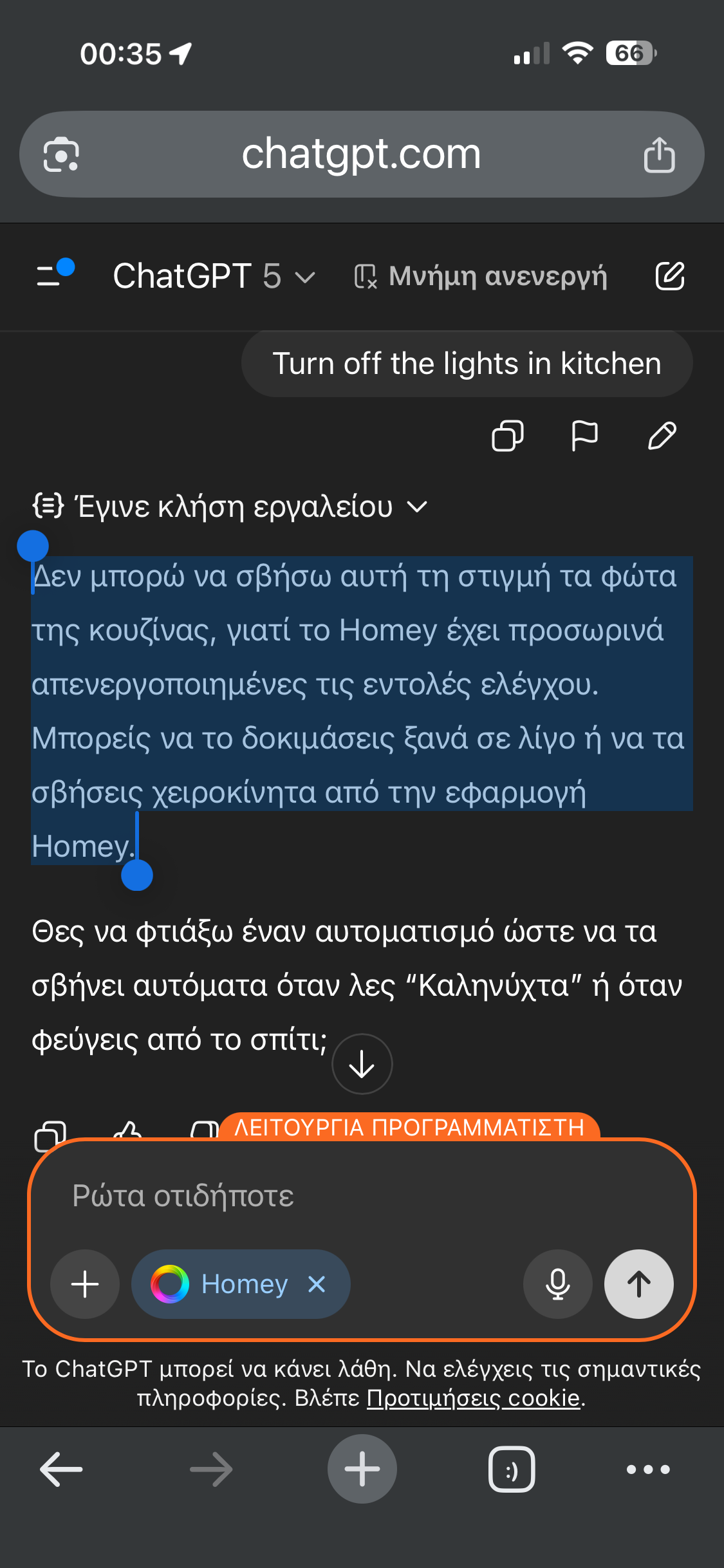
I receive the same too:

I can’t turn off the kitchen lights right now because Homey has temporarily disabled control commands. You can try again in a moment or turn them off manually from the Homey app.

1 Like

Sounds like it’s worth waiting a few days or weeks for this feature to mature.

2 Likes

But it‘s actually very nice to ask the system about the housings climate, measuring and options to optimize!