The app settings page is only available on Homey Pro, so are you using one of those or Homey cloud?
Hi Adrian, I am using the app tahoma by somfy with the latest version (2.03). Guessing its within the cloud. Would like to change to tahoma classic by somfy because this is supporting knx (which i need) but have not found a way how to do this
Best Frank
as hw i am using the tahoma switch
Sorry, I’m confused. Do you have a hardware Homey Pro or are you use the virtual Homey?
Do you have the Somfy Tahoma and Connexoon app installed on your Homey (version 4.0.110)?
sorry Adrian. My fault. I thought you were asking for a device log from the TaHoma side.
its working now. Mange to integrate them by using “Rolladen (io)”
Hi all, I recently bought a pair of motorized blinds, using the new Somfy Sonesse2 28 Wirefree Zigbee motors.
Currently I only use the Somfy YSIA zigbee remote control, but I am looking for a way to operate the blinds using Homey.
I tried pairing the blinds with Homey with some tricks I found on a Reddit forum but that didn’t work and for now I am not willing to spend another 150 euro for a seperate Somfy hub.
I posted an app request here ( [Requests] Homey Pro Community App Requests - #1023 by Merpster ).
Hope that there will be a way of ‘Homey only’ integration soon.
Hi Adrian,
Which device do you suggest to select when trying to add a Zigbee motor?
I am looking into getting the Somfy Tilt & Lift 25 WF Zigbee (1245602) to install them into my roman blinds. I already have the current version but then with RTS.
I do have a TaHoma Switch where I already have connected my exterior blinds and have added them as Exterior blind (io). And also the tilt & lift 25 RTS. They are working great!
Before buying the new motors I am curious how they should be added. Because I don’t see any Zigbee options in de devices list. If I use a different device, does it support the other functionalities like feedback as we have with the io devices, position etc?
I hope to see your answer. Have a great weekend!
Kind regards,
Bart
As far as the Tahoma app is concerned, if they can be added to the Somfy box, then they can be added to Homey. I might have to make some additions to support them, but I would need the device log from the app once they have been added to the box.
The app already supports some zigbee devices via the Somfy box.
Note, the app doesn’t support zigbee devices directly.
I understand that it will not work directly with zigbee from Homey to the Somfy zigbee motors.
With the Somfy box, you mean either the Somfy Connectivity Kit or the Somfy TaHoma Switch, right? I have the TaHoma Switch, so if you need data or logs from it, that’s possible.
Could you tell me exactly which logs you need?
I’ll try to get my hands on a new motor so I can share the logs.

Ah great! When I have the motors I will sent you a message.
Ah, I might have not been clear there, I meant will work with the Homey app.
I’m not sure if they all work with zigbee.
The Tahoma switch is zigbee compatible.
Hi Adrian,
I received the Somfy Tilt & Lift 25 WF Zigbee (1245602) motor and added it to my TaHoma Switch. Ofcourse I am able to control them from inside the TaHoma app. But I would like them to add/import them into my Homey.
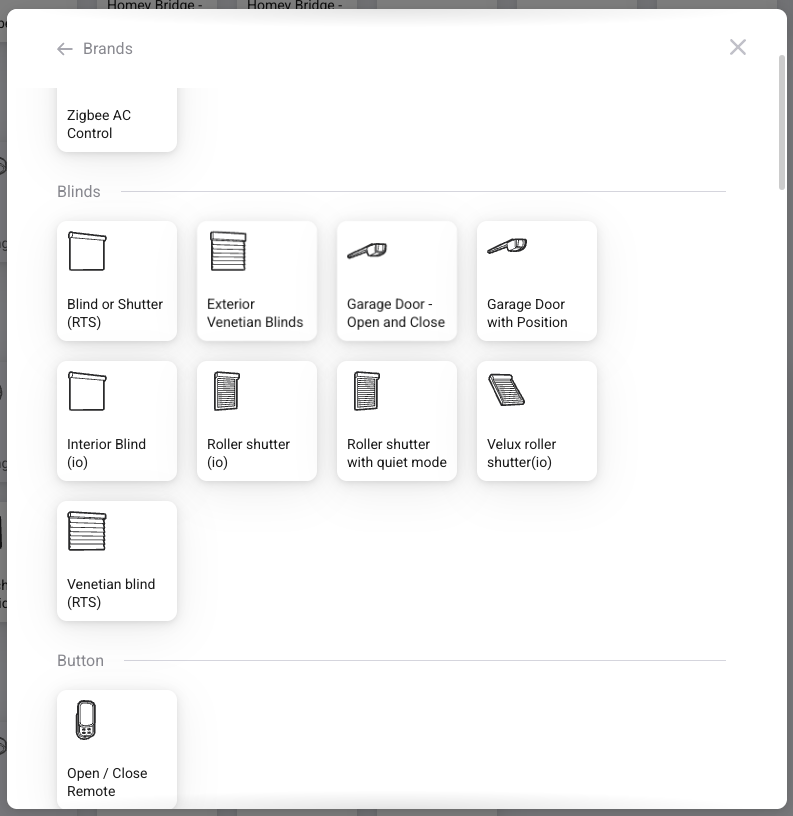
When I want to add a new device, I select the ‘Somfy TaHoma & Connexoon’ app and then I need to select a device. Which one should I select? I have tried multiple but it did not find the new motor which is already in the TaHoma switch.
Let me know if I can help you, for example with logs. I got the feeling we need to add a new driver to the repository? If that is the case I can make a PR for you.
Can you send the Device Log, see two posts up. Then let me know the log id and the name you have given the device in the Tahoma app
Second try sending the logs I got the following log id: 1782609857. And the name of the device: Tilt & Lift 25 WF Roller
You need the ““Roller shutter (io)” / “Rolluik (io)" / “Rollladen (io)” (not sure what language you use) for that device.
Yes, that seems to work. But for example I cannot see the battery percentage in Homey. I would like to make a flow to get notified when the battery is almost empty.
I have double checked the log, but the battery level is not reported by the API.
Inside the logs you can see core:BatteryLevelState the value is the same as what is shown in the TaHoma app.
