Here is a homey script that automatically goes in and finds the devices that are using battery and will give you a push notification on your mobile, with the name(s) of the device and how many % are left on the battery.
You can choose in the script how many % the battery must be below before you get a notification. Line 9 - (battery <= 20; // Here you can change %) It is set to 20%.
Remember to run the script before you create a flow, as then ”tags” will be created
If I don't answer any questions, it's because I'm sick.
But I hope you can figure it out.

It was me and AI who made this script. 😁

Here is the script:


// Get all devices and filter for those with a battery
let batteryDevices = Object.values(await Homey.devices.getDevices()).filter(device =>
  device.capabilities.includes('measure_battery')
);

// Find all devices with a battery level of 10% or less
let lowBatteryDevices = batteryDevices.filter(device => {
  let battery = device.capabilitiesObj.measure_battery.value;
  return battery !== null && battery <= 20; // Here you can change %
});

// Prepare the notification message
let message;
if (lowBatteryDevices.length === 0) {
  // If all devices are OK, the message is an empty string
  message = '';
} else {
  // Otherwise, create a clear list of devices with low battery
  message = 'Low Battery Alert:';
  lowBatteryDevices.forEach(device => {
    let battery = device.capabilitiesObj.measure_battery.value;
    message += `\n${device.name}: ${battery}%`;
  });
}

// Create a flow tag for the message
await tag('low_battery', message);

// This return value is for confirmation and is not used in the flow
return 'Script executed successfully and created the "low_battery" tag.';
@Peter_Kawa Very interesting! I currently have separate flows per battery device to monitor and inform me of a (custom) threshold. This flowcard would allow me to replace them with one flow. Do you know since when this flowcard has been made available? I haven’t seen it before.
Owww, for me it’s been there since I bought my 1st Pro 2019 back in 2020.
BTW (maybe you knew alr) Homey automatically notifies you when a battery is below 20%, but it’s sent to the timeline only (or with push notifications as well if you have it enabled).
However, there’s this trigger card “when notification was sent”;
with a logic AND card “contains battery” you can send the notification to “anywhere”.
// Get all devices and filter for those with a battery
let batteryDevices = Object.values(await Homey.devices.getDevices()).filter(device =>
  device.capabilities.includes('measure_battery')
);

// Filter out specific devices by name
let filteredDevices = batteryDevices.filter(device => {
  // Replace 'Name of your device' with the exact name you want to exclude
  return device.name !== 'Name on your device';
});

// Find all devices with a battery level of 10% or less from the filtered list
let lowBatteryDevices = filteredDevices.filter(device => {
  let battery = device.capabilitiesObj.measure_battery.value;
  return battery !== null && battery <= 10;
});

// Prepare the notification message
let message;
if (lowBatteryDevices.length === 0) {
  // If all devices are OK, the message is an empty string
  message = '';
} else {
  // Otherwise, create a clear list of devices with low battery
  message = 'Low Battery Alert:';
  lowBatteryDevices.forEach(device => {
    let battery = device.capabilitiesObj.measure_battery.value;
    message += `\n${device.name}: ${battery}%`;
  });
}

// Create a flow tag for the message
await tag('low_battery', message);

// This return value is for confirmation and is not used in the flow
return 'Script executed successfully and created the "low_battery" tag.';


And if you need more devices to eksklude, then use the &&

return device.name !== 'Enhed 1' && device.name !== 'Enhed 2';

Meggi
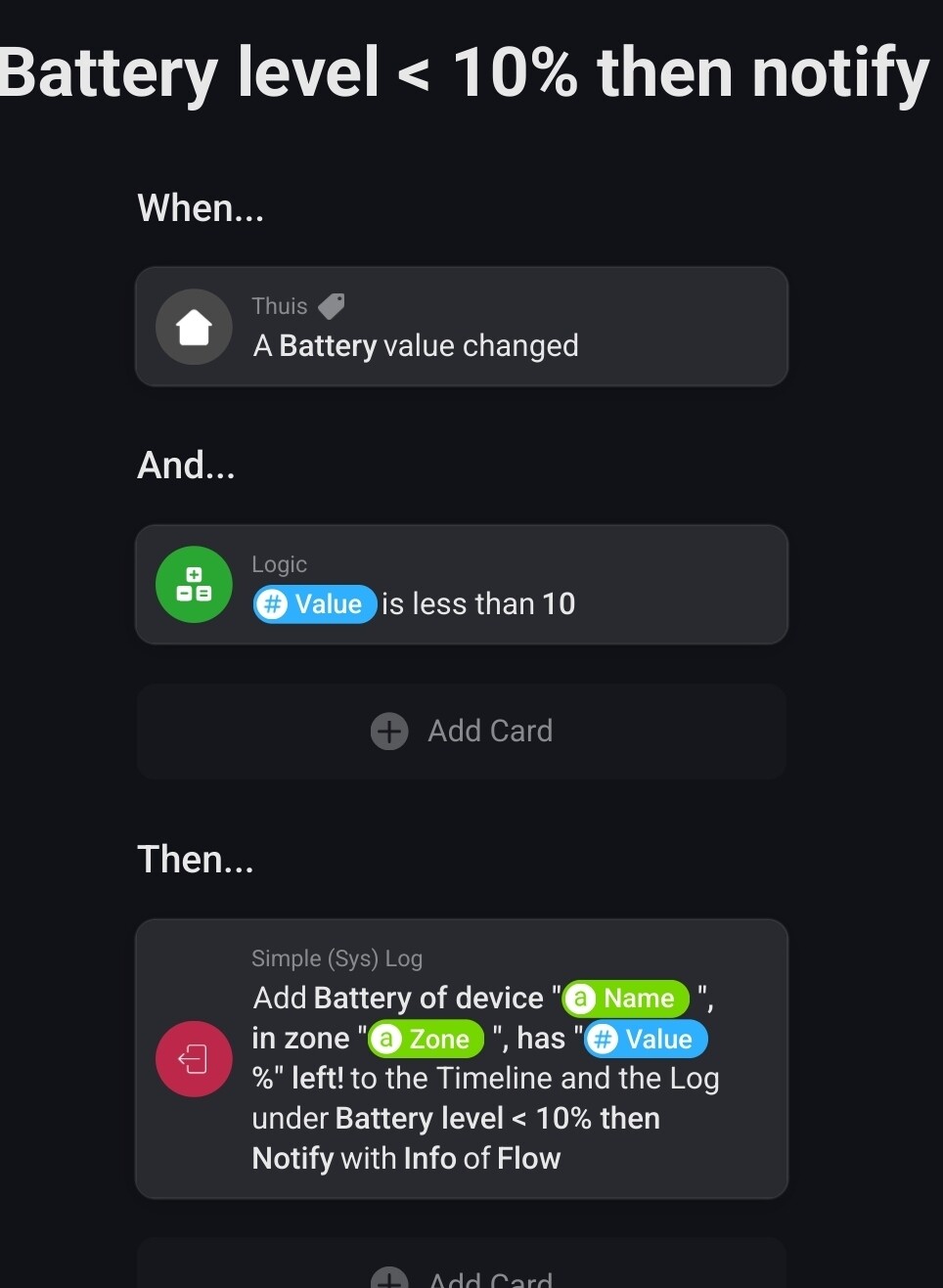
Hey thanks for your idea but honestly spoken i do not have any clue how it works with home script. Is there also any solution with flow cards? Maybe to compare result tag “#Device” Name with Name of solar power battery.

 .
.


