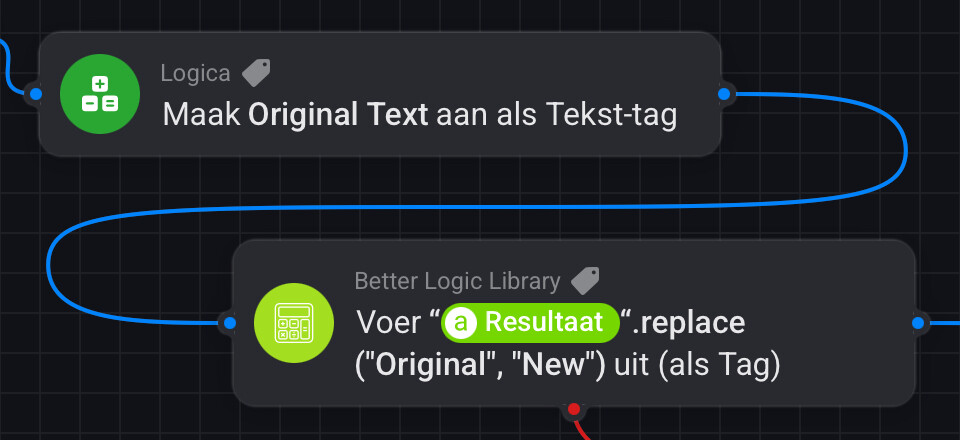
@SunBeech Unfortunately we cannot use the ‘calculate a value’ card for a string variable. But with Better Logic we can, with the 'Set [variable] to BLL [Calculation], like this:
Hi @Peter_Kawa, interesting. That was also my thought. I tried the BLL ‘execute BLL expression as’ card before posting and got the same error. As I normally use that card for operations on strings, I assumed the method is not supported on Homey.
As such, I don’t understand why the said BLL card does not work with the replace method, while the ‘set variable’ card does. Did your suggested flow work?
This card I used, can take string variables, that’s the trick.
Mathjs functions for strings just don’t work with cards which only take numeric variables
Yea, I 'trial and errored" until I discovered this particular BLL card, which can be used for string/text calculations on any variable type.
Afaik all other cards take only numeric variables to calculate on, and using .replace on strings/text just gets rejected for non-numeric data.
Does this make sense?
But, wait! Yesterday I couldn’t get it to work, but now I tried this in an ordinary notification card and it works !
This should work with Homey variables as well
I got confused because the ‘execute as tag’ BLL card I normally use for string calculations, like the following example (which extracts the first name from the full Homey user name):
I still hope there comes an option for flowcard defenitionw (within the app for devs) to mark a flowcard-argument field as coding. So if you include a string token, it wraps it in double qoutes. Or a yes/no token as true and false, instead of yes/no (hp2019) or emoticons (hp2023).
Yes that would make sense and easier for the end user.
I am a HP2023 user and also having trouble understanding how to use booleans in math.js functions, since Homey seems to convert them to symbols (as you indicate), while my mind thinks in true/false options .


 , I also included the timeline notifications it produced


 .
.


 !
!
