Good point  . That had to be the reason.
The people at IFA are probably not the actual tuya decision makers, and whatever they said got wiped off the table by some higher up at Tuya. Which makes sense, since now from the perspective of Tuya, Athom is just LG. This means your name got elevated to different discussion tables in tuya and probably got more scrutinty from the business/finance/strategy folks.
Since Athom does not want to go for the Tuya offered solution, what routes/ options are you exploring or willing to explore? Or are you waiting for Tuya to change their decision?
Because if you are only doing the latter, i think expectations are not fairly managed here.
What would help is clear communication on the value for Athom to offer a Tuya integration. Are you willing to work for it? Invest for it? Have hassle for it?
Or is this only feature you want to support it it comes easy?
At this point in time we know:
Athom becomes LG
Tuya did something that was not agreed upon with Athom (but maybe with LG?)
Tuya offers solution that requires investment from Athom. ( is it actually a better (technical) solution in the long term, apart from the work you would have to do or investments to make?)
Athom refuses the proposed solution
Have you considered asking your users for a contribution for the tuya app? I would be more than happy to pay a fee, will be way cheaper than swapping out AC units, underfloor heaters , leds strips and switching sockets and be simpler than having to have two apps to control things and not having to explain that to my family…
If you are 16 and need some bolts for a project, the hardware store will probably give them for free ( because they like kids learning that stuff), if that same kid is now 26 and works for Eriks, that same bolt will cost a premium and everyone understands that. How homey/Athom fits in this story is for you to decide 
Besides the Tuya community app does the Alexa workaround also still works?
This problem does not relate to the Tuya Zigbee app, as is talks to the connected devices locally. The ‘official’ Tuya app and the ‘community’ Tuya app talk via separate cloud-based solutions, which are now both truncated by Tuya for NEW users. Existing users can still login, as I understand. So therefore it is possible that your devices work with all the apps.
One of my Tuya lights just stopped responding through the official app.
Guess that is killed now as well 
Try deleting it and adding it back in again. Doesn’t need a log-in. Works for me. If it’s the same problem I’ve reported, turning the light on and off in the Tuya/Smartlife app updates the status in Homey - even though Homey reports it as unresponsive!
Andy
Are you sure that is with the “official” app? In that case it is easier to “repair” the device. (That way I don’t need to add it again to all my flows) But that doesn’t work either on the official app.
This is something that happened in the past few hours. The official app was working just fine.
I am currently reverting back to the community app. Which is unfortunate as it has fewer options.
Absolutely. I’ve had to do it a few times. Fortunately, in my case, the problem devices are lights that are set to different configurations by running Smartlife scenes. So no flows to redo.
Repairing doesn’t work because that requires a login.
Andy
And adding them doesn’t?
Currently all of my devices connected through the official Tuya app have an error.
No. Try it yourself. Once you’ve added the first device, subsequent additions have never needed a login.
Andy

Hello everyone, what I understood from the news here is that the official tuya homey app no longer exists and it is still uncertain what will happen next. Is it still possible to connect Tuya with Homey? It used to be possible via this website:

it was complicated but it worked at some point: and then the question is, even if you want to pay yourself, there is currently no other solution, right? Thank you!
As far as I know this is still possible through the Tuya Community app As far as I can see that is the method you’re referring to. But I heard some people have issues with that one as well nowadays. This is being discussed here.
Next to that for Tuya Zigbee devices you also have the Tuya Zigbee community app. The nice thing about that one is that you don’t have to add devices to the Tuya app first, no you can just directly add them to Homey. That provides a level of confidence
And there is another Tuya community app that allows you to add Tuya devices locally. I haven’t used that one myself, but perhaps others can chip in.
The two pictures below depict my situation and they also clarify my position in this matter.

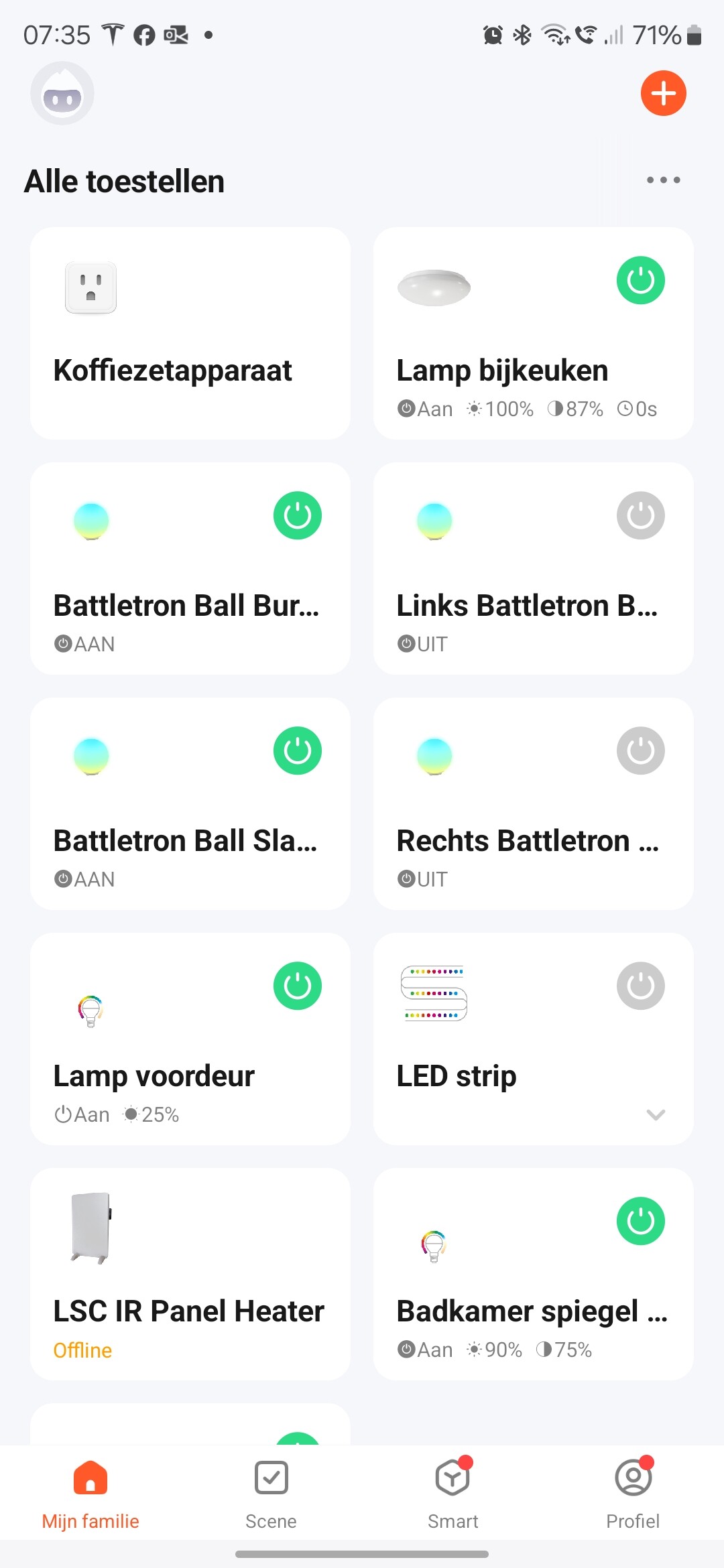
I used to have some “funny lights” in the bedrooms of my children. Not expensive. Using the community Tuya app, I was able to switch them on and off. Dimming them was in most cases possible as well. The colors displayed in Homey were completely different from the actual colors, so if I wanted to change that, I had to set it in the Tuya app. And if these devices broke, didn’t get supported anymore or whatever, I would remove them and never look back.
For these devices it is just fine if it would be impossible to control through Homey. Then I would just use the Tuya app as workaround. Preferrably not, but well… what are you going to do?  My home in that case would be less smart, but still controllable. For example the panel heater: I had that connected to activity (measured by non Tuya devices), the actual temperature etc. Now I would just have to start the thing manually from the Tuya app.
Another example is the light in the “bijkeuken” which was more an experiment than that I needed to rely on it for years to come.
Then the official app was anounced and I was in the market for some black power plugs and an outdoor power plug. I thought I was safe, so I bought some of the first items I found on AliExpress and those were Tuya WiFi devices. That was a mistake! Because one of them is for my coffee maker and thus I have implemented a Tuya WiFi device in a place where I am relying on it. And with the Tuya community app, I cannot control the device as it displays this:

To cut a very long story short: Hope this is of help to you @Stefan_Beck
And if you are using Tuya as a fundament for your entire home automation and as an important factor in buying Homey or not: go to Home Assistant!
Sorry to hear that. I just deleted one of my bulbs and added it back in without a problem.
From the error you are seeing it looks like you’ve triggered a login requirement. I’m hoping it’s not time-based because, if it is, I’m heading for the same issue as you.
My fall-back will be to use Alexa as an intermediary.
Andy
I was thinking the same thing, but then use Google. However, I can integrate Tuya and Google. And I can integrate Homey and Google. So for example: I do see the power plug from the coffee maker in both Tuya and Google Home. And in Google Home I also see the one added to Homey using “Tuya Cloud” and the one added to Homey using “Tuya Official”. Yet in Homey I only see the non functioning one added using “Tuya Cloud” (I deleted the one added through “Tuya Official”)
What I would expect now is to see the one from Tuya, added to Google Home also in my Homey. Doesn’t it work like that?
Edit: no it doesn’t work like that: Connect google home device to homey
I have been following this discussion for some time. The fact is that I am currently installing the electricity of a cousin’s house. The plan was to control the whole house with wifi modules from MOES that work with Tuya. Then we were going to buy a Homey Pro to manage everything. However, this does not seem to work anymore.
If I buy these MOES modules on Zigbee, will it work with the Homey Pro? Or do you guys have any advice on what ‘the best way to go’ is for me.
All anyone can say about that is “perhaps”.
The problem with tuya zigbee is that the same devices can have different IDs that need to be added manually to the app’s code. If you’re talking about switches and have child like understanding of programming and don’t mind learning a bit, you can add yourself the ID of your zigbee smart switch to the already existing code that exists for the switches, I did it before and is not that complicated. All the instructions are in the forum for that app.
Tuya can’t block ur acess to zigbee units as it’s a close circuit
True, you do add the Tuya Zigbee stuff directly to Homey. No need to add them to the Tuya app first. So, you should be pretty safe.
Same devices different IDs? Never heard of it…
Tuya has never understood how Zigbee IDs are supposed to work and actually sets different identifiers for every small variant of a product. Things like just a different housing colour is enough to warrant a new manufacturer identifier, but the same product identifier is re-used for thermostats and lights for example. Seen enough of those unfortunately.
