You can’t be running zigbee2mqtt on Homey, so you can’t use 127.0.0.1 as broker address.
@Jan_Z I think what Robert is trying to ask is, did you install and connect a zigbee2mqtt bridge in your network and is it connected properly to your mqtt server?
Beware, the homey zigbee2mqtt app is NOT a Zigbee2mqtt bridge!
So your setup should be:
Homey zigbee2mqtt app ↔ mqtt server ↔ zigbee2mqtt bridge ↔ Zigbee devices.
2 Likes
Please carefully read the instructions in the first post of this thread.
Hi all, new to z2m and need some help. I’ve installed mosquitto and zigbee2mqtt on my NAS within HAOS. Using the zigstar uzg 01 adapter via wifi. Have managed to get mosquitto and z2m running on HAOS following the documentation. Now I’m stuck trying to add the bridge in the homey.
- Is it possible to add the bridge in homey app before adding my zigbee devices to z2m? Or do I need to add all my devices to z2m first before adding the bridge?
- When trying to add the bridge, I keep getting the timeout error. Not sure if I’m putting in the correct credentials. This is what I’ve tried so far:
IP address: tried the local IP (192.168.1.41) as well as mqtt://core-mosquitto
Port: left as 1883
username/pw: tried the one specified in the HA z2m app (addons) as well as the user I had to create on HA when configuring mosquitto
Zigbee2MQTT TOP Topic: Tried leaving it blank as well as setting it to “zigbee2mqtt”
What am I missing or doing wrong? Would appreciate any help.
New version 2.4.8 is ready for testing: Zigbee2MQTT | Homey
- Action event received trigger based on string match.
Many thx to @OH2TH for this addition!
2 Likes
Before the new card, I had a flow:

With the new card, it is simpler:

Has also a more complex setup with HomeyScript:

And with the new card:

All in all, easier to setup triggers and the flows become a bit more readable. Also, the flow doesn’t trigger on every event from the buttons unless specically expecting for an event.
2 Likes
When I add my Home Assistant as a bridge in Homey, it goes offline after a few hours. The only way to reconnect it is to remove the bridge and add it again. Anyone have an idea what this could be? Greetings
HA is not a bridge for Z2M, so what do you mean exactly?
Z2M works completely without HA (but HA can run alongside of Homey with Z2M).
They’re probably running z2m as a HAOS addon.
Okay, I mean in Home Assistant I have a Zigbee2Mqtt Broker for my Sonof Zigbee Stick. When I add this as a bride in Homey, it works for a few hours and I can also add my devices that I have in Home Assistant to Homey. Hopefully you can do something with this information.
Greetings
Where are you running the MQTT broker: HAOS or on Homey?
new version 2.5.0 is ready for testing: Zigbee2MQTT | Homey
- Added support for SONOFF TRVZB thermostat.
- Added possibility to send custom payload settings via a flow.
Thanks @Faceless for donating a SONOFF thermostat for this!
With the custom payload flowcard you can now set control values to a device that are not (yet) supported by Homey capabilities. E.g. for the SONOFF thermostat there is a function to calibrate the measured temperature. You can now send this command to the thermostat:
{"local_temperature_calibration": -0.2}
See documentation on available commands on the Z2M docs. This is for the SONOS device: SONOFF TRVZB control via MQTT | Zigbee2MQTT
4 Likes
Mqtt Broker run on HAOS
That’s good  I assume your Home Assistant server has a fixed IP address on your network?
Yes i use a fixed ip adress 
Hello,
I can’t find the problem, it seems that the broker goes into sleep mode or something like that. I have also tried to create my own user for homey without success. Anyone else have an idea?
Greetings
You did add the MQTT integration as well?
You can run the Homey MQTT broker app instead, to see if it gets better results.
Otherwise feel free to take a look at my tutorial about connecting HA + Z2M and Homey per MQTT.
When it happens again, you can use an app like MQTT Explorer to check if your broker is still accessible. If so, the problem is likely not caused by the broker.
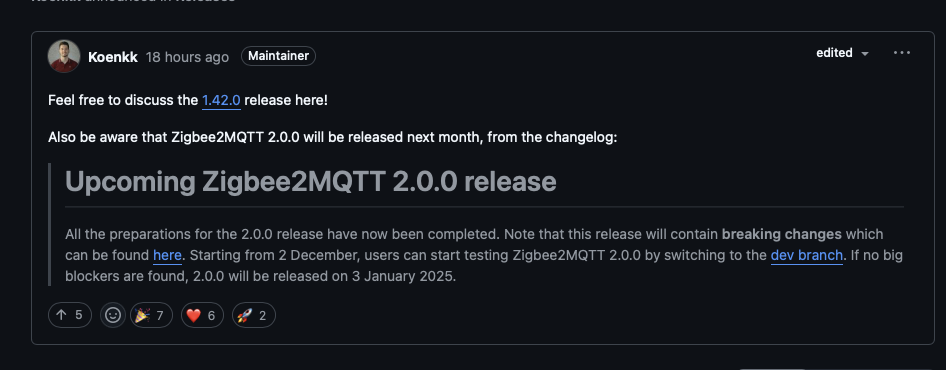
@Gruijter I noticed Z2M 2.0.0 will be released tomorrow and that it contains breaking changes, did you already do a check if the changes affect us?
See this link for more information: Zigbee2MQTT 2.0.0 breaking changes · Koenkk/zigbee2mqtt · Discussion #24198 · GitHub
It might break some stuff. We’ll find out soon enough 
1 Like
