Are you planning to support device and group scenes?
1 Like
No. Scenes should be done by Homey if you need that.
But z2m scenes are much more performant, Homey’s performance when controlling multiple devices is terrible.
1 Like
I’m open to PR’s 
3 Likes
Anyone facing unavailable Zigbee2MQTT devices after Homey restart and only way to fix it is to restart Zigbee2MQTT ? What is strange, I keep getting stats for bridge, like number of messages, device paired etc. but all devices have red exclamation mark until Zigbee2MQTT restart. 
v2.4.6 is ready for testing: Zigbee2MQTT | Homey
- Added support for Mode and Sensor setting of MOES BHT series thermostat.
@OH2TH any feedback on the MOES support?
System mode works, sensor selection doesn’t show up.
Re: support for scenes
Reading the source through, but can’t figure out how add a custom action card to the group device.
One card for devices/groups “Set scene to [autocomplete]”, where autocomplete would be the indexed list of available scenes on the device/group.
v2.4.7 is ready for testing: Zigbee2MQTT | Homey
- Extended light effect options.
- Added flow card for setting light effect.
- Fixed MOES thermostat. (Thx @OH2TH )
- Added Sensor setting for thermostats and presence detectors.
3 Likes
Everything works great in the new release
Thanks
1 Like
I;ve added a presence sensor ( FP1E ), and if i add it to homey i see the following which is great.

I see the distance on the device-page, but i can’t work with the distance except in logic-cards.
It would be great if you could add for presence/distance support for it on the if/else-cards.
For presence it would be nice to have the “is on” on the else-card

Exactly! Logic cards can already do what you need.
Except that i can’t trigger when i get near the sensor for example ( while already beiing detected ).
Because there’s only the card: when motion is detected… but because i’m already detected it’s not possible.
And furthermore, in simple-flows i can’t use the else-statement anymore because i would have need to add the logic-card with distance.
I think you’re asking for a card “When the distance has changed”?
It might be possible to implement, but my guess is that this will trigger too often and will activate the flow rate limiter (which disables flows if they get called too many times).
2 Likes
yeah, sort of
Ah, didn’t know that.
I get/see why it isn’t there
1 Like
Hi @Gruijter , seems there is something wrong with triggers - I setup simple conditions to be fired when socket is ON or OFF and I got mutliple fires.


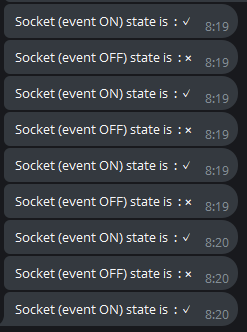
(I pressed ON / OFF / ON button)
When I initiated ON/OFF from Zigbee2MQTT, it gets triggered just once as it should.
Diag : e8a15697-4f15-4777-ac49-92d3b35e6f78
Not sure it’s problem on my side ?
Hey guys,
I am new to the mqtt thing and tried to get it up and running with Homey Pro 2023, Zigbee2MQTT and MQTT Broker apps.
At this point I am stuck adding the bridge. I set up the broker, added a cert and a user.
I can see in the logfiles, that my created user gets authenticated, does things like subscribing and logs off. In the screen to add the bridge I always get the message: “Error: MQTT settings OK, but no Zigbee2MQTT bridge info found.”
I dont know which values to enter in the last field to add the bridge. Leaving it blank results in the error message above.
I searched for it but didnt find a proper solution. All software is running on the Homey Pro 2023.
Thanks for any advice.
Jan
Have you configured zigbee2mqtt properly so it uses the MQTT broker on your Homey? What do the z2m logfiles say?
I installed MQTT Broker, set up TLS, Ports, Cert and User.
Then I installed Zigbee2MQTT, filled in the ipv4 (127.0.0.1, localhost etc results in the same error), user, pw, and left the last field blank during bridge device add wizard.
In the Broker Log, I can see the user I entered in Zigbee2mqtt logging in, subscribing etc.
So, the connection itself seems to be fine.
Did I miss something?
