Hi Johan,
Thanks for everything and good luck with all the rest off the work and I’ll be back again as soon as my Homey is repaired or replaced.
Best regards,
Peter van Werkhoven
Verzonden van mijn Xiaomi MI10 Lite 5G
Hi Johan,
Thanks for everything and good luck with all the rest off the work and I’ll be back again as soon as my Homey is repaired or replaced.
Best regards,
Peter van Werkhoven
Verzonden van mijn Xiaomi MI10 Lite 5G
Hi @johan_bendz, 4 Gang Wall Switch device already added, but only one switch is working.
Diagnostics Report Code:
d15beaee-5c6c-42a5-bb9d-a19ea63fb8dd
 Ummm, what I’d like to say about this: Johan is only one guy with two (I assume) hands
 , a day job and a family, and maybe even some friends as well
So I’d like to suggest to keep putting in the little efforts yourself, instead of playing the “a bit annoyed customer” 
Nothing personal, just a view on reality.
No worries, I think you got that wrong Peter  I believe Marcel is more than happy with the work I do as we also have a chat at Github about this… he just pointed out that he had a hard time keeping up with all the updates

@johan_bendz ia this sensor working
Can’t find a type nummer Ik heb net dit geweldige item op AliExpress gevonden. Bekijk het nu! €37,29 | Tuya Zigbee/WiFi temperatuur-vochtigheidssensor met achtergrondverlichting Hoge nauwkeurigheid Slimme thermometer Hygrometer via Alexa Google Home
https://a.aliexpress.com/_EzHpFid
Hi Mark it is working with my Home pro 2019 Johan did add it a little while ago, but the price you showing is far to high, look here Ik heb net dit geweldige item op AliExpress gevonden. Bekijk het nu!
€26,31 | Tuya ZigBee Smart Home Temperatuur Vochtigheidssensor met BackLight LCD Werkt met Google Assistant en Need Tuya Zigbee Hub
https://a.aliexpress.com/_EHT3NRJ
Inventualy I payed only € 7,59 if you shop around a little on AliExpress.
Good luck and regards,
Peter.
MvG,
Peter van Werkhoven
Verzonden van mijn Xiaomi MI10 Lite 5G
Thank you @Peter_van_Werkhoven
Is it possible on To hang him? Does it work well?
Every how many seconds / minutes does he know the status?
Hi Mark,
Yes you can hang it on the wall, there is a mounting hole for a screw at the back.
And I think you can change the interval within the settings page advanced settings.
But I’m not for sure on the interval settings because my Homey died yesterday  so I can’t check it now.
And it was working very well here.
Regards,
Peter.
can you tell me if this is all you need, or I have to provide anything else @johan_bendz ?
Thank you
Hi @Rocky_Lonigro, I have all I need as I collected the interview data from an other platform.
Next time you can do an interview here: Homey Developer Tools
Click the dots to the right of your device and then Interview, when the interview is done click “copy” and past that info inte the Github issue.
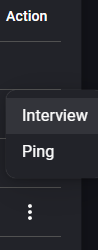
If you check my post with screenshots further up that’s exactly what I tried, but I did not get anything out of it.
it “interviewed” and suddenly the interview status was gone and I got no outcome or “copy” button or so?
also do I get an info on the github thingy when “my” device got added?
@Rocky_Lonigro Yeah, it can be a bit tricky. Some times it helps “keeping the device active” by pushing the reset/pair button every other second until the interview is done.
You will get a notice when I close the issue.
@johan_bendz can you elaborate a bit what you have to do to add such a device? maybe I can just help even more with the ones I get… I don’t think it’s going to be the last one…
What I have to do to add support for a device differs between devices.
Some devices are already supported, but I need to add the specific manufacturer ID, as all white labels have unique IDs.
For others, I have to write a new driver because the functionality of the device differs from any other device/driver that is already supported.
The work to add a new device/driver can range from simply copy/pasting and editing another driver to a complex process that feels like rocket science. Tuya is not great at providing the necessary info, and I often end up spending more time than I have searching for data, building drivers, and testing code—often without having the device myself. This means I have to rely on someone else testing the code, reporting what’s not working, fixing it, and repeating that process until it works.
The best way to help me is to follow the process for requests stated in the top post and fill out the request form on GitHub as thoroughly as possible. If I get stuck on a device, it also helps if you can provide info on where I can buy it or even send me one to use when developing, testing, and supporting it.
You can also help by testing the code yourself using the CLI. This can be especially useful for testing if simply adding a manufacturer ID to an existing driver is enough to get the device working, which can save me a lot of time. While setting up the CLI is more challenging for Homey Pro 2023 users due to the need for Docker, your feedback from direct testing would be incredibly valuable and significantly speed up the process of adding support for new devices.
Hi.
I’m new to homey pro (not new to smart home) I’m going to be migrating away from home assistant into homey. I don’t have time anymore for home assistant since the birth of my daughter. Order my homey pro and will get it to work with it next week, in the meanwhile I’m already reading up on what I need for apps.
I currently have a lot of zigbee tuya sensors in my home and to my happiness I found out that there is a zigbee tuya app available however the app store page tells me it is last updated 4 years ago, while this thread and the GitHub page shows a lot of activity. So my question is do need to manually keep the app up to date or is the homey page at fault?
See the first post of this thread, and find the link to the test version of the app. That’s the one that’s currently being worked on.
uh ok, I currently lack the time to do a whole docker setup (newborn here), and I guess for my device that’s needed as I don’t see any other comparable thing in the list with 6 buttons?
how does such a drive look like? can you show me an example of a 4 button device or something?
If I can help in anyway even if it’s bouncing Ideas, when I see code I should be able to understand even if I’m not developing myself a lot no more…
let me know the status, if having one of these helps I can order you one I got it on aliexpress for cheap
the other one I ordered came with no battery tho so I couldnt connect yet because the battery takes 2 months to arrive lol…
No worries @Rocky_Lonigro, I’ll push some updates the Test version way for you to try out instead.
Congrats on the little one! 
Hi and welcome!
In the app store, there’s a link to view the changelog for all apps. If there’s an orange TEST box at the top of the pop-up, it means there’s a test version of the app available.
By clicking the orange box, you will be redirected to the test version of the app, where you’ll have the option to install it.


