First i rechecked en relinked the project in Tuya cloud to my smart-life app. suspecting maybe the link was off or broken. Didn’t fix anything.
The thing that got me rechecking the config though was wat you and I saw as a difference - the useraccount. Somehow something with the useraccount affected what I was getting. And it HAD to be something unrelated to the api link/secret.
So - I checked the tuya cloud app config and sure enough - apparently the API key /secret was correctly filled - but my username was not (password was filled and valid though).
Refilled my username and now the messages come rolling in.
So when someone has this specific behaviour:
Using the Tuya Cloud app, you can link and control your devices
But you do not see the RAW messages appear with peters flow. recheck if you actually have the correct user/password data. This is separate from the API key/secret - because that part is obviously working.
I just read your article on that Peter. To my understanding that’s to control devices but how can I make these flows if they don’t show up in the first place? Can you explain why one floor heating is appearing and the other two not? It must have something to do with using Tuya Cloud because I had the same problem on Homebridge when using Tuya Cloud plugin instead of Tuya Web. I’ve read post #1 several times and it still not clear to me how I can make all the devices show up in Homey. Or perhaps it’s just not possible for some?
Sorry, the app is not actively maintained.
So it’s sort of impossible, without help of an external developer, to find out why only one thermostat can be added.
I just pointed you to the workaround, you don’t need to add the other thermostats to the app:
with RAW commands, you can receive any Tuya device update, and you can send commands to any Tuya device.
In the several posts above yours, you’ll see Vincent grabbing the thermostat values.
Thermostats should have wk as category, if not they currently dont work with the tuya cloud app. It is possible that your missing thermostats have a different category. You can check this through the tuya developer website, device info page.
I’ve looked through everything that had been posted about getting raw commands, and I have checked my username AND password for my Tuya Smart app as well as in the Tuya Cloud App config. I am still not getting any RAW messages with the flow created by @Peter_Kawa.
That icon for your inbound message seems off to me. You are using a tag to identify Tuya Cloud messages. You should use the Tuya cloud app itself for checking inbound messages.
I checked and double checked. User and password are the same in iot cloud, smartlife app and tuya cloud app on homey. Debug logs are enabled in iot cloud and visible in the device log page. Still no messages
I did check the device logs within Tuya Cloud and the devices are there and functioning.
None of my Tuya devices are able to be integrated directly into Homey, but I have been able to control all my Tuya devices using Tap to Run scenes from the Tuya Cloud.
So - I guess the api link is working then - otherwise it would not allow you to control the the scenes.
Then it’s back to the user again. The Tuya Cloud app actually seems to allow saving with an invalid config - although it will generate a one time error in the top such as skill id invalid. Maybe the user/password config shown seems valid - but it could be wise to check again ? (re-enter- and save ? - check if the credentials pass without notification in saving the config ?). Just saying - it happened to me - it could happen to you ;-0
I don’t exactly know what to tell you. So I would suggest two things now:
try to unlink - and link your smartlife account to your developer project. This does not break any existing links to added devices as far as I know and experienced myself. Linking is easy:
This re-establishes the link between your account (as entered in the config of the tuya cloud homey app) - and the cloud project.
if that doesn’t do anything for you - then I’d look into more help debugging at even a more basic level - finding out which raw communication is coming in on the homey - before flow processes it. This is debug info at the system level of which I personally have no knowledge. Maybe a portmirror on your switch could also provide some info - but it could be very hard to find out if messages you receive actually relate to either the API or to raw eventdata.
If you look at other threads - even from other home- automation solutions - it will tell you almost always the same - it’s a problem related to the user-config. Checking out if all needed tuya cloudsubscriptions are still active is sometimes also suggested. Maybe log a call with Tuya if none of this works.
It is - indeed strange. You start grasping and guessing to get it to work then…
You could maybe try (but this is in no way sound or very well motivated advice) to remove your username info and just let the API data as it is. save config - restart app - then re-enter -save and restart ?
It would help to know how exactly the username info is used to filter incoming messages by the tuya cloud homey app - in addition to the process it uses to just link the devices.
As it is - a non-working user/pass combination does not prevent the devices from being added, controlled and reporting their status. However - RAW data is also received for devices that are already linked by the api key alone. So these processes seem to indeed follow distinct paths - or at least it seems that way.
If someone is more familiar with the internals of these two processes - it could maybe help understand the mechanics of the raw data flow in more depth- and help identify specific points to probe.
I have triple check and I am using only official API any other configs that you think I could possibly have messed up? Sorry for being such a baby, but I have tried many times and I’m almost at my wits end hahaha
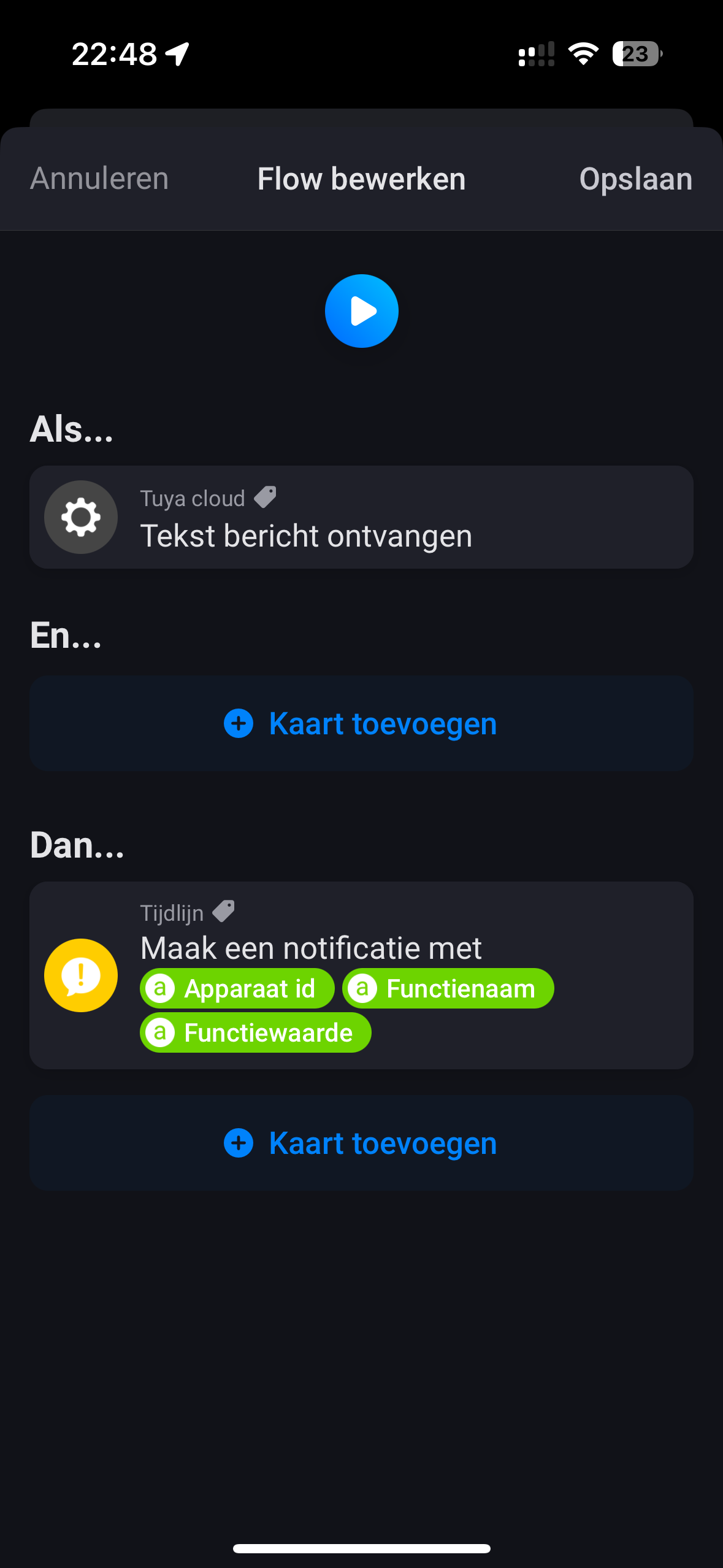


 any other ideas what could be the issue?

