Same here! You’re not alone… 
Also official only….
Strangest thing, the ones that aren’t recognised have wk…. And the one that’s recognised has qn
does this app work?
its possible that the ‘wk’ thermostats use the legacy api. I dont have any of those to test myself and dig through the code to actually see if thats the case but you can try.
‘qn’ is a heater device so if all 3 of your devices are identical thats odd.
it works fine for nearly all common devices just a few less common dont have the actual code to fully work
If I choose official and legacy they don’t show up either but thanks for suggesting.
Does the thermostat and smoke detector work or not?
Try it out i dont have any of those. Both smoke and thermostat are in the code. Tuya devices are more or less a mess so might be hit and miss.
@Marcus_Bitterling , @Howchuen_Lee:
- Is the account you’re using for the cloud project also the home-owner in tuya / smart life ?
- Is your Cloud project set-up before may 2021 ? (this might have impact)
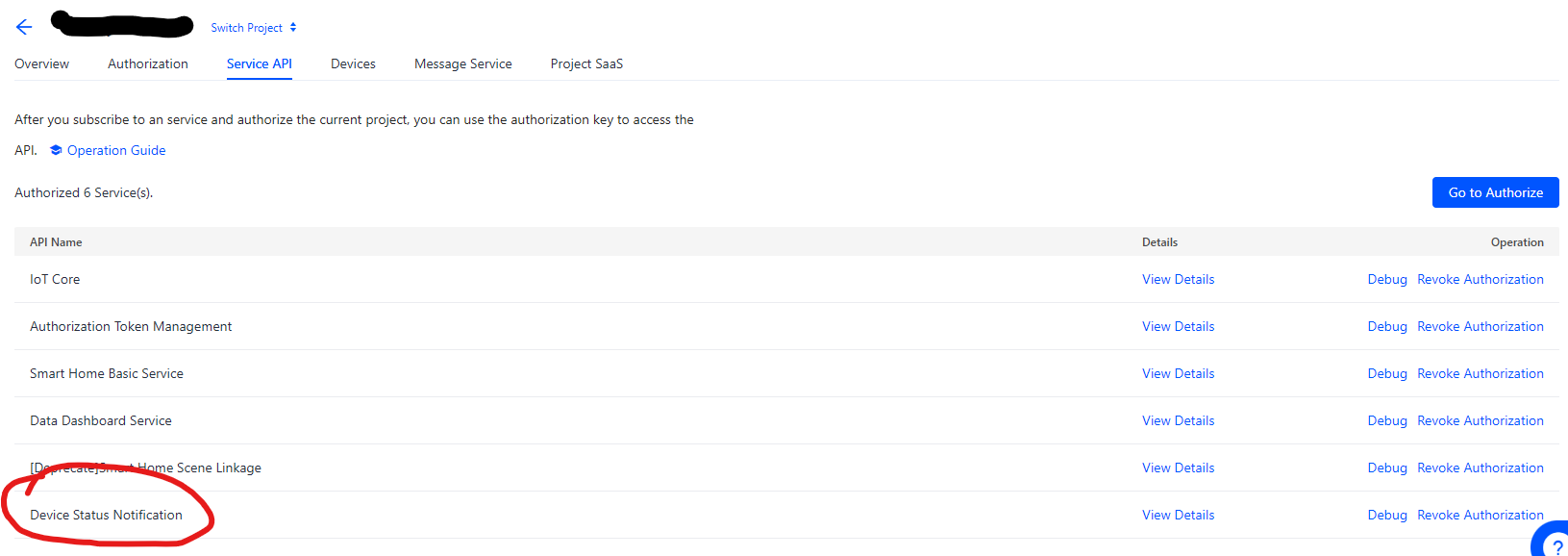
- Does your Cloud project correctly reflect the Device Status Notification API authorization ?
- Do you see correct API’s in Cloud - Usage ?

- Is your project created in the correct datacenter for your region ? and the countrycode set correctly in the configuration of the homey tuya app ? (cross-region API calls are always zapped by Tuya as I understand it)
Just trying to help - so probably you checked 10/10 - but couldn’t hurt to ask.
Hi Vincent,
Thanks for the suggestions any help is appreciated.
To answer your questions
- Yes the account I’m using is the Home-owner account in the Tuya App
- My Cloud Project was created only a couple of months ago
- Yes I see the Device Status Notification API authorised in my API page
- I do have the same API Usage as the ones you have shown in your screenshot, but I’ve uploaded a screenshot of mine for you to take a look as the message subscription usage is 0. Not sure if this is an issue.
- My project is created in the correct datacenter. Just to be sure I am in Singapore and the datacenter I’m using is central Europe.

Just wanting to be clear but this has nothing to do with the service that sends sms to my mobile phone right? because that is a paid service and currently i’m not subscribed to it.
Thank you very much for your help
Strange things tuya/wifi are happening in homey pro 2019
I have several flows that have works flawless in several months but latelely more or less is has been miss and hits…
The strangs is when a flows should start or I just try to trigger a socket its miss ( I have 14 sockets wifi thats tuya related ) Too fix the problem I just go to the tuya smart app and trigger a random socket either on and off, and then go back to homey and trigger a socket or flow then all flows or trigging work again.
Whats happening?
Singapore maps to central europe indeed.
One thing I noticed in your screenshot is that your projectname includes spaces. Could this maybe impact the inner workings of the messageflow for raw data ? probably not though- but straws are called straws for a reason. I’m also lost now on options to investigate and remediate. Seriously though- maybe- just maybe it’s worth trying out if creating a new cloud project maybe has some impact. it doesn’t exactly work now- so no big worry about breaking stuff- right ?
Hey maybe someone can help me.
I got an 3-way-switch for my ceiling light. In the Homey App I can control all 3 switches, but when I try to create an flow with my switch I can’t select an button id.
I only receive:
Cannot read properties of undefined (reading '_onButtonIdAutoComplete')
Is there a way to fix this issue ? I’m new to Homey, got my Homey Pro today.
Afaik the tuya/smartlife app can connect to devices locally over wifi bypassing the cloud. This tuya cloud app will always go through the tuya cloud. Only have a handfull of appliances tuya enabled wifi only and they have been hit and miss too last 2 weeks. Done a little troubleshooting and in pretty much all cases its tuya cloud replying with garbage.
I worked arround this with advanced flows to set a variable to what it should do and a loop to check device state. If ok do nothing if device state is different then expected attempt to set state properly. But this wont fly for sensors where you want to get reliable notifications from the tuya cloud on sensor state changes.
Thanks for answer👍
Can you publish your advanced flow so I can look at it, I am not an expert in advanced flows, but I have subscriped for that monthly. I have only Sockets that should start in the morning 07.00 on and off kl 10.00 and a other flows for sunrise (on) and ( off)01:30 nighttime


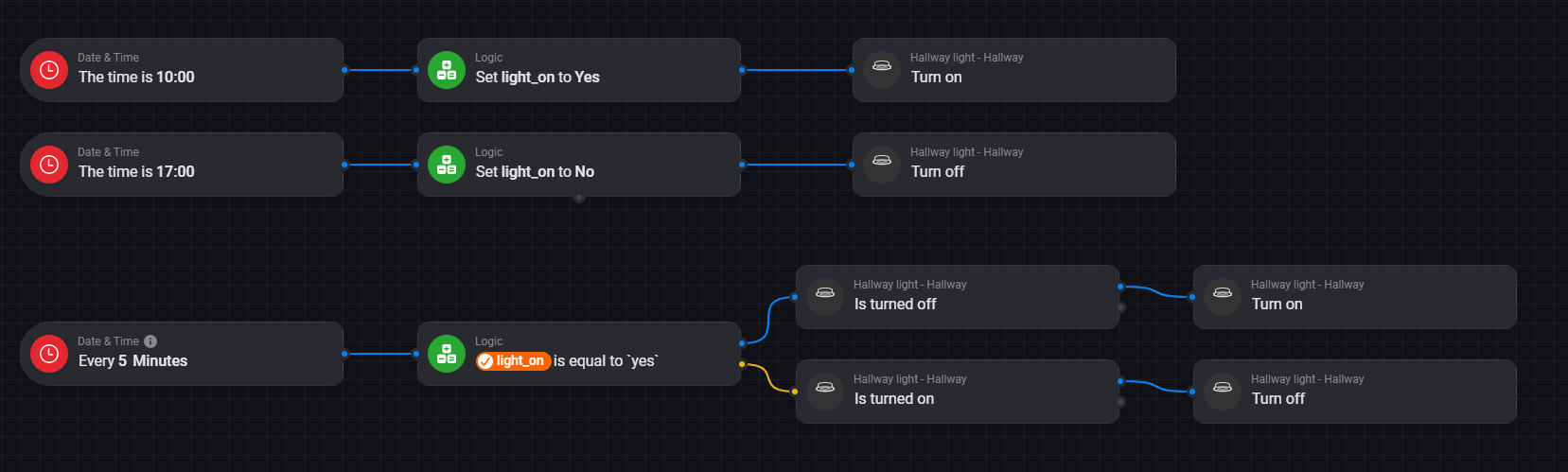
Thanks for tip👍 I shall try out this.
But before that maybe I have bigger issue with the Homey Pro hardware or maybe not.
I have used to restart tuya cloud every 3 hour( not working) and homey pro 2019 every night ( works) because maybe I have wifi issue with the hardware, I can,t explain it in words so I send you some pictures that resolve the problem for a while
Tuya cloud not working:

restart:

After restart all just fine:

After this it,s working for a while…. Weard because my melcloud app in homey ( Mitsubishi heater) thats a wifi connected service works just fine.
So I,m confused it,s a hardware problem or its a tuya cloud problem?
I have seperated wifi network thats is 2,4 mhz and 5 mhz , so I think its not the network/router issue
The missing messages coming from tuya cloud might be caused by expired trail or some other wonkey tuya cloud issue.
I’ve had strange messages about missing this and that, turned out my 6 months lapsed in the mean time. But even with the expired trail homey was somehow able to get through on start up.
Okay, thanks👍
I have also meet the expired half year try out, and I have get on more half year once again, but I have tried this since 2021 I,m tired of this, Its have been good days and bad days, but it,s should not been so.
So I just thinking just cutting out tuya products in the homey/tuya cloud, and use just tuya smart app for this wifisockets, and never bought similar wifi products again, since z-wave and zigbee have never let me down.
I have use too much time to get this work in the homey world, I,m think I giving up until someone or ATHOM HOMEY itself get a serious deal with the tuya company so it will be a solution like local control in homey or something else solution thats is steady and trusted, I,m thinking I,m not alone here….
Sorry to hassle with you and every people that tried to give tuya support to me👍
My little excuse I,m have being helping other people in the Homey community… Mill, Melcloud, general flows thing etc…
