In this case the received notification card throws an error as it makes the flow non testable. Will Tinker a little bit more with it once I’m home
With the flow that I created, I would expect that the flow starts as soon as I use the Tuya app on my phone to control one of my Tuya devices, right? Or if one of my Tuya devices is controlled by Homey.
Well, that doesn’t happen. I don’t have any scenes setup in the Tuya app. Is that the only way a text message is sent to the Tuya devices?
Correct. That is how it should work when everything is configured 100% OK.
No, it is just to verify your Tuya Cloud uses the official API, and thus works OK.
Just create a simple tap-to-run, like turn on light X, restart Tuya Cloud app, or hit the Refresh Scenes button.
Now see if you can select and run it by the “Execute a scene” flow card.
If that works, I expect the “text message flow” to work as well.
Are you sure that flow is (still) enabled? Might sound stupid, but it happened to me a few times 

Also, Homey tends to disable flows which get triggered to many times in a certain timeframe. Without any notification, but not sure if that’s still the case.
Ah, like that. The flow is still enabled, but I don’t have any scenes. Ok, just created a scene, added a flow in Homey to start the scene.
Everything works and the light is switched on. But I get no push notification at all.
OK, so it seems to work.
Hmmmm… I don’t know why you still don’t get any message. What happens when you add other flow cards to send the results? (Like the timeline notification, or Simple Log?)
Replaced the push notification card with a timeline card. Restarted the Tuya Cloud app, Switched some of my Tuya WiFi devices. Hit my tap to run test scene. Everything is working. However…nothing on the time line.
This is not a huge issue as I have more than enough other things to do (on my home automation)  But as I am following this topic, I was curious as to how this works…and it doesn’t in my case
I am definitely doing something wrong. I just don’t know what…
Hye, so i also tried what u asked from rudi, so i wanted to check if my conection is working.
Whit legacy scene i get my tap to runs but whit normal scene not.
Could that be my issue why i dont get an message?
Yes, you need to check all steps in post # 1 again.
But first, open app configuration, change API to “official only”:

Yours is still set to “use both”
Make sure to use the right telephone country code & format. Check for hidden white spaces.
Also check if the mobile app selector is set to the mobile app you use:

Ok, double checked. It is set to " Use official only", “31” and " Tuya". Has been like that for months/years
Added the garagedoor opener device but it shows reversed state in homey vs Toya app and reality. Anyone else with same issue?
I replied to @Yankee_Delta Rudi, but checking can’t hurt
I know Thought I’d just clarify we seem to have different issues.
I cannot stress enough that to me this is a nice to have. So far things are working. And controlling the battle ball lights is ok for now.
so i found out it was this.
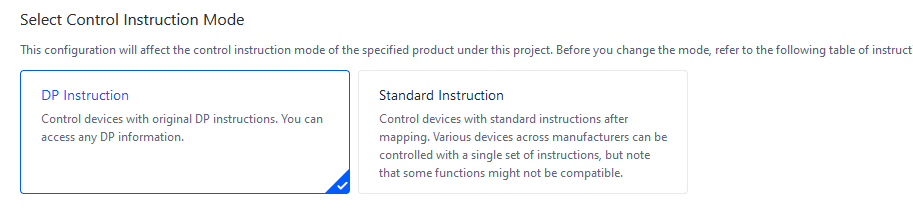
it was on standard but it needed to bee dp
@Rudi_Hendrix mabby somthing to check out?
it seems to work, only the text messages comme so quick after each other so my flow cant see them and only sees the last value. anny tricks?
Hi everyone,
I was using tuya cloud app on my hoemy pro, everything was working good, flow, devices etc…
But since one week about, it doesn’t work anymore. Any tuya device from homey doesnt work anymore.
When I try to switch on/off a device from homey it is prompted “Missing Capability Listener: onoff”
I logged on my account tuya cloud, everything seems ok, and device work from my smarthphone with tuya app.
If somebody can help me and got any idea.
Thank you very mutch!
Where can I find this setting?
Odd, I’ve never seen this, and also don’t know where to find that
Ill check when I’m back at my home pc.
Meanwhile @Peter_Kawa any idea on the message coming to fast problem?
so go to:
cloud
your project
devices
all devices
select the device you want to configuere whit the pencil (screenshot1)

change to DP
Thanks. I’ve never had to change it, so not sure what’s going on with your setup.
Try using Simple Log app log cards, it’s way quicker than timeline or push messages, and it can’t get rate limited (it writes logs to Homey’s local storage).
But, you actually don’t really need such a discovery flow, you can just open your iot project, and check for a device which ID it has, and which commands it sends.
Then you can build a flow like:
When…
-tuya text message received
And…
-device ID: [the ID number]
-function name: switch (just as example)
-function value: main (just as example)
Then…
-do something
