[APP][Pro] sysInternals - Shows Homey’s System Internals

@Peter_Kawa My next suggestion would be to know some more details about the last cloud backup.

I don’t have the automatic cloud backup enabled beacuse its only 7 times after it delets the oldest and i would rather have 1 backup from 3 month ago, 1 month ago , 1 week ago, last weekend(sunday evening (22;00) ago, last wednesday ago, last friday ago and before last firmware update.

So a flow that schedules this updates and starts the cloud backup as if I would start it manually through the Homey app or at least enable and disable the automatic cloud backup function to ensure not so much unnecessary cloud backups.

@Dijker And the best together with an entry on the widget with the condition of when the last backup was made, and how long ago it was made (in hours /days/weeks/months) and if there is a firmware update available or not.

A(n advanced) flow (in combination with homey script) should be possible or not ?

Together with a button to enable/disable manually/ by user the next/upcoming automatic cloud backup for for a dashboard widget. (the last backup(how long ago) should also be shown on a device widget (maybe in green if its within the last 3 days, yellow with the last 7 days, orange is its 8-14 days and red if its more than 14 days ago.)

1 Like

Tried To import the file with that name an the content below but it only worked when the file was created in plain tekst (with notepad) an had this exact (filename) :

“Poll for firmware updates.homeyadvflow” (No .json ending or “aflowname”)

This is my variant of your flow (bt you need the Homey apps “flowbits” & "Simple (Sys) log” and create a system boolean variable called “FirmwareUpdateAvailableLastPollResult”.

{"type":"advanced","name":"Poll for firmware updates - DrJaKe","cards":{"2e0bbb1d-37ae-4651-978d-15880cdb2f50":{"ownerUri":"homey:manager:cron","id":"homey:manager:cron:time_exactly","args":{"time":"17:17"},"type":"trigger","x":0,"y":40,"outputSuccess":["135336b7-12ad-4b2d-8146-d6535156044a"]},"0f05bbb8-f231-47ff-bb5c-e10c0d97b0b6":{"ownerUri":"homey:app:com.athom.homeyscript","id":"homey:app:com.athom.homeyscript:runCodeReturnsString_v2","args":{"code":"// Poll Homey for new firmware updates\n// by @peter_kawa\n// Filtered out of the great \"System Overview\" script by @Caseda\n\nlet homeyVersion;\nawait Homey.system.getInfo()\n  .then(result => {\n    tag('Current Homey firmware version', '\"' + result.homeyVersion + '\"');\n  })\n  .catch(() => tag('Current Homey firmware version', 'Error fetching current firmware version'));\n\nawait Homey.updates.getUpdates()\n  .then(result => {\n    if(result.length > 0) {\n      tag('Update available:', result[0].version);\n    } else {\n       tag('Update available', 'No');\n    }\n  })\n  .catch(() => tag('Update available', 'Failed to get update info'));\n\n  let undefined = 'true';\n  return undefined;"},"type":"action","x":860,"y":300,"outputSuccess":["3151ed23-b68f-4b88-8ec7-4f99fc419f30"]},"684655ba-f20c-4e6c-a3ef-3c96a7c948ea":{"ownerUri":"homey:manager:notifications","id":"homey:manager:notifications:create_notification","args":{"text":" Available firmware update:  [[homey:app:com.athom.homeyscript|Update available]]. \nCurrent version: [[homey:app:com.athom.homeyscript|Current Homey firmware version]]"},"type":"action","x":1860,"y":160},"9952ccde-9a09-411d-bf86-a835276a1628":{"ownerUri":"homey:manager:mobile","id":"homey:manager:mobile:push_text_critical","args":{"user":{"id":"__all__","name":"Iedereen"},"text":" Available firmware update: [[homey:app:com.athom.homeyscript|Update available]] \n(Current version: [[homey:app:com.athom.homeyscript|Current Homey firmware version]]) "},"type":"action","x":1860,"y":800},"82b8cb1d-4c87-4f17-bf05-da71ab9c244a":{"type":"note","value":"Optional / for testing","color":"blue","x":1880,"y":520,"width":null,"height":null},"3151ed23-b68f-4b88-8ec7-4f99fc419f30":{"ownerUri":"homey:manager:logic","id":"homey:manager:logic:equal","type":"condition","x":1080,"y":440,"outputTrue":["2ddc8bb3-dfa6-41f4-94a4-d3c3e650e4fb"],"outputFalse":["b924253d-6f28-4563-9382-d245380b202c"],"droptoken":"homey:app:com.athom.homeyscript|Update available","args":{"comparator":"No\n"},"inverted":false},"a894e48d-e0b6-4fb5-971f-0d7f989e6405":{"ownerUri":"homey:app:nl.nielsdeklerk.log","id":"homey:app:nl.nielsdeklerk.log:Input_group_logtimeline","args":{"log":" Available firmware update:  [[homey:app:com.athom.homeyscript|Update available]]. \nCurrent version: [[homey:app:com.athom.homeyscript|Current Homey firmware version]]","group":"Firmware Update","severity":"5","facility":"3"},"type":"action","x":1860,"y":300},"34e35c10-51bf-48ed-82da-58ec82545e9c":{"ownerUri":"homey:manager:logic","id":"homey:manager:logic:variable_set_boolean","args":{"variable":{"id":"40a3f967-6cc2-4f7d-8fa2-bdc89bfd2e02","name":"FirmwareUpdateAvailableLastPollResult"},"value":false},"type":"action","x":1860,"y":40},"9216d3ff-de18-4777-8b92-9708fd554d40":{"ownerUri":"homey:manager:logic","id":"homey:manager:logic:variable_set_boolean","args":{"variable":{"id":"40a3f967-6cc2-4f7d-8fa2-bdc89bfd2e02","name":"FirmwareUpdateAvailableLastPollResult"},"value":true},"type":"action","x":1860,"y":680},"1613986d-6157-4189-a3ed-721aff746b35":{"ownerUri":"homey:app:nl.nielsdeklerk.log","id":"homey:app:nl.nielsdeklerk.log:Input_group_logtimeline","args":{"log":" Available firmware update:  [[homey:app:com.athom.homeyscript|Update available]]. \nCurrent version: [[homey:app:com.athom.homeyscript|Current Homey firmware version]]","group":"Firmware Update","severity":"5","facility":"3"},"type":"action","x":1860,"y":980},"be90b8e1-d8a6-446b-ac05-ba05513e07c0":{"ownerUri":"homey:manager:logic","id":"homey:manager:logic:equal_boolean","droptoken":"homey:manager:logic|40a3f967-6cc2-4f7d-8fa2-bdc89bfd2e02","type":"condition","x":400,"y":420,"inverted":true,"outputTrue":["0f05bbb8-f231-47ff-bb5c-e10c0d97b0b6"],"outputFalse":["b924253d-6f28-4563-9382-d245380b202c"]},"b924253d-6f28-4563-9382-d245380b202c":{"type":"any","x":1480,"y":700,"outputSuccess":["9216d3ff-de18-4777-8b92-9708fd554d40","9952ccde-9a09-411d-bf86-a835276a1628","1613986d-6157-4189-a3ed-721aff746b35"]},"2ddc8bb3-dfa6-41f4-94a4-d3c3e650e4fb":{"type":"any","x":1460,"y":320,"outputSuccess":["34e35c10-51bf-48ed-82da-58ec82545e9c","684655ba-f20c-4e6c-a3ef-3c96a7c948ea","a894e48d-e0b6-4fb5-971f-0d7f989e6405"]},"5a45689e-535d-440d-a417-1f49a9604c58":{"ownerUri":"homey:manager:cron","id":"homey:manager:cron:every_nth","args":{"n":11,"type":"hour"},"type":"trigger","x":0,"y":800,"outputSuccess":["135336b7-12ad-4b2d-8146-d6535156044a"]},"01716ed0-c7c5-4b0b-8900-bbce7a796b94":{"ownerUri":"homey:app:com.basmilius.flowbits","id":"homey:app:com.basmilius.flowbits:no_repeat_window","args":{"window":{"name":"HomeyFirmwareUpdateAvailablePoll","description":"Nieuwe geen-herhalingvenster in deze flow"},"duration":131,"unit":"minutes"},"type":"condition","x":460,"y":300,"outputTrue":["be90b8e1-d8a6-446b-ac05-ba05513e07c0"]},"135336b7-12ad-4b2d-8146-d6535156044a":{"type":"any","x":240,"y":320,"outputSuccess":["01716ed0-c7c5-4b0b-8900-bbce7a796b94"]},"8dfea9b2-7fd0-4310-80ab-2038034203d7":{"ownerUri":"homey:app:com.sysInternals","id":"homey:app:com.sysInternals:systemRunning","type":"trigger","x":60,"y":960,"outputSuccess":["83cc1cfa-075a-4aeb-aa94-6e6e03b0ee25"]},"83cc1cfa-075a-4aeb-aa94-6e6e03b0ee25":{"type":"delay","args":{"delay":{"number":"131","multiplier":1}},"x":500,"y":980,"outputSuccess":["135336b7-12ad-4b2d-8146-d6535156044a"]}}}

I Also created an additional “Reminder flow” that is enabled or disabled by this flow depending if there is an Homey Pro firmware update available :

It would be really nice is I could enable the automatic firmware update or even start the firmware update just immediately by just answering a yes/no question in a mobile message (from the reminder) (either default no update). In a next step/another additional (advanced) flow.

You might also be able to use there endpoints (they return JSON)

Pro 2023/2026/mini:
https://ota-api.homeypro.net/api/v1/changelog
Homey Cloud:
https://ota-api.homeycloud.net/api/v1/changelog
Pro 2016-2019:
https://firmware.athom.com/api/update/changelog/

1 Like

Yes code always needs to be handled by code editors, not the infamous Word or such.

Ah, we learn every day, I didn’t know you’d have to save the flow export with it’s original name :saluting_face:

It was exported as Poll for firmware updates.homeyadvflow.json
When I remove the .json part prior to importing it, it is grayed out. I could import the flow on my 2 other Homey’s just fine with the .json part in the name.

“aflowname” was just a placeholder to use your own flowname. But apparently I have to pass the original flowname with flow exports. Thanks for the heads-up.


Unfortunately Homeyscript limits the owner’s options;
The firmware auto-update toggle and the backup enable toggle are read-only.
So, you can check them, but not set them.

You’ll have to request for less tight Hscript permissions at Athom’s.

However, apps can have more permissions, so returning to your original request:
if possible at all, and dev Geurt likes to extend the sysInternals app with Toggles for:
enabling Firmware auto-updates,
enabling auto-backups and
manual firmware updates,
we’ll be able to control it with flows.


Getting the timestamp is possible with this command:

const lAstbackup = await Homey.backup.getOptionLastSuccessfulBackup();
log('Last succesful Backup:', lAstbackup.value);

Compare the two timestamps to get the ‘how long ago’ info.


With the tip from @smarthomesven I added the last changelog to the flow;
For Pro 2023 and up:

For Pro 2019 and earlier:

1 Like

It might be possible to get the backups as well, this is the Backups API specification:
https://backup.athom.com/api/v1/specification.json
I don’t have a Backups subscription so I can’t help with this but you might be able to figure out the correct endpoints from the specification.

1 Like

I did not (yet) Install the latest firmware update, and am getting nothing for update available.

Am I reading the js correctly by having the idea the new version is displayed by “log”, but never assigned by “tag”, or is my js knowledge not adequate (I am a complete novice regarding js…)

The only update available is a boolean from my Fritzbox (and is set to no).

Nevermind: suddenly it popped up…

There’s no firmware update available if your pro runs the latest already, v12.12.0 (or v12.11.0 for 2016-2019 models).
I’ll keep an eye out when a new update gets announced, to see if it actually reports the update.

I was one behind on my HP23. Now I’m on the most recent version.

I see!

Can you play show me how to do this comparison within a(n advanced flow) ?

And how about making an advanced Homeyscript of scipt getting the timestamp of the last successful Homey cloud backup? And using this number and showing it in green if within 3 days. Yellow if within 7 days, Orange if within 10 days and red above 10 days.

My code experience is a longer time ago. 25 years with 68xx & x86 assembler machine cide, Turbo Pascal, (Visual) Basic, Delphi & C++ and first java from my computer science studies(‘95-00) at the university

I wouldn’t know what or which code I have to learn/master nowadays to get this job done today.

To many trees in the forest. :wink:

These checks / the state of these toggles (, although there are read only) are also interesting to get and display in a reminder/message (from a flow like with a message that the user could answer to

“There used to be a new firmware update either version number “….” Available. The Automatic update is currently “en/disabled” and your last backup is “…” days ago with the automatic cloud backup is currently “en/disabled”. Do you want a reminder or Enable Autobackup or Enable AutoUpdate ? Just answer to this message “Reminder” and the amount of days to remind you later. E. g. “Reminder 6” or “En/Disable AutoBackup” or “En/Disable AutoUpdate” to en/disable automatic cloud backup or en/disable automatic firmware updates. “

And maybe you got a better connection/relation to the dev of sysinternals to make him think about expanding the possibility/functionality of his app. :smiling_face_with_sunglasses::wink:

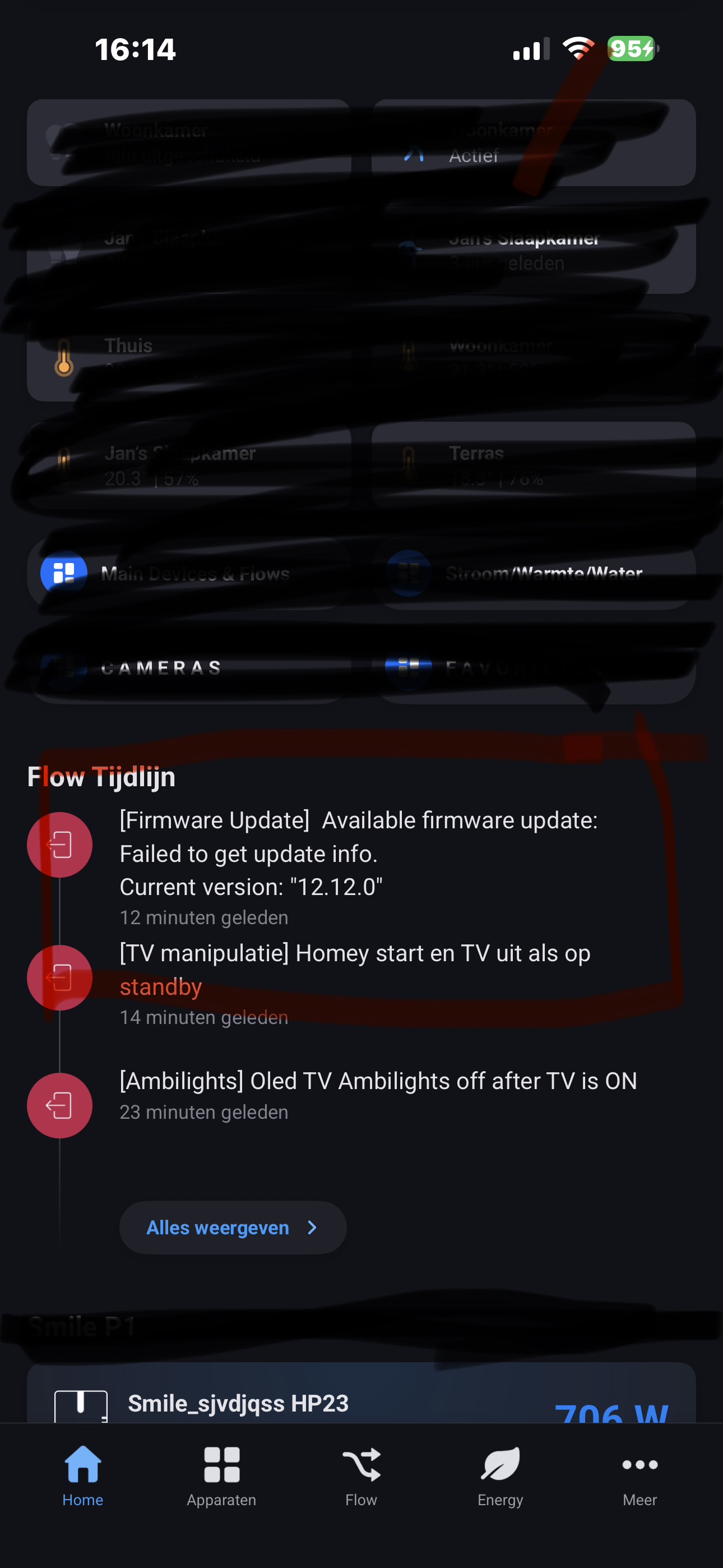
@Peter_Kawa For your information/heads-up. Somehow I just got a message/reminder that there is a Homey Pro 23 firmware update available just a couple of minutes after a restart of my Homey Pro 23 (after beeing shutdown through a Shelly smart power plug :electric_plug: for 17 minutes).

No update available:

Will investigate this if my own flows are faulty but just in case …

Hmmm , not quite. It said: Failed to get update info
That’s not like: here’s update version x!

I received the usual notification:

Yesterday was the test with actual firmware updates; v12.13.0-rc.x for the Pro 2016-2019 models and newer Pro models.

I noticed 2 little typos with big impact​:grimacing:

The first line of this code snippet

      log('Update available:', result[0].version);
    } else {
       tag('Update available', 'No');
    }

should be changed into:

tag('Update available', result[0].version);`

So, ‘log’ should be changed into ‘tag’, and the colon ‘:’ right after ‘available’, should be removed.

@Peter_Kawa : Thank you.

Could you maybe filter out any RC version out ?

And maybe post again the whole corrected code please so its easier to copy & paste.

:folded_hands:t2:

1 Like

Yes I corrected my original post as well, incl. the flow export.
When you disable “Experimental updates” in the developer site, it shouldn’t alert on RC’s.

1 Like

But I think you might forgot to change / correct the (solely/seperate) script here :

Picture just taken:

I also reloaded the page. Or is it still wrong in browser cache?? :person_shrugging:t2:

You’re absolutely right, the colon ’ ; ’ was removed, but somehow ‘log’ was not replaced by ‘tag’. :zany_face:

I updated the flow and export again, I found a way to remove the HTML tags from the changelog text:

Code
//Cut HTML tags
var htmllogNotagsA = (args[0]).replace(/<[^>]*>/g, '');
var htmllogNotagsB = htmllogNotagsA.replace(/\\r|{|}|[|]/g, '');
var htmllogNotagsC = htmllogNotagsB.replace(/\\n\\n/g, ' - ');
var htmllogNotags = htmllogNotagsC.replace(/\\n/g, '');

return String(htmllogNotags);

I’ve just imported your “Poll for firmware updates (Export)” flow and got some “errors” in the last few things : Notifications :

Can you please help out.

Thanks.