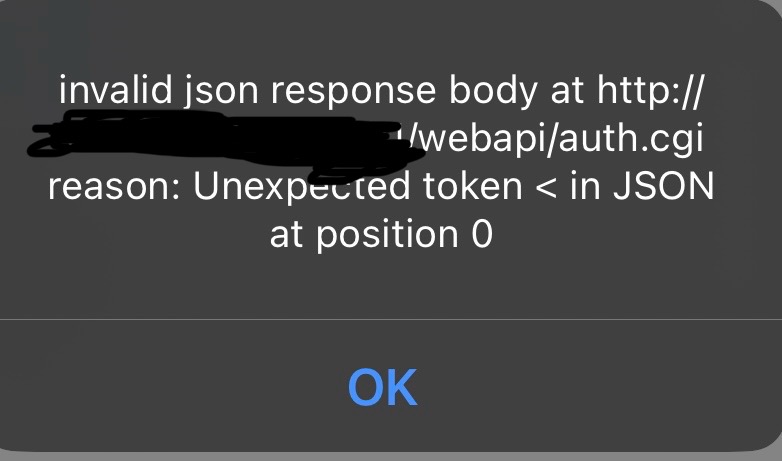
@Jerome_Lechatreux So no errors in your report. Which makes sense ofcourse.
What i do see is that you use a external domain for your DSM address.
would it be possible to use a local address? That might also help with the login failure
@Jerome_Lechatreux So no errors in your report. Which makes sense ofcourse.
What i do see is that you use a external domain for your DSM address.
would it be possible to use a local address? That might also help with the login failure
@martijnpoppen ok I’m connected now with a local address,
I hope it will solve this issue
I will monitor in the next days
thanks a lot 
@Jerome_Lechatreux let me know! and feel free to send another report when it doesn’t work
@martijnpoppen can you please take a look at my diagnostic report?
I can no longer log in at Surveillance Station. I use the ip address of synology to login, used gate 5001 and my admin account from Synology. Furthermore, I restarted the surveillance station app on homey amd restarted my homey. But I continue to receive the following notification:
My diagnostic report: 671e9361-ae1e-4c9e-908e-86aaa2aa29a4
Thank you in advance!
@AGies checked the report
You use the 5001 port but are not using https/secure
So either enable secure or use port 5000
@martijnpoppen Thank you it works now!
I can’t send any Snapshot any more, my flows are broken (tag = unavailable ).
And if I create a new flow there are no image tag to choose.
Any body else having this issue?
@Most already restarted the app?
Well, I’ve recently restarted Homey. But upon your request I restarted the app and then all cameras went offline. So I did a fresh start, deleted SS and all cameras and re-added them.
@Most please send a diagnostic report
7d9b4b10-af91-45ad-8081-939d376ff24b
@Most does the account that you use for SS2 have admin rights on your synology dsm?
No, not Admin. But Applications “SS” and R/W on Permissions/surveillance. This account has worked before.
I changed to an Admin account and I had to delete and add the camera again to get the snapshot, repair did not work.
What are the access rights requirements to the account? I rather not use my main Admin account for this.
New report: 738b275e-e0ec-492d-9cc5-79872f6362bd
(InDoor2 - re-added, Indoor1-Hall - Not re-added)
@Most There have been quite some change to Synology DSM and therefore only admin accounts are being able to be used.
Can you check if FAQ Q3 works for you? [APP][Pro] Synology Surveillance Station 2 - #4 by martijnpoppen
Yes, works now. For others, I created a admin account which only has access to Applications “SS” and R/W on Permissions/surveillance. Deny on all others.
@martijnpoppen, thanks for great support!
@Most great that it works!!
Hi @martijnpoppen
I used the synology surveillance station (1) plugin in homey to take snapshots when pressing the bell, this worked until the beginning of November. I’ve been trying to solve it for quite some time now, but I haven’t been able to find the cause.
I also switched to the Synology Surveillance Station 2, which works a lot better.
The cameras are visible in homey, motion detection is working, the enable/disable and recording of video’s is working, so all functions seems to work except for the snapshot.
I have a separate account for homey which is also administrator in surveillance station.
I can make snapshots manually in de synology software.
Do you have an idea what could cause this?
@Bart_Schulte There have been quite some change to Synology DSM and therefore only admin accounts are being able to be used.
Can you check if FAQ Q3 works for you? [APP][Pro] Synology Surveillance Station 2 - #4 by martijnpoppen
@martijnpoppen Thank you for you quick response.
I found the FAQ last week and the user was not member of the administrator group, so I changed that but it didn’t help.
I have also restarted the homey and synology after the change, and also removed the plugin in homey and configured it from scratch, but unfortunately that didn’t help.
That user is also administrator member in the synology DSM.
And when I login is the homey user into the synology app I can take a snapshot of the camera’s.
@Bart_Schulte please send a diagnostic report after taking a snapshot