The last log I sent to you is were I disabled ONVIF authentication on my NVR, so username password should not be needed. Still no connection to the cameras.
Any Ideas?
Yes, indeed. But the browser accepts the self-signed certificate while ONVIF app does not. 
You should disable TLS validation in the app to accept the certificate. Possibly through an option in the connection screen.
I’m not sure what version you are using but I added the settings to disable certificate errors in version 26
  "2.0.26": {
    "en": "Set option to ignore certificate errors to allow for self-signed https connection for snapshot."
  },
        if (this.snapUri.indexOf('https:') == 0)
        {
            agent = new https.Agent({ rejectUnauthorized: false });
        }
So, I’m not sure why it’s not working. That is working on my Somfy app for local access.
I can’t remember if you sent me the log with the failure in it?
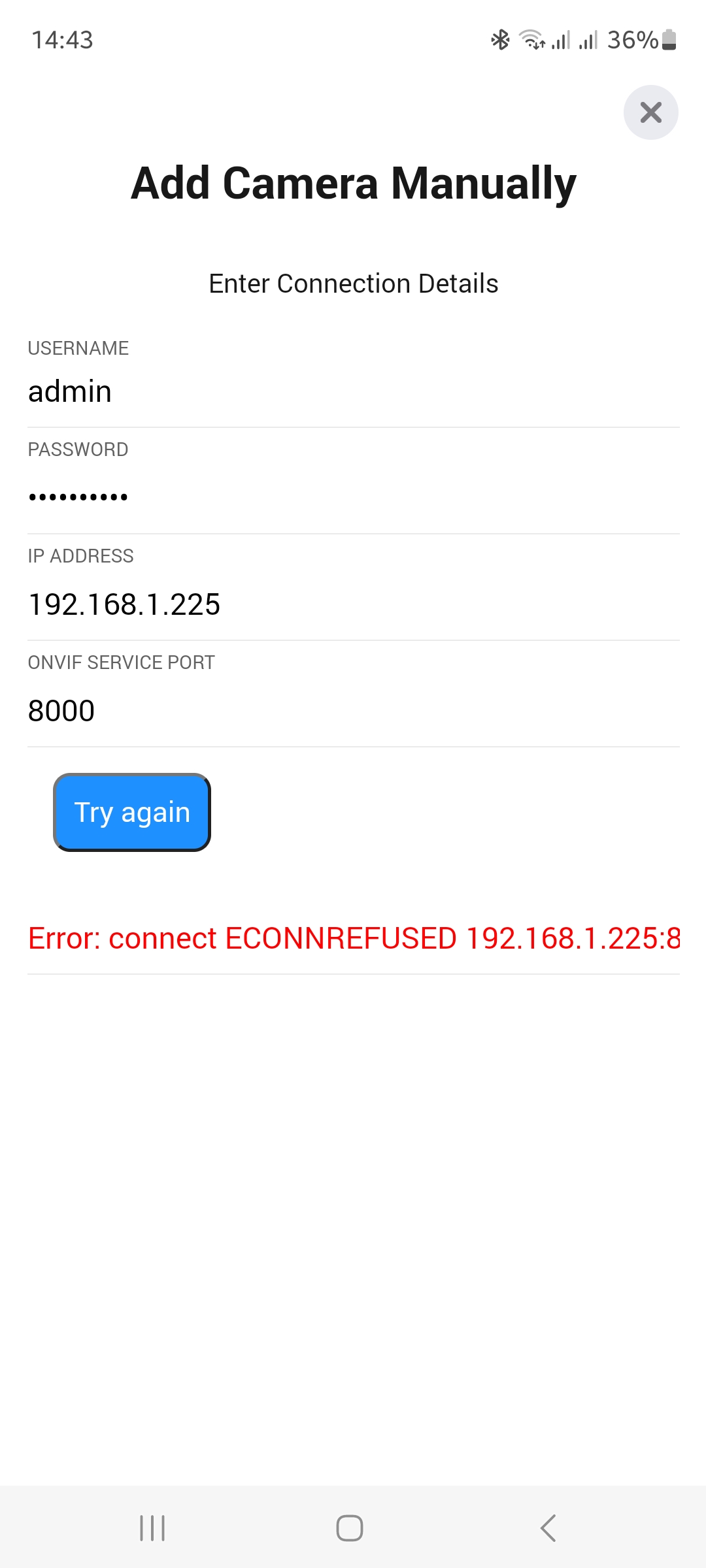
Log ID: 2023-07-21T12:42:32.448Z
App version 2.0.3012:42:32.448: ==== Discovery Starting ====
12:42:41.462: ==== Discovery Finished ====
12:42:41.463: Discovered:
12:43:9.571: Login-----
12:43:9.573: --------------------------
12:43:9.576: Connect to Camera 192.168.1.225:8000 - admin
12:43:9.598:
_request (192.168.1.225): {
“hostname”: “192.168.1.225”,
“port”: 8000,
“path”: “/onvif/device_service”,
“agent”: false,
“timeout”: 15000,
“headers”: {
“Content-Type”: “application/soap+xml; charset: utf-8; action="http://www.onvif.org/ver10/device/wsdl/GetSystemDateAndTime\”",
“Content-Length”: 261,
“charset”: “utf-8”
},
“method”: “POST”
}
<s:Envelope xmlns:s=“http://www.w3.org/2003/05/soap-envelope”><s:Body xmlns:xsi=“http://www.w3.org/2001/XMLSchema-instance” xmlns:xsd=“http://www.w3.org/2001/XMLSchema”></s:Body></s:Envelope>12:43:9.615: Request error (192.168.1.225): connect ECONNREFUSED 192.168.1.225:8000
Error: connect ECONNREFUSED 192.168.1.225:8000
at TCPConnectWrap.afterConnect [as oncomplete] (node:net:1494:16)
12:43:9.620: getSystemDateAndTime error (192.168.1.225):connect ECONNREFUSED 192.168.1.225:8000
Error: connect ECONNREFUSED 192.168.1.225:8000
at TCPConnectWrap.afterConnect [as oncomplete] (node:net:1494:16)
12:43:9.624: Connection Failed for 192.168.1.225 Port: 8000 Username: admin
OK, that’s not a certificate error. The camera is just rejecting the connection and it’s not using https at that point.
Maybe that’s just it, it may require https.
Not responding to http calls?
Maybe. The new version of the ONVIF library I use has added an option for HTTPS connections, so I will see what I can do to use it.
Could you set the log level to “Basic Information” and try to add the camera again. It should show a section for:
9:58:15.876: Reply from { "hostname": "192.168.1.18", "port": "80", "path": "/onvif/device_service", "urn": "urn:uuid:xxxxxxxxxxx", "href": "[http://192.168.2.18:80/onvif/device_service](http://192.168.1.18/onvif/device_service)" }
I would be interested to see if the href shows https that I can use to determine if the secure option needs to be used or mot.
Edit: Not sure why the forum is altering the preformatted text, so it will look a bit different in the log.
Log ID: 2023-07-21T13:06:56.804Z
App version 2.0.3013:6:56.804: Discovered:
13:7:21.329: Connection Failed for 192.168.1.225 Port: 8000 Username: admin
Hmm, could you updated to the test version?
Maybe I changed the logging option since the release.
Actually it could be the way the forum has changed the log. Could you send the log using the button on the settings page?
Sent to developer.
Log ID: 2023-07-21T13:13:22.400Z
App version 2.0.4113:13:22.400: Discovered:
13:14:7.169: Request error (192.168.1.225): connect ECONNREFUSED 192.168.1.225:8000
Error: connect ECONNREFUSED 192.168.1.225:8000
at TCPConnectWrap.afterConnect [as oncomplete] (node:net:1494:16)13:14:7.177: Connection Failed for 192.168.1.225 Port: 8000 Username: admin
Sorry, I don’t know what is going on as the log is missing lots of information. Could you try setting it to Detailed Information and repeat.
Ahha, I think I just twigged. It seems no cameras are being discovered, so did you add one manually?
Yes, manually. No camera discovered.
It may be the http call that fails and would really need https…
Is the camera on the same subnet as Homey?
Just wondering why it’s not being discovered.
And are you sure the ONVIF port is 8000?
Same LAN and subnet, yes.
(I’m able to browse it, right?)
Reolink states ONVIF port is 8000.
Tried a range of other ports without success.

Really fun this, already created a set of flows. 
But struggeling with Reolinks AI and Person detection.
By default it’s any motion but the RLC-510WA cameras detects Persons or Vehicles also.
So how to manage these notifications in ONVIF setup?
Notification types seems locked to ‘MOTION’.
Do I change Motion notification to use?
ANALYTICSSERVICE or what, and is there Event Object ID related to this?
