The cameras are also connected to a reolink Nvr. Should it still be possible to also connect the homey through onvif?
Can you connect the app to the NVR?
My Reolink cameras connect to my Reolink NVR and I add the NVR to Homey. It then finds the cameras via the channels of the NVR.
Ok, so it cannot connect direcly to Reolink cameras but instead to the NVR?
I don’t use NVR so I’m out of luck?
I have two cameras connected to my NVR and one is on my network. I can add them all to Homey with the ONVIF app.
Hi Adrian,
I recently bought a reolink video doorbell PoE which I try to integrate into homey with your app. The camera was found and I’m able to see the snapshots. But I don’t get any motion alerts. I tried the stable release 2.0.30 and the test version 2.0.41 which doesn’t make a difference.
Here is an excerpt from the log:
Log ID: 2023-07-12T21:56:09.081Z
App version 2.0.41

21:56:9.081: Initialising CameraDevice (192.168.177.180)
21:56:18.926: --------------------------
21:56:18.931: Connect to Camera 192.168.177.180:8000 - admin
21:56:19.018: getSystemDateAndTime (192.168.177.180): Finished -----
21:56:19.021: getServices (192.168.177.180): Started *****
21:56:19.152: getServices (192.168.177.180): Finished -----
21:56:19.154: callUpstartFunctions (192.168.177.180): Started *****
21:56:19.885: VideoSources (192.168.177.180): [
	{
		"$": {
			"token": "000"
		},
		"framerate": 20,
		"resolution": {
			"width": 2560,
			"height": 1920
		},
		"imaging": {
			"brightness": 128,
			"colorSaturation": 128,
			"contrast": 128,
			"irCutFilter": "ON",
			"sharpness": 128
		}
	}
]
21:56:19.889: ActiveSource (192.168.177.180) [0] = {
	"$": {
		"token": "000"
	},
	"name": "VideoE_000",
	"useCount": 1,
	"encoding": "H264",
	"resolution": {
		"width": 2560,
		"height": 1920
	},
	"quality": 0,
	"rateControl": {
		"frameRateLimit": 20,
		"encodingInterval": 1,
		"bitrateLimit": 6144
	},
	"H264": {
		"govLength": 40,
		"H264Profile": "Main"
	},
	"multicast": {
		"address": {
			"type": "IPv4",
			"IPv4Address": "239.0.1.0"
		},
		"port": 4000,
		"TTL": 64,
		"autoStart": false
	},
	"sessionTimeout": "PT10S"
}
21:56:19.891: VideoSource (192.168.177.180) [0] = {
	"$": {
		"token": "000"
	},
	"framerate": 20,
	"resolution": {
		"width": 2560,
		"height": 1920
	},
	"imaging": {
		"brightness": 128,
		"colorSaturation": 128,
		"contrast": 128,
		"irCutFilter": "ON",
		"sharpness": 128
	}
}
21:56:19.894: callUpstartFunctions (192.168.177.180): Finished -----
21:56:19.896: CONNECTED to 192.168.177.180
21:56:19.928: ** service capabilities 192.168.177.180 = {
	"network": {
		"IPFilter": false,
		"ZeroConfiguration": false,
		"IPVersion6": false,
		"DynDNS": false,
		"Dot11Configuration": false,
		"HostnameFromDHCP": false,
		"NTP": 1
	},
	"security": {
		"TLS1.0": false,
		"TLS1.1": false,
		"TLS1.2": false,
		"OnboardKeyGeneration": false,
		"AccessPolicyConfig": false,
		"Dot1X": false,
		"RemoteUserHandling": false,
		"X.509Token": false,
		"SAMLToken": false,
		"KerberosToken": false,
		"UsernameToken": true,
		"HttpDigest": true,
		"RELToken": false
	},
	"system": {
		"DiscoveryResolve": true,
		"DiscoveryBye": true,
		"RemoteDiscovery": false,
		"SystemBackup": false,
		"SystemLogging": false,
		"FirmwareUpgrade": false,
		"HttpFirmwareUpgrade": false,
		"HttpSystemBackup": false,
		"HttpSystemLogging": false,
		"HttpSupportInformation": false
	}
}
21:56:19.931: getServices (192.168.177.180): Started *****
21:56:20.010: getServices (192.168.177.180): Finished -----
21:56:20.014: ** Service 192.168.177.180{
	"namespace": "http://www.onvif.org/ver10/device/wsdl",
	"XAddr": "http://192.168.177.180:8000/onvif/device_service",
	"capabilities": {
		"capabilities": {
			"network": {
				"$": {
					"IPFilter": false,
					"ZeroConfiguration": false,
					"IPVersion6": false,
					"DynDNS": false,
					"Dot11Configuration": false,
					"HostnameFromDHCP": false,
					"NTP": 1
				}
			},
			"security": {
				"$": {
					"TLS1.0": false,
					"TLS1.1": false,
					"TLS1.2": false,
					"OnboardKeyGeneration": false,
					"AccessPolicyConfig": false,
					"DefaultAccessPolicy": false,
					"Dot1X": false,
					"X.509Token": false,
					"SAMLToken": false,
					"KerberosToken": false,
					"UsernameToken": true,
					"HttpDigest": true,
					"RELToken": false
				}
			},
			"system": {
				"$": {
					"DiscoveryResolve": true,
					"HttpSupportInformation": false,
					"DiscoveryBye": true,
					"HttpFirmwareUpgrade": false,
					"HttpSystemLogging": false
				}
			},
			"misc": {
				"$": {
					"AuxiliaryCommands": ""
				}
			}
		}
	},
	"version": {
		"major": 21,
		"minor": 6
	}
}
21:56:20.016: ** Service 192.168.177.180{
	"namespace": "http://www.onvif.org/ver20/imaging/wsdl",
	"XAddr": "http://192.168.177.180:8000/onvif/imaging_service",
	"capabilities": {
		"capabilities": ""
	},
	"version": {
		"major": 19,
		"minor": 6
	}
}
21:56:20.018: ** Service 192.168.177.180{
	"namespace": "http://www.onvif.org/ver10/deviceIO/wsdl",
	"XAddr": "http://192.168.177.180:8000/onvif/deviceIO_service",
	"capabilities": "",
	"version": {
		"major": 19,
		"minor": 6
	}
}
21:56:20.020: ** Service 192.168.177.180{
	"namespace": "http://www.onvif.org/ver10/media/wsdl",
	"XAddr": "http://192.168.177.180:8000/onvif/media_service",
	"capabilities": {
		"capabilities": {
			"$": {
				"SnapshotUri": true,
				"Rotation": false
			},
			"profileCapabilities": {
				"$": {
					"MaximumNumberOfProfiles": 10
				}
			},
			"streamingCapabilities": {
				"$": {
					"RTPMulticast": false,
					"RTP_TCP": true,
					"RTP_RTSP_TCP": true,
					"NonAggregateControl": false
				}
			}
		}
	},
	"version": {
		"major": 20,
		"minor": 6
	}
}
21:56:20.022: ** Snapshots are supported on 192.168.177.180
21:56:20.025: ** Service 192.168.177.180{
	"namespace": "http://www.onvif.org/ver20/media/wsdl",
	"XAddr": "http://192.168.177.180:8000/onvif/Media2",
	"capabilities": {
		"capabilities": {
			"$": {
				"SnapshotUri": true,
				"Rotation": false,
				"VideoSourceMode": false,
				"OSD": true,
				"TemporaryOSDText": false,
				"Mask": false,
				"SourceMask": false
			},
			"profileCapabilities": {
				"$": {
					"MaximumNumberOfProfiles": 10,
					"ConfigurationsSupported": "VideoSource VideoEncoder Metadata AudioSource AudioEncoder"
				}
			},
			"streamingCapabilities": {
				"$": {
					"RTSPStreaming": true,
					"RTPMulticast": true,
					"RTP_RTSP_TCP": true,
					"NonAggregateControl": false,
					"AutoStartMulticast": false
				}
			}
		}
	},
	"version": {
		"major": 21,
		"minor": 6
	}
}
21:56:20.027: ** Snapshots are supported on 192.168.177.180
21:56:20.029: ** Service 192.168.177.180{
	"namespace": "http://www.onvif.org/ver10/events/wsdl",
	"XAddr": "http://192.168.177.180:8000/onvif/event_service",
	"capabilities": {
		"capabilities": {
			"$": {
				"WSSubscriptionPolicySupport": true,
				"WSPullPointSupport": true,
				"MaxPullPoints": 2
			}
		}
	},
	"version": {
		"major": 21,
		"minor": 6
	}
}
21:56:20.031: ** PushEvent supported on 192.168.177.180
21:56:20.115: Camera Information (192.168.177.180): {
	"manufacturer": "REOLINK",
	"model": "Reolink Video Doorbell PoE",
	"firmwareVersion": "v3.0.0.2033_23041302",
	"serialNumber": 192168177180,
	"hardwareId": "IPC"
}
21:56:20.118: getCapabilities (192.168.177.180): Started *****
21:56:20.187: getCapabilities (192.168.177.180): Finished -----
21:56:20.194: Camera (192.168.177.180) supports PullPoint
21:56:20.265: Supported Events(192.168.177.180): MOTIONALARM,IMAGINGSERVICE,PROFILECHANGED,CONFIGURATIONCHANGED,MOTION
21:56:20.790: Snapshot URL: http://192.168.177.180:80/cgi-bin/api.cgi?cmd=onvifSnapPic&channel=0
21:56:20.905: Registering Now image (192.168.177.180)
21:56:20.926: registered Now image (192.168.177.180)
21:56:20.938: SnapShot save file (192.168.177.180) = eventimageec_71_db_de_1c_5f.jpg
21:56:20.942: Registering event image (192.168.177.180)
21:56:20.959: registered event image (192.168.177.180)
21:56:20.966: Camera (192.168.177.180) is ready
21:56:47.510: Fetching (192.168.177.180) NOW image with no Auth from: http://192.168.177.180:80/cgi-bin/api.cgi?cmd=onvifSnapPic&channel=0
21:56:47.589: SnapShot fetch result (192.168.177.180): Status: false, Message: Unauthorized, Code: 401

21:56:47.595: Fetching (192.168.177.180) NOW image with Basic Auth. From: http://192.168.177.180:80/cgi-bin/api.cgi?cmd=onvifSnapPic&channel=0
21:56:47.682: SnapShot fetch result (192.168.177.180): Status: false, Message: Unauthorized, Code: 401

21:56:47.687: Fetching (192.168.177.180) NOW image with Digest Auth. From: http://192.168.177.180:80/cgi-bin/api.cgi?cmd=onvifSnapPic&channel=0
21:56:47.919: SnapShot fetch result (192.168.177.180): Status: true, Message: OK, Code: 200

21:56:47.972: Now Image Updated (192.168.177.180)
21:57:3.346: Fetching (192.168.177.180) NOW image with Digest Auth. From: http://192.168.177.180:80/cgi-bin/api.cgi?cmd=onvifSnapPic&channel=0
21:57:3.626: SnapShot fetch result (192.168.177.180): Status: true, Message: OK, Code: 200

21:57:3.674: Now Image Updated (192.168.177.180)
21:57:4.888: Fetching (192.168.177.180) NOW image with Digest Auth. From: http://192.168.177.180:80/cgi-bin/api.cgi?cmd=onvifSnapPic&channel=0
21:57:5.242: SnapShot fetch result (192.168.177.180): Status: true, Message: OK, Code: 200

21:57:5.293: Now Image Updated (192.168.177.180)
21:57:7.414: Fetching (192.168.177.180) NOW image with Digest Auth. From: http://192.168.177.180:80/cgi-bin/api.cgi?cmd=onvifSnapPic&channel=0
21:57:7.676: SnapShot fetch result (192.168.177.180): Status: true, Message: OK, Code: 200

21:57:7.726: Now Image Updated (192.168.177.180)
21:57:8.972: Fetching (192.168.177.180) NOW image with Digest Auth. From: http://192.168.177.180:80/cgi-bin/api.cgi?cmd=onvifSnapPic&channel=0
21:57:9.291: SnapShot fetch result (192.168.177.180): Status: true, Message: OK, Code: 200

21:57:9.348: Now Image Updated (192.168.177.180)
21:59:32.569: Fetching (192.168.177.180) NOW image with Digest Auth. From: http://192.168.177.180:80/cgi-bin/api.cgi?cmd=onvifSnapPic&channel=0
21:59:32.950: SnapShot fetch result (192.168.177.180): Status: true, Message: OK, Code: 200

21:59:33.003: Now Image Updated (192.168.177.180)
I tried different camera settings, with no success. I also don’t know what the push server (port 9998) is for. I think my camera doesn’t use this port.
What can I do to make it work?
Daniel
Have you switched on the motion detection in the Homey device?
See image here [APP][Pro] Support for ONVIF compatible cameras (Release 2.0.30, Test 2.0.41) - #918 by Tamer_Bakir
Hi Adrian,

the switch was off, of course! I had interpreted this as a status indicator, so it would switch on when motion was detected.
After switching on, the notifications fires as expected. Thanks for your fast response and your app!
Daniel
I think I need to rename the button as you are not the first 

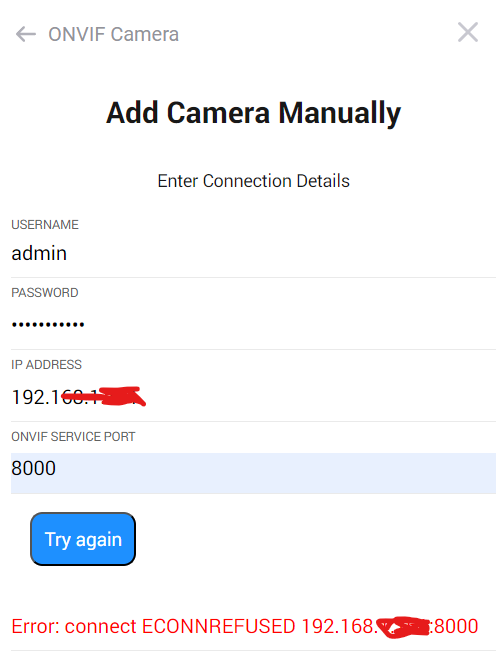
You don’t say what error you see when you try to add the camera.
I don’t see the ONVIF port shown in the picture so I presume you typed that in before trying to add the camera?
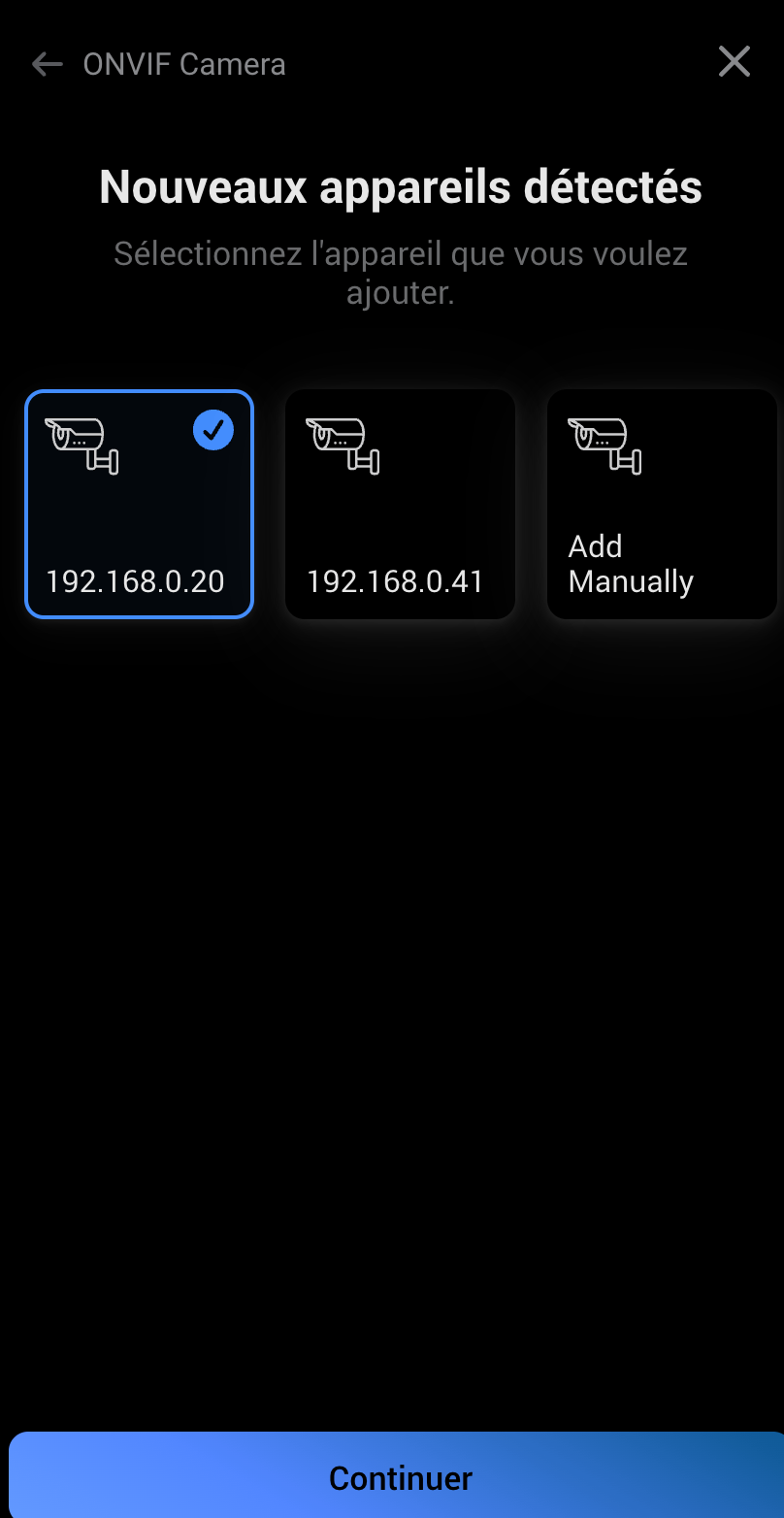


Was the port number picked up automatically or did you have to enter it?
Could you go to the app settings page, select the Diagnostics Log tab and then set the Log to Detailed Information. Then try to add the camera and once it has failed, go back to the Diagnostics Log tab and tap on Send Log. Hopefully that will show me where it’s failing.
thank you for care to me
i’ve got the solution using port 80.
well done and thanks for your help
Denis
Adrian,
I have a NVR and 4 ONVIF capable camera’s connected. But the camera’s are in a different subnet as my Homey. It is not possible to connect homey in this subnet because this subnet is connected behind the NVR. If I do an autosearch I can only connect one camera there is no list of camera’s, what should I do to get all 4 of the cameras in Homey. Is there a possibility?
Thanks in advance for your answer/support.
Can you set the Diagnostics log level to Detailed Information, try to add camera’s and then send the log.
If the NVR supports ONVIF it should give a list of camera’s once you select it. So it’s possible the one you see is the NVR.
I sent you a log when I try to discover the NVR via port 80.
I am not able to find a NVR or camera.
If I use port 30000 (camera 1) up to 30030 (camera 4) I can discover one camera. But only one camera can be discoverd. If I try to discover the camera’s with there own IP-addresses (172.16.0.5:80) I get the message “Error: Could Not Get MAC Address”. This is the second Log I sent to you
I can not find in the NVR an ONVIF port, there is a RTSP port
My Reolinks does not get discovered, and the manual connection fails all the time.
Possibly because of the self-signed certificate over SSL (https:).
But is this browser link compatible at all with the ONVIF app?
Since we only add IP adress (unlike the Virtual IP Camera feature in Homey) I wonder if it’s more to it than SSL issues?
The URL looks good, so it should work.
If you put that in a browser do you see a snapshot?
