Since today I’ve been using a Reolink WiFi doorbell. I was able to pair it without any problems.
Now I’m trying to get notifications when someone presses the doorbell button. I searched around and found that a general alarm is required for this, but I don’t see that option anywhere in the list.
As a workaround, I’ve forwarded the trigger through Home Assistant, which works, but it’s a bit against my nature since I’d prefer to keep things simpler.
Am I missing something, or is there another way to achieve this directly?
Can you open the app settings page and select the Diagnostics Log tab, then set the log level to Detailed Information. Now press the doorbell button and wait a few seconds, then click on Send Log. I will check to see if a notification is being received. Also make sure the Motion detection is enabled in the device page of Homey
Get an error message when I want to upload the log file.
But my problem is that I’m not seeing the general alarm chart. And HA is working without problem.
For those of you using hikvision cameras through an NVR what ‘ONVIF motion notification to use’ and device class setting are you using for each individual camera for line crossing, intrusion detection to work?
Ive tried them all and none of them seem to work for any hikvision camera I have and they’ve never updated since I added them to homey.
Anyone else run hikvison cameras through an NVR and have line crossing, intrusion detection working?
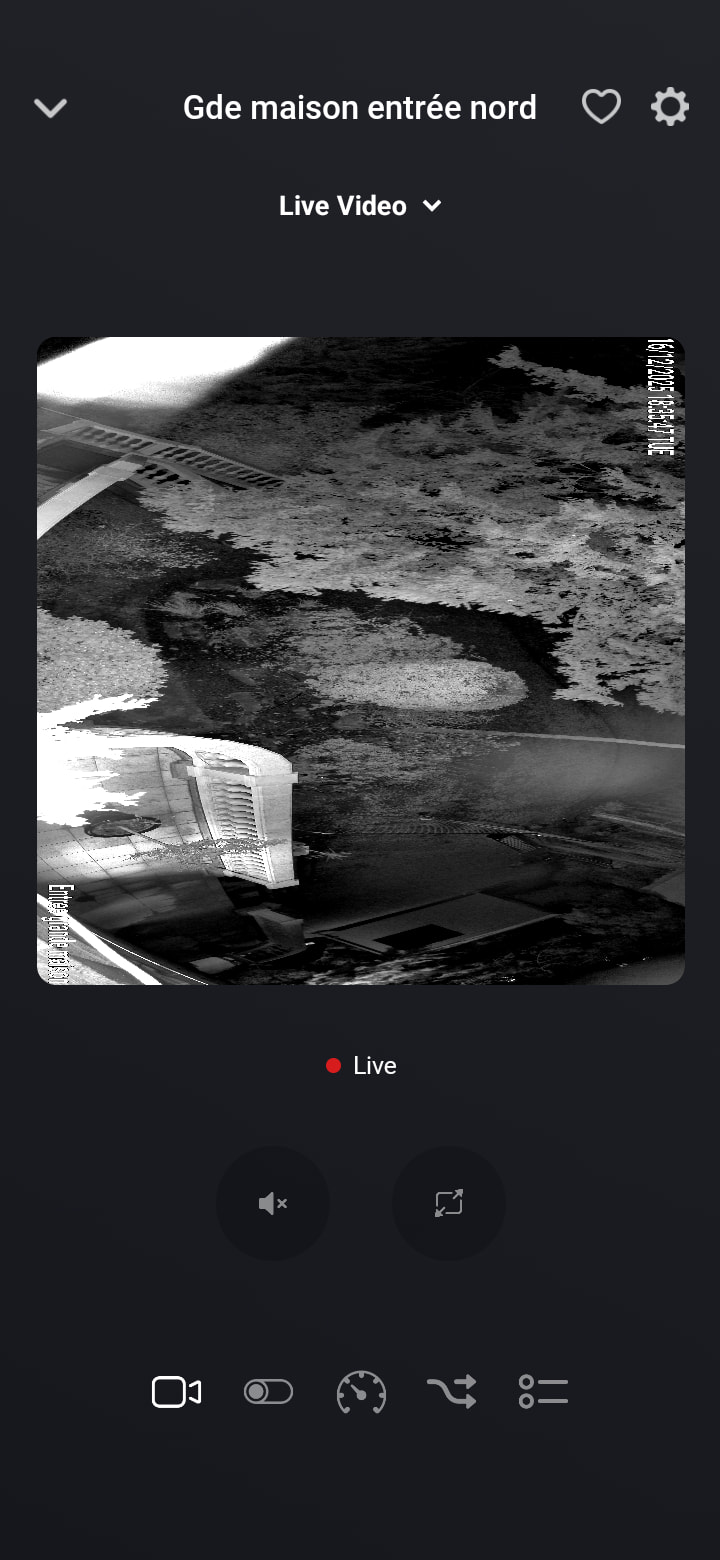
My Reolink Duo 3 cameras are greatly integrated to Homey thanks to you. However, I expérience a strange issue in the live mode : the camera ( duo 3 is 2 coupled lenses making a field of 180°) is shown at 90° and is coming messed in a square as it’s original rendered format is a rectangle…. Do you have any clue for these lives to be properly displayed?
Thanks by advance for any answer and solution.
Below are : the normal display in night mode, the live display.
I have started the migration from Homey pro to Homey SHS.
My Axis camera works fine with Homey pro.
However, it doesn’t show the live video when I connect it to Homey SHS, this works fine on the Homey pro.
The settings are the same on both systems.
I have tested with all devices on the same subnet, also disabling the Synology firewall on the NAS.
I guess it has something to do with the SHS running on the NAS.
Anyone out there with an explanation?
Thanks!
Same problem with SHS… try to add a new Reolink RTSP camera for live stream but don’t work…
My log:
Log ID: 2025-12-23T14:11:40.186Z
App version 2.0.60
14:11:40.186: Live video streams require a Homey Pro or Homey Max
14:11:40.357: Push renew every (ip): 300s @ http://ip:8000/onvif/Notification?Idx=163299587
14:11:41.586: Live video streams require a Homey Pro or Homey Max
So, it seems SHS does support the live feed, but it doesn’t support the function that checks if it is supported
So I have reported it to Athom and hopefully they will add that in the next update. Unfortunately, I have to have the check else thousands of older Homeys will crash.
Hello everyone, does anyone else have the problem that the formatting of the camera live view does not work with Android? For Apple devices, the formatting is correct.
Unfortunately, that is down to the Homey mobile app. All the ONVIF app does is pass the URL through. So you will need to raise that issue with Athom support.
I use the Onvif app for my Reolink D340W doorbell.
I cant get it to work with flows in Homey. It doesn’t record a visitor etc. I thought I had the issue because time was incorrect. So in the settings frOm the camera I ajusted it to adapt to timezone. After that Something changed because before Visitor detected for example was 56 years ago. And now for example 40 minutes. But… 40 minutes is incorrect because in the meantime I pushed the doorbell multiple teams but Onvif doesn’t register anything at all.
Things Like visitor detection etc is all on Yes.
Can you @Adrian_Rockall as Developer of the app or anybody else perhaps help me? I tried but I really can’t get it to work…