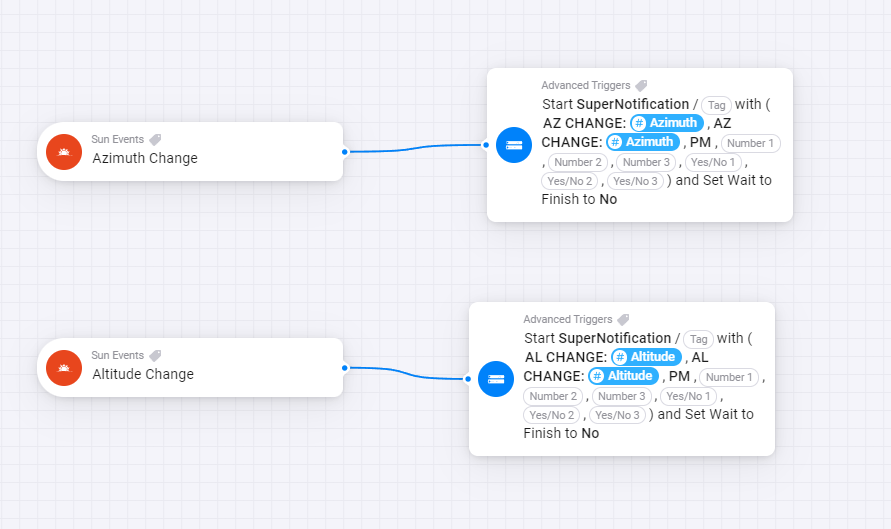
There’s a bunch of interesting things I can do with that approach, it can replace those curves above, I can calc that off the altitude, and then I am back on real data instead of a simulated curve.
On the other hand azimuth and altitudes have no when cards, only and cards, so no triggering. That puts me back to periodic checking, which is one of the things I am trying to avoid.
But if ya’ll say there ain’t no triggering possible with the flexibility I need, I’ll take that route anyway, even though it’s uncouth
Edit: Oh, and thank you!
Edit2: I was wrong - see next reply.
OK, question before I disappear into my workshop
Altitude is the angle from the sunlight hitting me right? Or not? If so, going from + to - is sunset, from - to + is sunrise? What happens during the day? It climbs to what before it starts declining? The highest altitude in the day means Zenith? (In that case the change in Zenith across days, with the accompanying changing day lengths, IS the expression of seasonal change…) The lowest negative value at night is Nadir?
How do I get from Azimuth to my time (EXcluding DST)?
See? Whole bunch of questions
Edit1: Hold on again. Post wiki here Looks I was right on Altitude. But I didnt undestand Azimuth very well, I thought it just did a 360 with the rotation of the planet. But it looks like it is the rotational direction of the sun towards the observer.
Sooooo…
Altitude:
In winter: shorter period of positive Altitude (day time) and a lower top altitude (lower sun, max about 15 degrees up in the sky in NL)
In summer: longer period of positive Altitude (day time) and a higher top altitude (higher sun, max about 62 degrees up in the sky in NL)
In NL we live too northerly to ever have the sun pass directly over our heads (the earth doesn’t tilt that far - 23.5 degrees and NL is up at 52 degrees north) so Altitude never crosses 90 degrees. But if I would live in say, Addis Abeba, I would see the sun climb to 90 Altitude and then, as it crosses into the northern hemisphere of my sky,… drop back down again or continue into the 180 direction?
Azimuth:
what is the seasonal variation there? Its still just a 360 degree rotation, but it must happen differently because of the change in angle towards the solar equatorial plane, at least, the pacing should be different. Or not? Do we have exactly the same Azimuth progression every day, does it “just tell time”? I am so confused.
Edit 2: Hmmm this makes kind of sense… Azimuth functions kind of like time, but you can see the blue time lines “curve” across the red Azimuth angles, especially mornings and evenings in the summer. See? It does have seasonal behavior. But I am still confused.
Edit 4:
I recognize that B1 event - that’s Nadir. So 0 Azimuth is Nadir? That would make 180 Azimuth Zenith?
Also, the Altitude just stops triggering somewhere during the night?
It’s azimuth. Sun events app is mostly about the position of the sun towards the earth.
Altitude comes in handy when f.i. the sun shines right through your window in winter time, (low altitudes), and isn’t “that annoying” during the summer (high altitude). You can use it to control the shades in a smart way, next to azimuth, which determines the position of the sun, from left to right so to speak.
Also, azimuth === regular interval.
It takes 4 minutes to shift a degree, no matter what season.
In other words, when you want a trigger on every azimuth degree change, you could use the “every 4 minutes” trigger as well.
Hi @Peter_Kawa , great that you come back and help me out!
360/(24*60)=0.25 - yeah that holds. That’s earths rotational speed in degrees/minute. 15 degrees per hour.
But your claim that this means a equivalent linear progression for AZ doesn’t hold I think, consider what happens at 52 north (NL) in summer:
I thought that AZ===time or AZ===“Earths rotation angle” would hold during equinox, but even that doesn’t seem to hold.
This is Singapore seasonal chart (almost on the equator!) - you can see the “warp” is biggest during solstice and flat at equinox:
Wow, you are taking a deep dive into the subject. I am afraid that I am not knowledgeable enough to answer your questions or advice you better than you do yourself.
I use azimuth and altitude for controlling my sun screens. Using a compass I first determined the orientation (azimuth) of my windows. From that I determined the azimuth- range when those screens should be lowered (or can be rised again).
What you see is that at a fixed time the azimuth is the same each day. Sunrise is the moment the altitude is zero. Sunrise at an earlier time means the the sun rises at lower azimuth (more to the east).
The altitude is used by me only at the end of the day: when the altitude is too low the sun is blocked bij trees and buildings at the horizon, so the screens are rised. I estimated the limiting altitude by just looking at the sun.
After some optimizing bij tweaking the azimuth an altitude windows I have a very stable situation now that adapts itself to the season.
I will try something similar I think, thanks you for that!! I will probably start playing around with the custom events since those are based on Azimuth. Thank you for the idea.
So enough theory, let’s stick to something practical: testing with Sun Events itself.
That linear interval of 4 minutes? definitely not true. Here’s what happens when I analyse Sun Events AZ trigger logging. The top is AZ progression, the middle a scatter chart of the time difference between a trigger and the previous one, using the log (Simple Log) timestamps. Something is pacing these triggers, trying to make them appear with full minute distances - but its not working. I don’t know what is happening under the hood there.
Combined with scattergraph of time between triggers: you can see a lot of (exactly!) 3 minutes and 4 minutes, but - especially in areas where the graph climbs faster - also 5 minutes.
OK @MarcelT , after all the stuff I posted, fair question.
Let me see if I can boil it down.
How accurately does the Azimuth when card represent real azimuth changes? And I know that is not directly app related, but if you could please shine a light on what “real” azimuth progression is supposed to look like, that would be great!
This would be the question: “is azimuth progression supposed to be a progression through 360 degrees at regular even intervals”? Is there supposed to be significant difference in the time between one Azimuth ping and another? For that, have a look at this:
The orange dots a the intervals between one ping and the next. The blue line is the azimuth value at the ping.
I hope that makes the subject more manageable - thanks a lot for any answer you may provide!
I never used a azimuth compass to compare. However, the calculated value should be very accurate as it uses the formula that is everywhere used with the most precision.
Yes. Azimuth is measured in degrees from 0° to 360°, starting from the north and moving clockwise. For example, east is 90°, south is 180°, and west is 270°.
The Earth rotates 360 degrees in approximately 24 hours. Therefore, it takes about 4 minutes for the Earth to rotate 1 degree of azimuth. I am not sure how this graphic is made.
The azimuth angle, which is the compass direction from which the sunlight is coming, varies with the seasons. For example, at the equinoxes, the Sun rises directly in the east and sets directly in the west, making the azimuth angles 90° at sunrise and 270° at sunset.
Hope this will help you a bit. Having said this, I am not an expert! At that time I started to develop the app I looked into this very closely but most of the info I already forgotten ;).
Currently, I am only maintaining this as for me personally I moved to Home Assistant.
I have used this calculation myself for many years to close the blinds when the sun hits a certain window and it worked perfectly.
@MarcelT the graph is made from taking log messages from the Azimuth change when card in the app - this is a representation of how the app shows azimuth changes. And the data seems “off” to me. Why “about” 4 minutes, and not exactly?
I appreciate your explanation though It looks like I would be better off using an “every 4 minutes” timer or not, what do you think? Especially since you only maintain the app?
Why’d you switch to home assitant btw?
Not sure exactly anymore, but it has to do something with the sun’s position and atmosphere. Depending on what your goal is. I am using it just for when the azimuth is in a certain range I flip a boolean which I am using.
Well, it started with frustration about the progress and stability of Home OS. However, in Home Assistant you also have complete hardware freedom, which results in a very fast-responding system with lots of flexibility and various integrations. You can create automations that would be almost impossible or very hard to achieve in Homey. You have complete freedom with dashboards and many other features I like. And if you don’t like the Home Assistant automation language you can even use Node Red (similar to Homey advanced flows but much more powerful). There is also a huge community.
Home Assistant is free and remain free.
The only downside is that the learning curve is a bit steep.
could somebody help me understand the logic of the coindtions below? Shouldn’t the first one “between dusk and dawn” be true? If is is, well between dusk and dawn? Anybody remebering the iconic movie “From Dusk till Dawn”?
No it is false. Currently it is implemented between the same day. I am working on a new version to check if the time is already passed it will take the next event.
Thanks for the quick reply. Looking forward to the new version, because at the moment there are combinations that would never turn true. Like in the example above. I really appreciate your work!
For the time being, you could ‘fool’ Homey by inverting it twice.
The condition “It is between Dusk and Dawn”
can also be configured as “It is not between Dawn and Dusk”
Now the midnight / new day “problem” is not involved.
I use this for time conditions as well, like
“the time is not between 02:00 and 20:00”
to create a condition which is true between 20:00 and 02:00 hours
Thought about this, also. I think I will set it up this way tomorrow, but it would be great if this bug could be resolved or an information popup on the condition.