Let us plan a date / time for me to activate shine link and change the power discharge level with the hope you see anything happening …
Hope to figure this one out, it is crucial.
I need your precize instructions for testing.
Let us plan a date / time for me to activate shine link and change the power discharge level with the hope you see anything happening …
Hope to figure this one out, it is crucial.
I need your precize instructions for testing.
@Edwin_Biemond
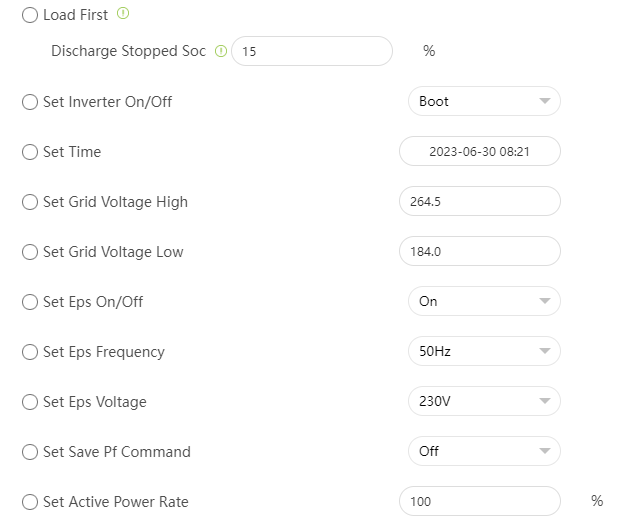
These are the settings/parameters available through Shinelink

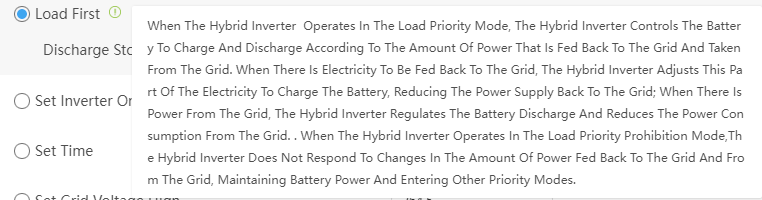
Here’s the explanation for the different parameters:
Same here, the register ref. is nowhere to be found… 
I was hoping to setup a test with you but correct me if I’am wrong;
When changing the parameter in Shinelink, you are able to see before and after what kind of data has been changed in the daig?
Sorry for not responding, had the tracking on instead of watching, no notification.
yes, we can add some suspects and you send me a diagnostic report. or we need add some mqtt client and read all the registers and see the change. let me ask @lucje if he has shinelink and I can vpn in to see the change.
Ok, will hear from you when to do what exactly.
@Edwin_Biemond and @Phil_Bro
Just let me know if I can contribute with anything 
Furthermore, do you know of/how I can set update interval?
Currently data is being refreshed about every 30 seconds, I would like to bring that threshold down to about every 2 seconds?
I can test on the system of @lucje and he has a mqtt bridge with ha and shinelink so I will find it for sure.
2 seconds is not possible , it takes some time to read all the registers and process them. plus at some point homey also becomes slower. so 30 seconds is a safe limit. but I can add it and maybe you can bring it down to 15 seconds or so.
@Edwin_Biemond you’re a true superstar!
Is there any way to add Grid Import as the same “metric” and thereby frequenzy as eg. solar input.
ATM there’s only a day yeld adding up, and with variable spot prices it’s it’s difficult to get a view of actual cost of imported electricity
EDIT: I use Power By The Hour to look at electricity expenses


@Yestond @Phil_Bro so it looks like it only supported on TL-X
only got this and I can set grid, batt or load 1st but no stop SOC with load 1st.
prioritychange 0 0 Priority
gridfirststopsoc 10 0 GridFirst stop SOC
batfirststopsoc 100 0 BatFirst stop SOC

        "prioritychange":        [1044, 1, 'UINT16', "Priority", 0],
        "gridfirststopsoc":      [1071, 1, 'UINT16', "GridFirst stop SOC", 0],
        "batfirststopsoc":       [1091, 1, 'UINT16', "BatFirst stop SOC", 0],
is there something else we can try?
Hey, solar input and grid import are not the same . w (now) vs kwh . Do you have a smart meter, here in NL you have a P1 meter which will give you also watt. but let me check if there a realtime register.
what they do on HA. you only probably only want totals, capture these per hour. calculate the diff and see how much you imported and exported in that hour
I have a smart meter also.
Actually I have this as well Electricity Meter Interface - smart Zigbee meter for home electricity monitoring - frient but this also tracks power being sent back to the grid, so it looks like I’m importing way more kw/h than I am.
So basically what I’d like to do, and this may not be on your table @Edwin_Biemond, is to measure Grid Import hourly and use those data in Power by the Hour app in Homey
oh that is based on blinking light. what is the max deviation?
you can use today total import / export (from inverter, p1 etc) and get the diff with the previous hour and use the price of that hour
I’ll have a look at it
Regarding this:
I’m not sure how I can help but I’d be happy to give any info you need 
The way I interprete your post, there’s no way to stop battery from discharging right?
Ironically, that’s really the most important feature for me, so that my house battery doesn’t deplete when charging the car over night 
Let me know if I can help you in any direction 
Same goes for me, stopping the battery from draining is absolutely a must have.
Allow me to understand the test you did;
So if you select LOAD first, wait for some moment to allow inverter pickup this setting, and then change the value discharge SOC, you read nothing? For sure the setting works, I used this with our previous tests to make sure we asked for panel load and grid etc. so when the shinelink interface allows “some” parameter to change, you must be able to capture that, true?
I do this on a daily basis, with totals per month. There is no need (for me) to know the export/import per hour…
EDIT:
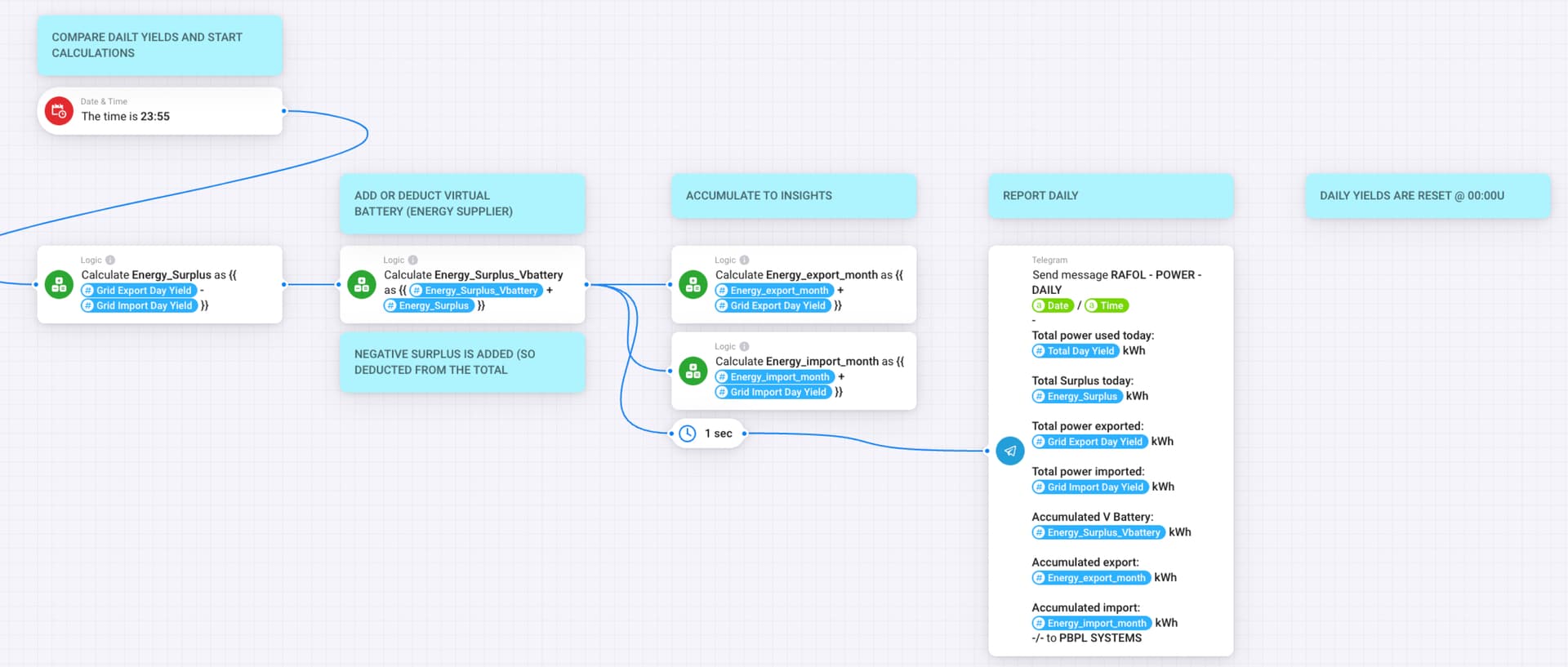
So the setup I made (thanks to the APP ugrade @Edwin_Biemond !);
Each day (2 hours before sunrise I check;
Constant monitor is on (each 10sec) if:
If batteries are not full, use solar capacity for this, stop other heavy duty apparatus with (**) resume delay (Airco, Water pump etc.)
(*)
Switch on for 5 min and see consumption, if not, boiler is full
(**)
The delay of the apparatus depends on the capacity available and the battery-level.
At the end of the day all the yields are collected, stored and reported to the Private Telegram channel.
-/-
so I checked these Storage(SPH Type):03 register range:0~124,1000~1124;04 register range:0~124,1000~1124
put the value to 14 and 15 % from 0 (was already load 1st) and checked all registers group for Storage Power (1000~1124)
there was no change I could detect.
Ok, You cannot do better I think. What if the range is not ending with 1124, the load first enable is one of the last in the range of 1124. I ready do imagine that the protocol list is behind the firmware of the inverter, but that is just a suggestion. If you have any chance testing with a wider range (upto 3124, so incl. the vars for the TL-X models… I will go through the list V1.20 step by step again. I’ve seen v1.24 at:
but not able to download that.