Installed, I will test it tomorrow.
After a few days of testing (see what happens). And tweaking my flow. Does it work as far as I see it fine now.
Hi Pieter,
First of all: I really like your app! Thanks a lot for making it!
I have a request for a “and” card, that would make my life easier when trying to heat my house at the time I get most out of my PV.
I would like to have an AND card “and current hour is within “x” hours with most kWh today” Where “x” is an integer between 0 and 24. This can have either a true or false outcome as all AND card have.
Is something like that possible?
Everything is possible, but it is a bit complicated.
Just wondering how you plan to use it, maybe there is an easier way.
If it is so specific, maybe it is easier to make the raw data available as a json and you can parse your own data.
Currently, I’m calculating the hours of heating my house needs per day based on the set temperature, outside temperature and inside temperature. Now I’d like to heat the house at the times I have most PV output to maximize self-consumption because feeding back into the grid costs money in the Netherlands.
So when I calculate I need to heat for 4 hours, I’d like this to be the 4 hours with highest solar production. That is where this card would be useful. Do you see a better solution? BTW: providing the JSON is also fine for me, but the card might help others as well.
Sidenote: Not (yet) with a dynamic contract.
Easy fix if you can enable curtailment on your inverter
Is not easier to provide the time of the highest peak in the app?
(First peak, because if your inverter is undersized, your peak will be flat)
If you assume that PV output is parabolic shaped, not skewed a lot, and has only 1 peak per day, that already would help. For now, maybe the JSON option is valuable for more people in more usecasses.
If I would be able to enable curtailment on my inverter (I’m not) that would not help me in this case. Let me explain: I have fixed energy rates. When I feed back 1 kWh I pay 15 cents. When I consume 1 kWh from the grid I pay 24 cents, but I strike-balance power that I fed back with my consumption. So when I consume 10 kWh from the grid and I feed back 6, I have to pay 4 times 24 cents and 6 times 15.
Feeding back is profitable, but raising self-consumption saves me 15 cents per kWh. This is why I’d like to turn on my heating at the hours my PV output is highest, since my heat pump uses more kW than my PV can generate.
Can you please add another IF card. Just as the Remaining today becomes less than x kWh. But then instead of today, before a specific time. So Remaining before xx:xx becomes less than x kWh.This is to make the flow of charging my battery more accurate. (selling and storing energy)

For @RoelK his question, an IF card like this one from Power by the hour might be a good idea? But then solar energy instead of price. And because Solcast offers half-hour data, you get 8 for 4 hours. I can see a use for a card like this too.

just tried something, but are you using solcast or forecast.solar?
Because Solcast only stores the data from the current moment.
So the highest point will always be calculated from now.
The only way to override this is to use data from midnight and store this for 1 day, but is not up to date.
Homey has no database function or whatever or ability to store custom json’s such as HA.
Forecast.solar always has the data of the whole day. (but is way less accurate, I think)
Solcast here, and from now on is fine as far as I’m concerned.,
I am trying something, but I don’t have too much time and it always crashes.
So there is an (untested) new test version with a new trigger and condition.
I also added the raw json under the settings.
To use the raw data (for example in homey script)
Limitations (for this test version): I can only store 1 data for the device type (solcast, forecastsolar)
Solcast:
const settings = await Homey.apps.getAppSettings({ id: 'com.solcast' });
let solcastData = settings.solcast_raw;
Forecast.solar
const settings = await Homey.apps.getAppSettings({ id: 'com.solcast' });
let forecastData = settings.forecast_raw;
Example to use in a flow, to check that the current hour is in the top 3 hours.
const settings = await Homey.apps.getAppSettings({ id: 'com.solcast' });
let solcastData = settings.solcast_raw;

if (!solcastData) throw new Error("No Solcast JSON found in settings.");

// Only parse if it is a string
if (typeof solcastData === 'string') {
  solcastData = JSON.parse(solcastData);
}

// Set how many top hours you want to check
let x = 3; // example: top 3 hours

// Get current local hour
let timezone = Intl.DateTimeFormat().resolvedOptions().timeZone;
let now = new Date();
let nowLocal = new Date(now.toLocaleString("en-US", { timeZone: timezone }));
let currentHour = nowLocal.getHours();

// === Extract today’s forecast ===
let todayString = nowLocal.toISOString().split('T')[0];

let forecastsToday = solcastData.forecasts
  .filter(f => f.period_end.startsWith(todayString))
  .map(f => {
    let date = new Date(f.period_end);
    let hour = new Date(date.toLocaleString("en-US", { timeZone: timezone })).getHours();
    return { hour, value: f.pv_estimate };
  });

// Sum values per hour
let hourlySum = {};
forecastsToday.forEach(f => {
  hourlySum[f.hour] = (hourlySum[f.hour] || 0) + f.value;
});

// Sort hours by PV estimate descending
let topHours = Object.entries(hourlySum)
  .sort((a,b) => b[1]-a[1])
  .slice(0, x)
  .map(([hour, value]) => Number(hour));

console.log("Top hours today:", topHours);

// Check if current hour is within top x hours
let withinTopX = topHours.includes(currentHour);
console.log(`Current hour (${currentHour}) is within top ${x} hours:`, withinTopX);
Use ChatGPT for more flow conditions or triggers
testing new trigger and condition.
The trigger doesnt work, if it is not an easy fix I will remove it

I just got my HW plugin battery in and started playing around. I stumbled on your app for forecasting solar production (Thx Johan). What a bit is confusing is the two devices one with API and the one without.
The issue is with azimuth where my panels are on the portal South East -135 but when I apply the same to the non API one it seems it needs a positive 135. As I tried the negative value which did not update the parameters. Or was this just a glitch and should it be negative too for South East?
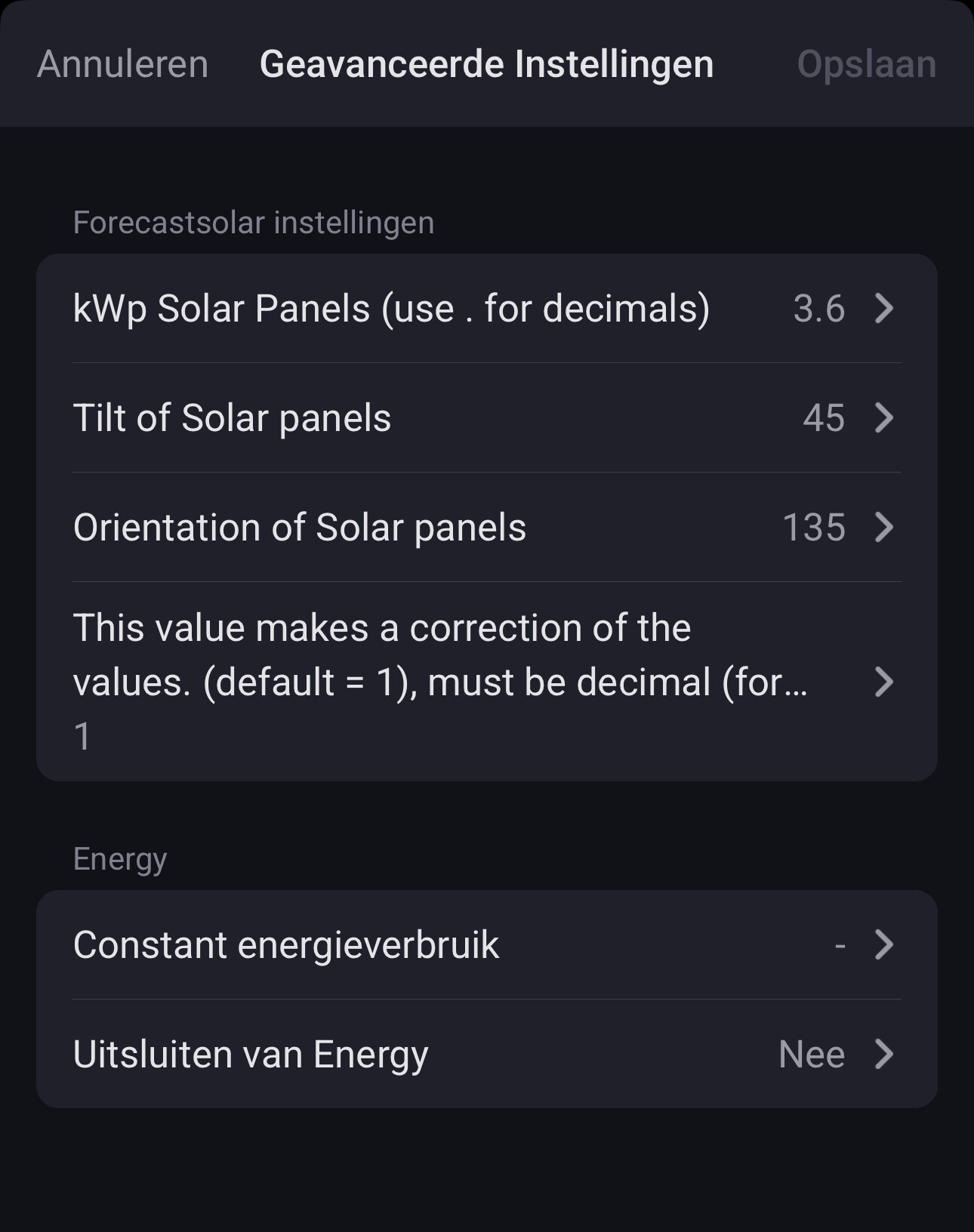
It are 2 different services. No need to use both.
I prefer N= 000 and South = 180, so that is why forecast.solar is like that. (European service)
The Australians of Solcast have a different approach, this is not something I can change, it is more confusing indeed.
Ok, just figured 135 only gives proper data (graph loads and no strange dates below the graph).
Yet the API one gives a better forecast looking at today’s weather and what the panels did today.
