I have published an update that should prevent the devices going offline.
Hi Adrian,
Screenshot 1
Value 1 is wrong value 2 is correct.

Screenshot 2
Here is the correct value from my Inverter:

And the second thing which is different:

It must be this value:

I hope you can make use of this.
The other values look great.
Greetings
Frank

I think I have found one of the wrong values and the error message that appears when changing the currency units. However I can’t see why the ‘Consumption Today’ is wrong, so could send the log again and let me know what the value should be at the same time.
Logs send: Consumption should be 16.8 kWh
So, I’m currently not reading a register that matches that number.
Could you open the app settings and select the Register Log tab. Then enter the register numbers, one-by-one, that look like they might report Consumption Today from the list you sent me and tap on Start. The result should be returned in the list below. Once you have exhausted the possibilities, send me the contents of the list.

Hi Adrian,
I spent three hours yesterday trying to find the correct value. Then I realized that the value you currently have seems to be correct.
However, it looks like the daily consumption in both the Solarman and Deye apps is calculated using different values.
Attached are screenshots of both apps from yesterday.
You can also see here that the composition of the value is different in both apps.
I think the difference might be due to the charging process/charging losses.
Is that the same for you?


I only use the Sofar app and the Homey app and they show the same values. Plus, AFAIK, it is the inverter that generates the numbers, so I would have thought they should be the same in all instances, give or take due to latency of data collection. The Sofar app only updates about once per minute, but the Homey app updates every 15 seconds.
I will publish the latest changes when I get home so the other issues are fixed and we can monitor the that last value to see if anything comes up.
Thanks!!!
I’ve encountered another problem.
I’m currently charging my car, and the grid connection is showing 8.6 kW, but your app is displaying -4W.
Screenshots attached.


Could you send the log again while that is happening
The logs are out.
It should now show that it’s feeding power into the grid.
Hi,
In the new version seems so far everything to be right except for the inverter.
What is circled is wrong everything else or right with hooks.
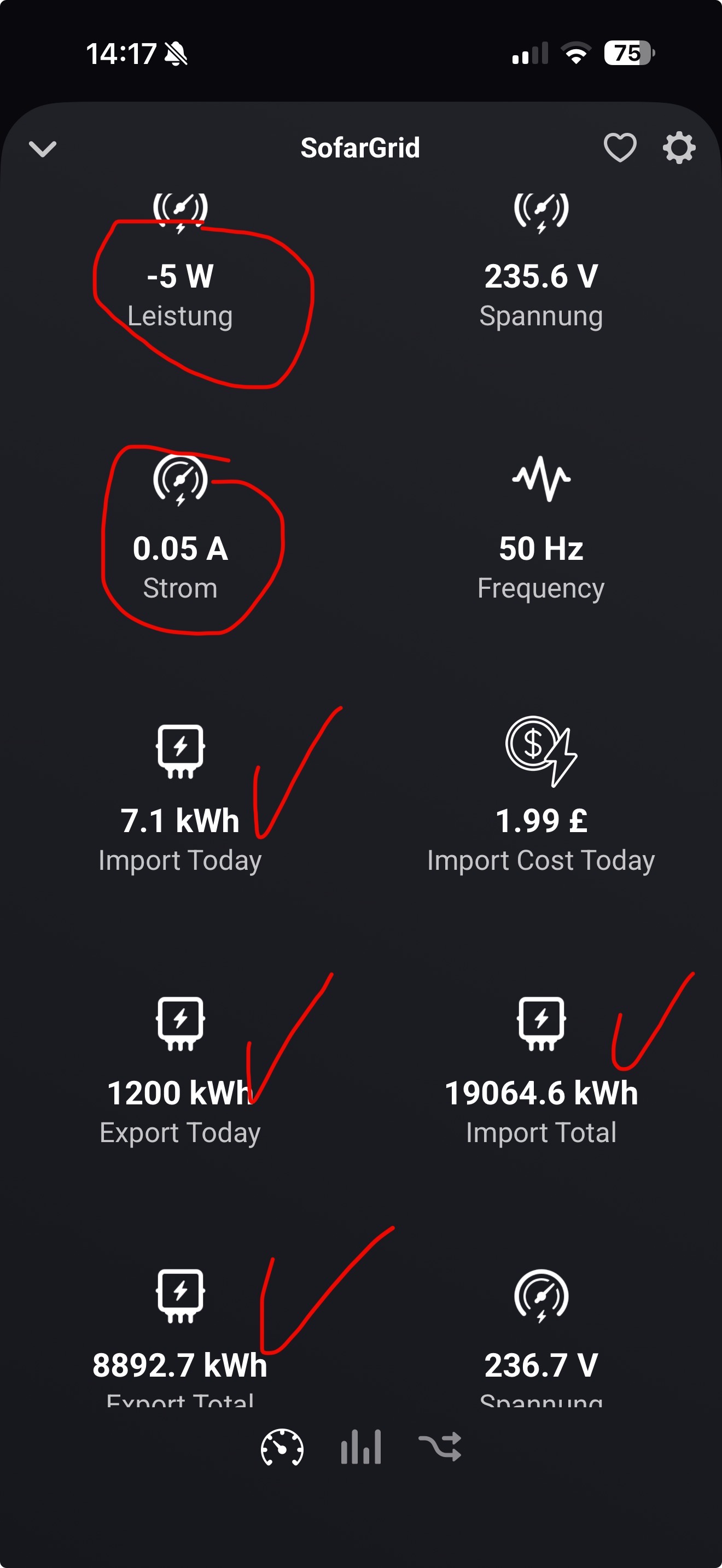

Glad most of it is working.
Maybe you could use the Register Log in settings page and set the start register to 500 and then the number of register to 200 and hit Start. Once it has grabbed all the registers, copy them and send it to me along with the values you expected to see at that time.
Hello,
I think for the Power, reference and feed-in from the Grid should be register 625.
For the current of the 3 phases it should be:
613, 614, 615.
Can we test this?
If possible, you could still replace the signs of the battery.
I have now displayed it in the Energy Tab and it shows loading even though it will be discharged.
Not replace change +=-
I have to be careful with that as it works for everyone else and I don’t want to break them.


Do you see a positive or a negative value when the batteries are discharging?
If the power sign is backwards, e.g. + when discharging and - when charging, then I might be able to just change the sign of the scale factor in the profile.
I can change the Grid Power to 625, but I am already using registers 613, 614 and 615 for the current:
                {

                    "name": "Grid_Current1",

                    "uom": "A",

                    "scale": 0.01,

                    "rule": 1,

                    "registers": [

                        613

                    ]

                },

                {

                    "name": "Grid_Current2",

                    "uom": "A",

                    "scale": 0.01,

                    "rule": 1,

                    "registers": [

                        614

                    ]

                },

                {

                    "name": "Grid_Current3",

                    "uom": "A",

                    "scale": 0.01,

                    "rule": 1,

                    "registers": [

                        615

                    ]

                },
Is it just a scaling issue?
What do you see in Homey v the solar app?


