New app update ( LIVE: 2.1.1):
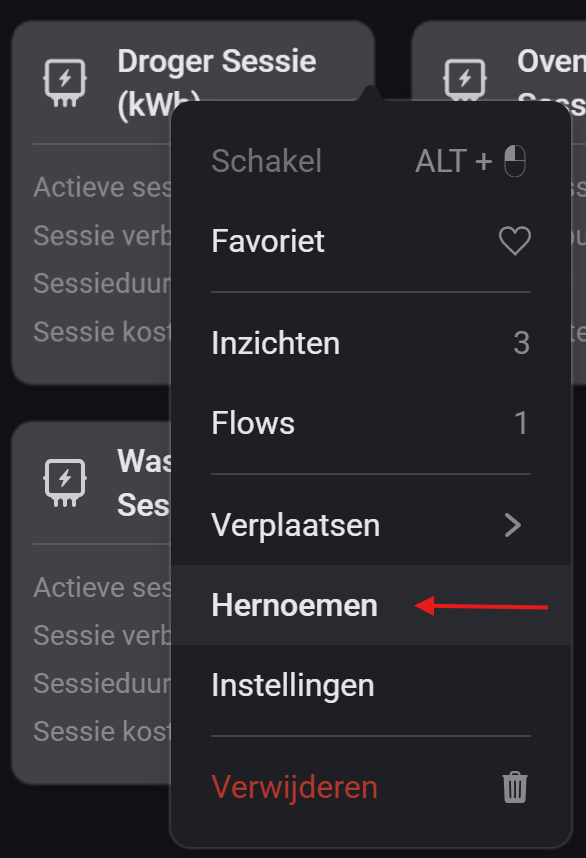
NEW: Dashboard device widget
OPT: Enable usage & costs decimals in device settings.
LIVE: 2.1.1):NEW: Dashboard device widget
OPT: Enable usage & costs decimals in device settings.
The short answer is that measuring this type is not suitable with kWh meters. This can be done with Watt power consumption of the socket better.
What happens is:
Session is done Power Price sets value to f.e. 1kWh
Until new session is starting the graph will draw a straight line, because the meter is not set to 0 but is frozen until next session start.
Because the insight graphs are set to 7 days the update interval you see in this view is per hour. So it will not show the short period when a session was set to 0 when new session start (if you enabled this option) and when the first update was set.
So it’s quite some  and
and  to have a good view.
it would be good if you can label sessions so that you can run multiple sessions at the same time
Can you elaborate a bit more?
Note that it is already possible run run a session for different devices simultaneously. Also you can change the name of the session device (label name displayed in the widget).
Perhaps you are referring to something different.
there doesn’t seam to be an option to set a name in the start session cards. or in the end cards or update cards
That is correct, a session is coupled to the device. It’s not possible to have multiple sessions for the same device at the same time.
You can solve this by adding another Power Price device for the other session, like @SunBeech showed above.
thanks i hoping to have just one device for this.
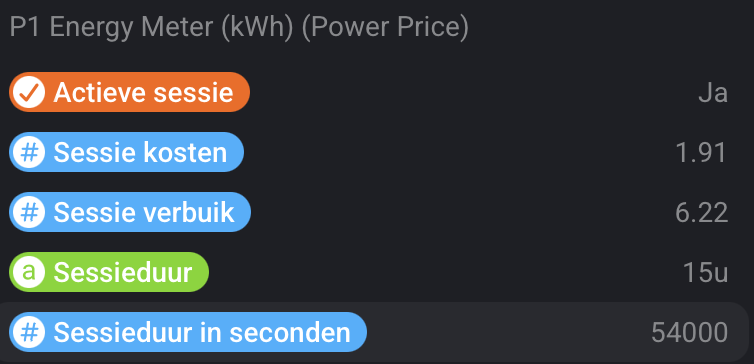
Hi @RobbertV, not sure whether you have plans to add the above on the short term. I want to fully transition from Flow Utilities to Power Price, as I find the latter more convenient to use. The one thing I am missing is the duration in seconds tag. Not sure whether you have some kind of planning in mind  ?
?
Hi @SunBeech,
Thanks for reminding me. Due to other stuff I have forgotten this, Sorry about that.
I did had something already lined-up but not published. I quickly had a look and created a test version with an extra device capability that can be used in your flows.
 TEST: 2.1.3):
Please let me know, how this woks for you.
Hi @RobbertV, thanks for adding this tag! It works great  .
.
LIVE: 2.1.3):NEW: Add duration in seconds capability for flows
@RobbertV: Is it somehow possible to retrieve the timestamp of when a session ends in a tag or flowcard? I am currently using the ‘When the session alarm deactivates’ card as trigger to save the current date/time in a temporary tag. However that tag/datapoint is lost after the flow completes, as it is not stored anywhere. I would expect that the completion timestamp is stored in the Power Price device, as you also use it in the widget, but it is not clear to me how to access it.
Hi @SunBeech,
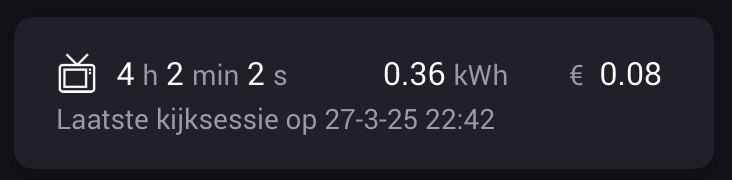
We have the date object stored, but that is for session update/end currently this is stored locally for the widget only.
I could expose it the same way as for the duration is seconds, what kind oof output would you expect? literal timestamp or the date object (could be tricky as this is converted to string type).
but I can’t promise when  since I have some busy time ahead.
On the other hand, why are you using the trigger from the device state to store date/time? and not use it on the same trigger that will also trigger the end action card?
Hi @RobbertV,
Per session device I have a set of flows that control the start / end / tariff updates of a session. For ending the session I use the respective end session (THEN) card:
In addition I have a separate flow that controls the session information shown on my dashboard. For that purpose I use the status widget of the Enhanced Device Widget app that I customized via HTML (so not the Power Price widget):
This flow is triggered when the session ends. As far as I understand the WHEN card that indicates the end of a session is the following, which I use:
Since I also want to show the timestamp of when the session ended, I use the Date.now() method to get the current timestap, when the flow is triggered, and format it in a specific format via one of the Better Logic Library cards. The downside of this method is that the original timestamp is not saved, so if I would re-run this flow (e.g. for testing) then the timestamp is replaced by a new one.
If I am correct the Date.now() method returns the Epoch value of the current (local) date/time. Since date/time formatting is a personal preference, if your app could make available that same value, it could be used for further processing by the end user. Though I also understand that a pre-formatted string/text based time stamp (like the one I am using) is more user friendly.
An other option for me is to store the timestamp/Date.now() value in a variable directly after the end session (THEN) card. Then I can use that variable as input for the flow that controls the dashboard. That would mean that I have to create a dedicated variable for all session devices. That is of course not a problem. Though it would be neater if the session device itself would expose the timestamp in a tag.
Please note that I do not want to rush you whatsoever or expect that you implement my requests/questions . I am just trying to figure out my options for retrieving the timestamp.
As far as I know, the values in the Power Price device are only updated when the session completes.
However, Power Price provides a THEN flow card that lets you update a running session:
The screenshot is in Dutch, but translates to ‘Update active session with [price] tariff and [meter reading] meter reading’.
I assume the values in the Power Price device will show the most recent ones after the update.
Hi, like @SunBeech mentions above is correct.
The widget will only update on the update or end action card.
Hi, I just had another think on your request regarding the timestamp tag.
When placing this in the end card as tag this wil always be the timestamp when running that card. So it would have the same effect as you have now in your flow.
So if you are testing and want to keep the original value. Best solution is like you mention in option 2, to store in a variable I think.
Optional, you could start the flow with a parameter “isTest” = true.
Indeed, the variable option seems to be the best.
That’s what I have settled for and have been using now for some time. I created a BLL variable for each session device to record the date/time stamp.
Thanks for thinking along!