Tja, wordt er helaas niet beter op.
17:05 app reset, die geeft de dagopbrengst gelukkig terug.


600 W op een dag…. Een dieptepunt….

Hi @Gruijter , apologies if this is included in the thread already but there are so many updates that it’s very hard to follow…
shouldn’t be the values rounded as per currency decimal ? It works for meter readings but seems it’s not working for decimals
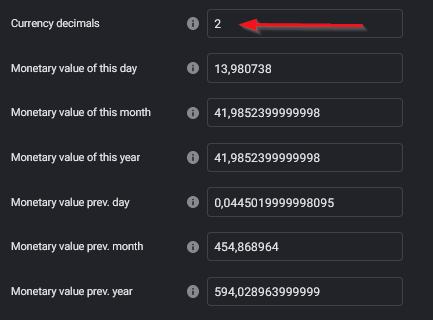
what are the kWh actually showing ? Eg. in case of given month, shouldn’t be this just incremental growth ? See some comparison what I mean…
Or :
Thank you.
Assuming you use v4.9.x this will be fixed in v5.x.x (once I resolve the major bug that v5 still has)
It should be always incremental when you dont have solar panels or other sources of energy that deliver back to the grid. If you do deliver back to the grid the total kWh can go down again.
Thank you, actually I’m on v5.0.9 - I just see that’s not the case for all the devices I’m using, some are rounded, majority are not, even they are updated just recently. But on overview page (not settings) they are fine…
Even for sources which are not dependent on sources which would be delivering back ? Eg. you are right that main power meter might be bad example due to the energy overflows, but look for example just for wall charger… it’s this month but those random drops is what I see basically everywhere, device is using Wh as source, not watts…
Yes, that is the major bug v5 is suffering from. 
Any new updates here? Still same problems with summarizers…
I think if there was a update @Gruijter has already pushed an update.
I am also using the 5.0.9 and the problems are the same.
In the Insight the powerchange was 2 days in a row at 16:05 but the day before it was not.
With my solar panels it adds 800Wh.
My pc uses -2220W and the freezer -2900.
So i hope and think that he will fix this.
But it is not easy.
Maybe another “new” app for as long as it takes to keep watching the “prijsplafond”.
And if it is all fixed merge it gain.
OK, i dont know what kind of problems you other have, but my main problem is that it just doesnt sum corerct. it goes back to zero, and all that kind of problems. Hopefully it will be fixed soon. For some very strange reason, it doesnt apply to virtual devices, those work…
That is interesting! That gives me a very good clue where to look. Thx 
Yes, I know I am hopelessly behind in managing all the input/requests/feedback I get via a multitude of channels. I do hope people keep doing that!
But I also hope that people understand that my spare time to handle all this is very limited, and that I often need to prioritize my familily and paying job over the 20 Homey apps I am maintaining. But from those 20 Homey apps, PBTH definitely is my number 1 priority at the moment.
No problem  Just hoping it will be fixed Trying to help if you need some more testing, stats, tests etc… Let me know!
R
I have made 2 virtual PbtH devices and made a flow.
https://homey.app/f/ZQUb7m
I have used today 1377, 98kWh this day with my TV.
So in my test the virtual device is also wrong.
The other flow has used 97,6kWh. (dishwasher, standby) today.
This is just info.
v5.1.0 is ready for testing.
This change is another attempt to fix the random meter jumps that v5 is suffering from. After going countless times through my code I just cannot find the culprit. 
So now I have made a change based on the assumption that the homey-api module (code that Athom provides to access device information from other apps) is not behaving as I expect. This change only affects the hourly poll on ‘real’ kWh source devices, and will not work on virtual PBTH devices. Also it does not affect Gas or Water summarizers. But I am not sure if those had the problem in the first place.
So fingers crossed 
Do we need to install something or does it autoupdate? Nothing happend at my end.
I have updated the app. Will see if I have tomorrow strange values like 26508W for the washingmachine and 21289W for the dishwasher. Both as highest power.
After the update to 5.0.10 the highest values are now 0. Minimum values are stil - 14750W and - 76324W.
How to update?!
** Ignore, suddenly updated.
So far so good. My daily bug around 17:00 didn’t show up today. I will disable the app restart (at 17:05) and see what tomorrow brings .
v5.1.1 is ready for testing


