As far as I know, there is no way to tell Adam the temperature or the need for heating, in a room. This is only possible with connected thermostat (don’t you have one?), or Lisa/Tom/Jip in other zone’s.
Are you sure you want to go this way? I wouldn’t want to rely on any home automation to control this central part of my heating. Or try to emulate the (very complex) thermostat functionality.
Adam SA is the Adam HA without the Zigbee stick.
Adam SA communicates with an app on your phone via WiFi.
However, the app Plugwise App voor Homey | Homey only supports Adam HA, and in the list of commands supported by this app for the Adam SA, there is no command to start/stop your heater or set the temperature’s set point of the heater.
Have a look at OpenTherm Gateway App voor Homey | Homey
And for heating your home in zones, you need controllable thermostats anyway, because you want to control every zone individually.
For just switching your heater on/off, there might be a relais on your heater.
Thank you for your reply. The reason for my recent research is because my Honeywell thermostat died. So I need to replace it, but wasn’t sure what was possible. The heating part of home automation is something I haven’t worked on until now, so I appreciate you’re feedback and will go for Adam HA or something different.
An Adam SA and a second handed Honeywell round thermostat will do the job (if you don’t want to control different zone’s).
Do your research on “PID temperature controller” complexity before deciding to implement such functionality yourself (if you go the opentherm gateway route, which gives the advice to only use it to monitor, not to steer the opentherm signals).
I have the plugwise system for 3 years - with connection to Homey (and Google). All worked fine. Since about a week, all plugwise devices are offline/unreachable in Homey.
The plugwise app works normal, all is in the same network. Any thoughts?
Ah, Ted, I was just reading THIS POST - and realised that was what happened just over a week ago; I installed a (brand new shiny ubiquity) network router, so all IP adresses were new.
after restart of Homey, it had found the Plugwise devices again.
I do understand this should not be this way - it should have found them itself? does it help you if I send you diagnostic report? Or is it too late because it’s resolved?
Hi Ted, yes it’s resolved. It obviously did not update automatically - it had been on a different subnet/IP range for 10 days with a leasetime of 1 day.
@TedTolboom As far as I can find It’s been rather quite on the question of implementing the pauze functionality, or did I mis something? Is there an option to implement this into the Plugwise app? In my opinion that’s the easiest way to let Adam regulate the heating based on schedules and have Homey doing the hone/away funcionality. Thanks in advance.
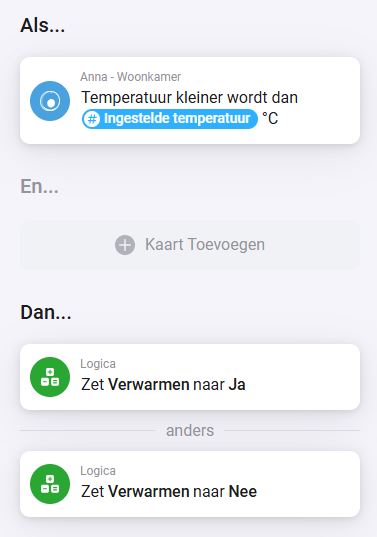
Hello, I made a flow to identify if the ANNA thermostat is on heating or cooling. For this i have created the flow below. It works for a fix temperature, but not for the anna variable ‘Ingestelde Temperature’. Could you check?
Hi @Franck , who are you asking? If you want an answer from the app developer, you enlarge your chances if you add his name with an @ (like I did with your name) and send him a bug report from within the homey app and reference to the id of that bug report.
@TedTolboom I sent you a diagnostic report 3de95e90-c381-4f60-87ef-9b0f08842bf5
The IP adres of Adam HA has changed, and it seems that the app does not know.
By the way, I am managing this Homey Pro (early 2023) remotely. So I have no access to the network router to change the IP back again.
Firmware version 12.3.2, App version Plugwise 3.1.1
Just installed the Emma in combination with the Plugwise Adam SA on a ATAG Q38C. For now I use the open therm thermostat option within the Homey Pro because the Emma is for now not support.
So herewith also a request for support for integration for the Emma😉