I might be able to upgrade the sensor via a Hue bridge, to get the same results as you.
Out of curiosity: why do you need a lux update every 15 seconds. What do want to achieve?
Well .. i just want my sunscreen to go down and up when needed.
So i have a flow that starts a timer for 16 minutes when the LUX is above a certain point
As long as its sunny it resets the time .. when the timer is 0 it goes up
The problem is that 3 times checking in 16 minutes is way to low.
Especially when there are clouds
Then i often happens for example that when there are a lot of clouds .. its darker at the 5 minute intervals .. but sunny in between ( believe me happens more often then you think  ) … so the suncreen goes up when it should stay down
Probably a 30 seccond interval could be ok also … but once every 5 mins is not usable for me
My windows are poiinted south .. so in summer i want the screen down ..
even its just 4 minutes of sun in the 16 minute timer
Like i said .. i have the aeotec multisensor ( wired ) on my shed.
Worked perfectly in my prvious house .. with same flow checking every sec.
But due to a house move and shades and plants i can not use it for my sunscreen.
I can place it on my roof just like the hue one .. but i do now want to drill holes there for the wire ( USB need to fit through ) .. so thats why i bought the battery Hue one.
I also have a aqara batteryone .. but that one measures with a weird angle .. not like the fish eye view of the HUE .. so also not working
So now i have 3 sensors that all 3 do not function for me ( measure lux on battery every 15 to 30 secs on my roof in all weather )
Clear.
With an update every 15 second, the batteries might soon be dead. Maybe that’s why it’s not so easy to find something like that.


Sure … and is that for outside use like i described earlier ? Can that be screwed on my rood ?
Does i have a disheye coverage like the HUE … or does it measure wrong just like my even cheaper aqara zigbee sensor ( like also described above )
There are plenty of indoor options that work great. I need an outdoor with battery that works with 15 or 30 sec intervalls
Well my aqara sensor does it on a “knoopcel “ … but is not for outdoors ( and the weird spiking like described )
Also … the Hue is now working for 2 or 3 years and still 100% in hue app (5 min interval ). So if i need to change every 4 months .. that is fine for me
This sensor runs on 2x AA (not AAA) batteries, lasting longer than a year.
I’d mount it in a transparant box outdoors.
I"ve several cheap Tuya ‘crap’ indoor lights and sensors hanging outside, protected from direct rain/snow, but not from humidity/sun/frost, for 4.5 years now  NOT what I expected (one year tops).
So I’m pretty sure this sensor lives for several years outdoors in a box.
I don’t understand what you want with these intervals.
Most sensors work “event driven”:
Something changed > send event
Nothing changes for 30 mins > no events
Hi peter … i described above what i want
Please read
And sure … if the lux does not change its fine if it does not update even for a month 
Lux change of the outside world is not a event … its dynamic and changes almost every second.
How does something know there is an event anyway ??
By CONSTANT measuring .. otherwise events are missed !
The problem is the lack of reporting what it constantly measures i supose
But I am not talking on that
I am talking IF LUX CHANGES i want to know faster then once every 5 minutes
If there is a cloud at 0 …. Sun at 1-2-3-4 …. And a cloud again at minute 5 …. Then the sunscreen goes up … despite the most part is sunny … that is how my HUE sensor failing.
With every 15-30 sec intervals this chance is WAY less
Again please read the above
I now have for €140 on sensors that all have disadvantages
- wired. ( aeotec 7 )
- 5 minute updates ( HUE )
3 ) weird measure angle ( aqara )
The hue measures best …. Just not often enough
Was hoping this app would fix … but looks its not suported anymore ( and is not working )
The luxmeter measures the lux continuous, or almost continuous. Bases upon the difference of the lux since last message send to Homey, the minimal and maximal time between messages, the luxmeter decides to send the new lux value in a new message to Homey. That message can trigger a Homey event, depending on the conditions of the WHEN card used.
I have the Hue Appear up/down light. In the app, I can see that it’s possible to add the up and down lights as separate devices. However, I’m not able to do that.
When I try to add one of the two lights (either up or down), it adds both at once, and I can’t add the second one separately. How can I set different colors for the top and bottom lights?
Hi,
Im using this app for the Philips Hue Wall Switch to connect the device directly to Homey Pro (because I dont have the Philips Hue base).
Works well overall, but with the Hue Wall Switch I have one weird issue. I connected 2 push buttons to the Hue wall switch and installed it as such in the settings:
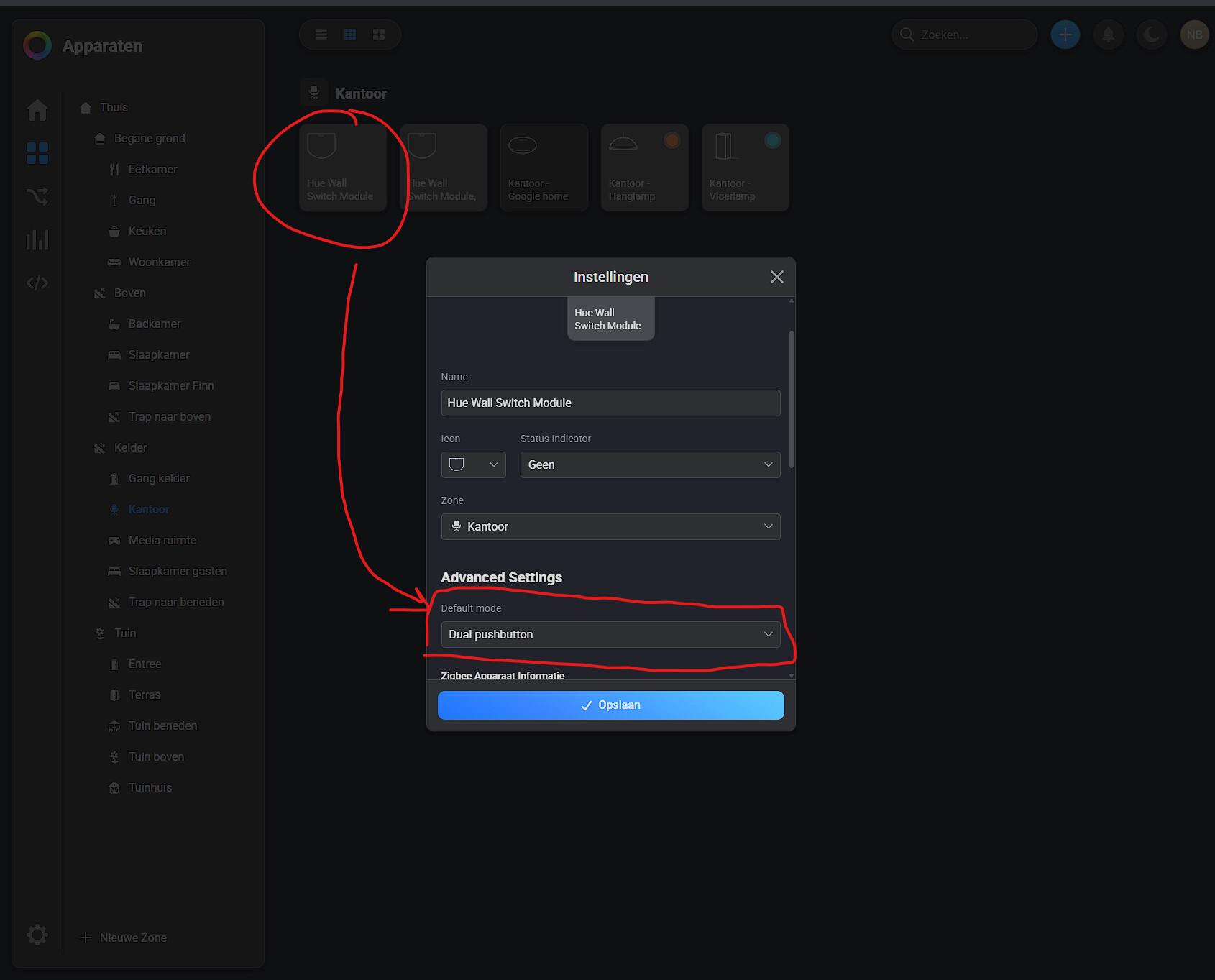
‘Mechanically’ both physical pushbuttons work. However in the flowchart the second push button is selected to do an alternate action, but seems to execute the action of the first push button always. Or in other words, both pushbuttons seem to be recognized as pushbutton 1.
My flow:
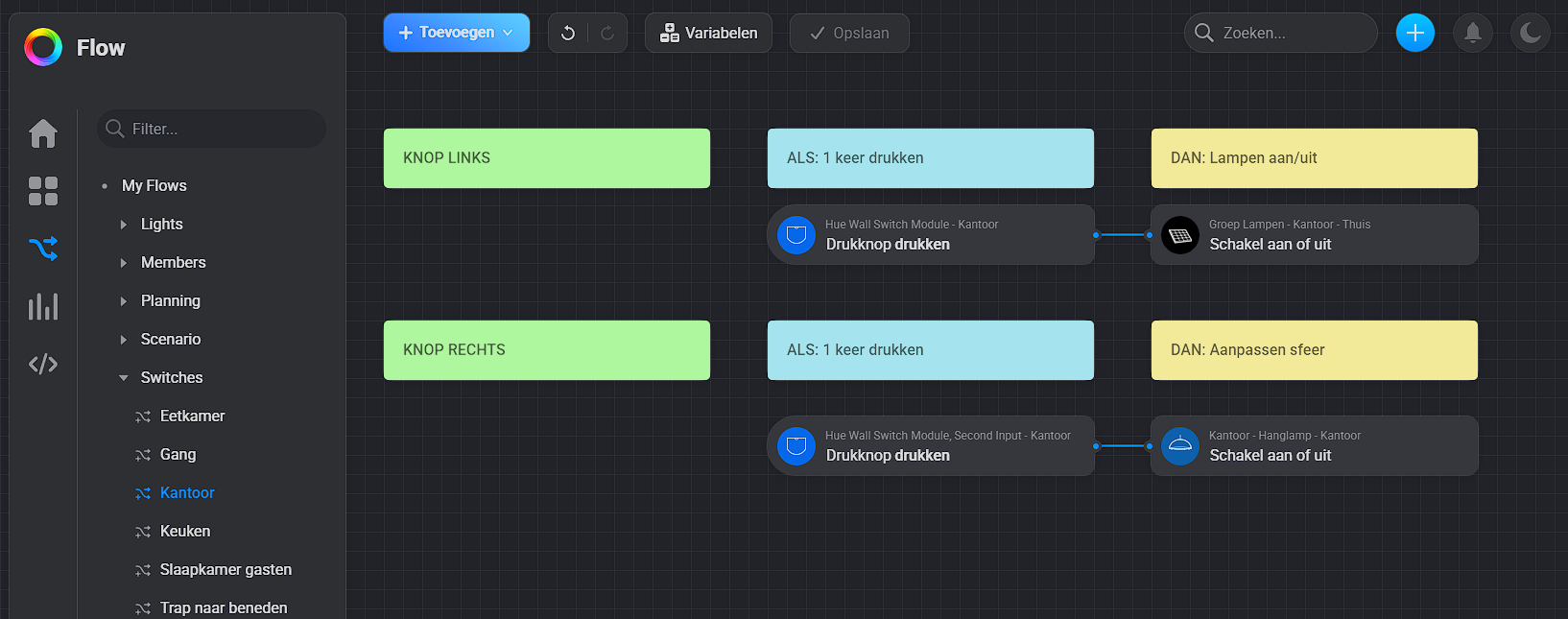
In another room with another Hue Wall Switch I have exactly the same issue, so its not a defective model presumably.
Is this a known issue and if so, is there a fix?
https://community.homey.app/t/philips-hue-wandschakelaarmodule-second-input/119964/4?u=sschot
Take a look.
Do you have a Hue Bridge? Then solve it to connect to the HB and the HB over Matter with the Homey
(Link doesnt work).
But no, I dont have a Hue bridge. I tried that, but gave issues for me when using it also in combination with my ikea lights in the basement.
Strange, for me it do work, but in a incognito browser not indeed.
Search for Philips Hue wandschakelaarmodule second input and you will find the topic
It is a known bug and not fixed yet. Solution within Homey is not available, as far as I know.
I bought a set of two Philips Hue Appear wall lights, and it came with a free Hue Bridge. Right now, I’ve connected the lights directly to Homey and they work well. However, I know that Philips Hue has some extra effects like disco mode, which could be fun for parties. I also have a few Zigbee RGBW spots (not from Hue).
Are there any advantages to using the Hue Bridge, or can I just sell it on Marktplaats?
Next to disco mode, what other effects are available with the Hue Bridge and app?
And can I use the disco mode (or other effects) on my other Zigbee spots as well? Homey is too slow and overloads the Zigbee chip, especially since I have a total of 14 spots.
Firmware updates of your products
Connection over Matter with Homey
Possibility to set Zigbee channel number
Fast respons and no lack in action
IMO I should use the brigde. Regarding options and that kind of stuf, I do not have any idea.
Is there anything known for a fix on the Philips Hue Wall switch not working as intended when you use both inputs? (for users without the Philips hue base).
I saw posts from people 2 years ago with similar issues, seems like this is a long standing problem? Is this on a roadmap, or simply something that is unfixable?
Ask the developer on Github… He is the only one who is able to answer this question
Saw there that the question is already asked twice and a long standing issue. So probably not being picked up.
What I do not understand crom homey is why they rely on the community for this. Hue is about the biggest brand you can get. Why not natively support this?
I kind of understand you cant maintain everything, but this gives a weird feeling for me. Spend a ton on good equipment and an installer and still get these quircky issues.
Cudo’s to the devloper for this app, just more the. Surprised it had to come from the community to start with.
I guess ill look for a different brand switch if it exists at all considering switching the homey out is a step too far at this point.
Same issue here, after network connection broken a few times I decided to remove all my Hue lights, switches etc. from the Hue bridge and add them to Homey so my house can be “used” even without network connection. Got everything working except for the Wall switches, only one side works (input one), the other one shows in the Homey app, you can program in a flow, but it doesn’t work…
