Yes, you can insert a tag into the value field. Search for your variable in tag list.
Hi Ronny. I know how to use a tag. But can i adjust the value of a tag with a separate flow?
It’s still a bit unclear what you’d like to achieve, but I think you mix up tags and variables.
Users can only edit values of variables, by flows or by direct edit (variables = tags you created yourself).
Tags are read-only “variables” provided and managed by apps & devices, users cannot edit those.
(Well, except for tags generated by the advanced virtual device, because that’s a user created and editable device).
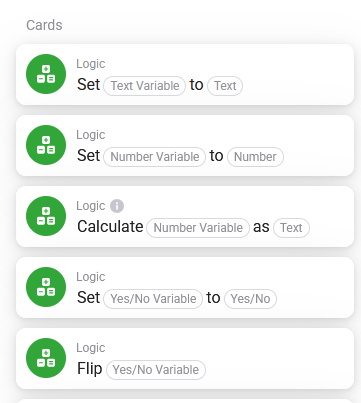
Install this Better Logic Library App for Homey | Homey
Then you can use the first flow to write to a variable and use that in another flow.
Hi Ronny,
I guess I have to explain better what I’am looking for.
To control our AlphaESS battery I have created a few flows.
FOR EXAMPLE:
Discharging
Set register 1000 to 3 ( activate modbus control)
Set register 1005 to 10 ( minimum powerlevel battery )
Set register 1006 t0 3000 ( Time in seconds for this action )
Set register 2000 to 7000 ( discharge-power in watt)
Set register 3000 to 4 ( pv power directly to grid)
I prefer to replace ‘value 10’ /register 1005 by a value of a variabele.
So if discharging is activated on a cloudy day it will be set to 50 instead of 10. So half of battery can be used for our own powerconsumption.
Because I have to set multiple registers for every possible workflow it means I have to configer for each case a complete flow.
If it is possible to use a variabele I can use the same flow for discharging with only adjustment of the variables I need.
Maybe it is already possible but unitil now i can not find or/how.
Kind regards
Hi, got it now (I hope) 
What you are searching for is standard functionality of AdvancedFlow.
Add one of these WHEN cards to your flow:
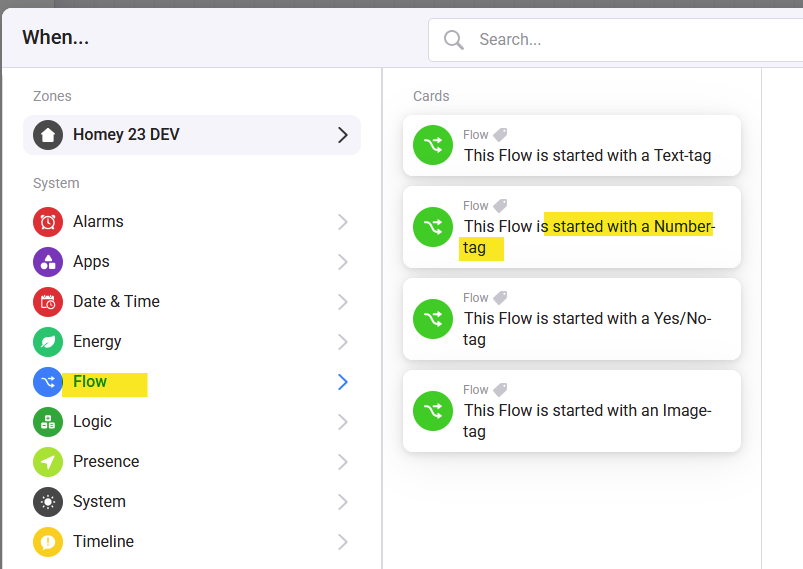
This tag will be your input parameter.
Example: A flow with input parameter for min SoC %.

The start button allows to start the flow without a parameter (from Flow list, from Dashboard). Set a default value instead.
To use your flow, use this cards:

You can use this cars like any other THEN card:

Select your flow and insert a value. Use a variable from the tag list.
Is that what you want to do?
Hi Ronny, this is indead a big part of my need. I Will try this.
I have doubt or/how this Will work if I want to change more then 1 value.
In my example start discharging with different vallues for register 1000,1006 and 2000.
Well, I don’t know your flows in detail.
I would not recommend to create complete generic flows, because then you also could just use the Modbus cards with variable as content parameter.
I suggest to create flows for use case (one for min.power level with a parameter for % value). Don’t use registers as input. Just create a flow that sets all needed registers for your use case. Then it’s easier to use later.
Example: A flow to set discharge power level. I have to set some binary registers in addition. But the flow has only the % level as parameter:

Then it’s easier to use in complex flows like a simple action card - just with parameter.#

Dear Ronny.
I connected A Growatt inverter over a Modbus serial server over WIFI. I can read Holding registers, so thats perfect.
Now I like to write a single register (function 06).
Do I understand that there is no card for function 06?
Thanks for your support.
One day later: I used write holding register and that works great. So now I can read and write registers in the Griwatt inverter. Thanks for your great App.
Hi,
I have SMA setup with 3 solar inverters, 1 SMA Storage 5.0 with 32kWh battery. I could finally force charging using your modbus app, charging when prices are low. Have attached screenshot so others can see how it was done. A bit messy setup in flows, but it charges at night when prices are low. I use the parameter “Minimum width of backup power area”, and change it to force charging. Works well so far.

I hope you are aware of the fact that this is a parameter with a warning against “cyclic writing”?
See also [APP][Pro] SMA Energy - My home. My energy. Our climate - #464 by aste
Thanks for the tip!
Was currently writing 8 times per day, but might need to rethink this a bit.
Thats great news!! Hope it uses live prices from Nordpool, and not only time based..
For content that does not belong to Modbus app, please use a SMA topic - or create one in device section. Thanks.
Hi there,
I have a question about the Modbus app.
To write a holding register, does the app use function code 16: Write Multiple Registers?
I can write the register with modbus poll tester but currently not with Homey modbus app.
However, it is possible to read so the connection is OK.
Would be great if somebody can help me out.
Already solved.
For Goodwe GW5K-dt inverter (SDT-G2 series) you have to enable ‘ write multiple registers for single register (16 bit)’ in the advanched settings of the Modbus Connect App. Now able to read / write the power limit (register 292) via Modbus RTU (0-100%).
Next step is the advanced flow or script.
Maybe a bit rude to reply after almost a year, but still very limited in time, haha. Reading bit-wise is still working flawlessly every day. But writing bit-wise isn’t working. Sometimes I receive in my PLC a short time a good value but it looks like it’s over-written with a “0” after that. Sending INT’s is working flawlessly. Some screenshots attached.


Are you really writing in parallel tasks? This will cause overwriting issues.
Background:
Even if you write a single bit to such a register, it’s not a bit register, but an integer instead.
So the app has to read the register as INT16, change the bit and write the INT16 value back.
So please check the flows that each of writing cars are executed one behind the other, not parallel.
Yeah, just some testing but good to know. So, if I write bit number 3 to TRUE in flow 1, a second later bit number 5 to TRUE in an other flow (no changes at number 3), do I still receive bit number 3 and 5 as a TRUE value? The app reads the INT, changes the bit, and write the INT? 
