[APP][Pro] Modbus - Connect every Modbus devices

Good evening,

I’m trying to use this app. I’ve connected my Sigenergy device via this app in honey pro 2019.

All seems OK and when I read a register the flow works. However, when I want to sent a push notification with that read value, there is no tag available to select from the modbus device.

What can I do?

Just use the token from the flow card. It appears on top of the token list if connect the push notification card to the Modbus card.

Thanks, but it does not appear at the top (it is nowhere).

Can you please show a screenshot from your flow and the tag list?

Uh, that’s classic flow. The flow cards will only give a result back in Advanced flow.

Background: In classic flow, alls card are execuded parallel.

In Advanced flow, you can place the cards in a line. This way, the second card can use the result from previous card.

Thanks, I was a bit afraid of that reply :grimacing: .

Will upgrade to homey pro 2023 later, so it will be solved than.

Thanks again for your very quick reply!

Hehe, you will be surpriced how nice AdvancedFlows are in such cases when you align actions, conditions and again actions :grinning_face_with_smiling_eyes:

For now, you can use the cards to set Modbus values.

1 Like

I have tried the app called modbus with no luck.

Is it this you want? I got it from Gemini so I don’t know if you can trust it:)

Address Description Data Type Unit


31000 Total PV Power INT16 W
31003 Grid Power (negative=export) SINT16 W
31006 Battery Power (negative=charge) SINT16 W
31009 Load Power / House Consumption INT16 W

Battery Status

Address Description Data Type Unit


32000 Battery State of Charge (SOC) INT16 %
32001 Battery Voltage INT16 0.1 V
32002 Battery Current SINT16 0.1 A
32003 Battery Temperature SINT16 0.1 °C

Accumulated Energy

Address Description Data Type Unit


33000-01 Total PV Production UINT32 kWh
33004-05 Total Energy Exported to Grid UINT32 kWh
33006-07 Total Energy Imported from Grid UINT32 kWh
33008-09 Total Energy Charged to Battery UINT32 kWh
33010-11 Total Energy Discharged from Bat UINT32 kWh

Status

Address Description Data Type Unit


30000 Inverter Operating Status INT16 (e.g., 0=Standby, 1=Normal)

-– WRITE REGISTERS (Holding Registers - Function Code 0x06 or 0x10) —

Address Function Value & Description Data Type


40001 Change Operating Mode 0 = General Mode (Self-Consumption) INT16 1 = Economic Mode (Time-of-Use) 2 = UPS Mode (Backup) 3 = Peak Shifting

40002 Enable/Disable Grid Export 0 = OFF (Export disabled) INT16 1 = ON (Export enabled)

40010 Set Max Export Power A number representing the power in Watts. INT16 Example: 0 for zero-export, 5000 for 5kW.

40011 Enable/Disable Grid Charging 0 = OFF (Only charge from PV) INT16 1 = ON (Allow charging from grid)

40012 Set SOC Discharge Limit (On-Grid) A number from 0-100 for the minimum SOC INT16 level before the battery stops discharging.

40034 Force Charge/Discharge 0 = Auto INT16 1 = Force Charge 2 = Force Discharge

40035 Forced Charge/Discharge Power A number representing the power in Watts INT16 to be used for the forced command.

Håkan/sweden

Hi,

what have you already tried?

  • device added including IP, Port and Modbus ID?
  • flow card added and used the register and datatype in the flow card?

Do you get an error message from the flow card?

I’m not really sure how my post ended up here, it was a private message. Luckily not very private :grin:

I get connect ECONNREFUSED. I have exatly the same ip, port and ID as the SolarEdge + Growatt TCP modbus app, it works there but not here.

I just want to be able to change minimun soc temporarily when my car is charging so I don’t drain my small home battery.

Your post was moved from your post in app category (no PM).

Are you still using SolarEdge app? Perhaps the inverter can handle only one connection.

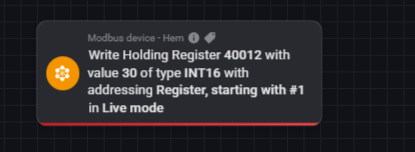
I think I made it but Im getting this error. Why does it mention 40011 when i’m using 40012?

{“err”:“Timeout”,“message”:“Req timed out”,“request”:{“_id”:9,“_protocol”:0,“_length”:6,“_unitId”:247,“_body”:{“_fc”:6,“_address”:40011,“_value”:30}}}

Testmode works but I dont know what that means?

You are using “Register starting at #1” In this case, the register is converted to an address (just -1).

So you can try to change the flow card option to “Address starting at #0" to insert an address value.

It depends on the manufacturer if the numbers are representing a register or address.

But the error is a timeout - no response from your device.

Everything works like a charm. Thanks :folded_hands:

Is there anyway to get energy in homey to understand that My device in modbus are solarpower and battery?

A virtual device would be the right way. But virtual device app and DevieCapabilities app are both not updated to support new HomeyEnergy settings. So at the moment it’s not fully possible.

But if I’m right, you can see your solar power.

Use a virtual dehice (DC app) with measure_power. Then set device class to ‘solarpanel’. But I haven’t tried it yet.

I think you are right. I created virtual solar panels, they now shows in energy tab. I also created a battery it does not show up. Thanks for help.

For battery it needs special energy settings, not only a device class.

Arie (the developer) said he wanted to extend the app. You can ask in the app thread how far he is :smiley:

1 Like

Is it possible to create an advanced flow that write the value of a variabele to a Modbus register.

For example.

Create 1 flow to discharge the home-battery but adjust the wanted soc level.

If forcast expect no sun I want 50% for our OWN purpose but etc
All sceanrios start the same write action and use the value of a variable.

Is this possible?