Thanks.
Short hint: when using INT32 or similar, the set size from flow card is not uses. The amount of registers is read based on data type.
With type BYTE you should use a size of “2” (registers, not bytes).
The 00 00 at the beginning and at the end are irritating. Are you sure the 5998 is a register number and not an address?

There is an offset of 1 between address (starting at 0) and register (starting at 1). What is right should be documented in the manufacturers manual.
If’ the correct decimal value should be -1,3 (-13 as INT32), then FFFFFFF3 should be the right byte value.
I think you are 1 register off resulting in trailing 00 00 bytes.
In your case, the app would read 0000FFF3 and that’s 65523 as INT32.
Please change your flow card to “Address, starting with #0”. Then you should get a Byte result of FFF3FFFF reading with a size=2.

Happy new year  Was also away and today it’s a lazy day.
But back to your example.
FFDE FFFF look right…if -3.4 would be the right value.
I used this converter:
https://www.simonv.fr/TypesConvert/?integers
And FFFF FFDE is -34 as INT32.
So it seemsyour device is using INT32LER (a lower endian variant where the registers are read from right to left - not the Bytes).

I think I have encountered a bug. I’ve recently changed my network, and needed to change the IP address. When I tried to update this setting inside the configuration, it seems to try to connect to the old IP first? Tried, restarting the app but the problem persists. Finally removed the device and added it as a new device to solve it.

Thank for the hint.
I haven’t found a real error. I think it’s a kind of race condition in this case.
When using the “keep connection” settings, the device tries to reconnect after connection lost. I think this works while changing the settings. Then the app disconnect from old IP and tries to connect to the new IP. This ended in a connect error (EISCONN / already connected). So an error on connect occoured and then the app resets settings to old settings and tries to reconnect to the old IP. This results in your connection timeout because the old IP was invalid.
Sorry for this really technical explaination 
I adjusted the connect logic to ignore the “already connected” error. I hope that works in future.
If such an error happens again and anyone needs a quick fix / workaround, please set “manual” as connection type. This prevents the check in settings view and you can adjust the IP. Then you can switch back to “keep connection”.
Ah, that totally make sense Ronny. Ill try to remember it when if a new modem forces me to use different IP ranges again 
Hi Ronny, thanks yor the great app. I installed it, connected, but there are no flow cards available - Can you help me ? Thanks and bye, Lars
Hi,
did you add a device and set IP, port and id?
Then add a flow action (THEN card) to read registers.
Modbus is not pushing updates. You have to read it with flows, e.g.every 5min.
HI Ronny,
thanks a lot – I got it running – was looking for flow cards under the IF Condition and got confused – now everything is fine…
Have a good day and thanks again,
Lars
Hi, I need som help. Ive tried to find the problem. My battery discharge to much and I think.
I have five different times I control my battery. Charging cheapest hours, Normal settings, paus, arbitrage and when my car Is charging. Now I have told the battery normal settings but it discharges to much so I export. This happens sometimes and I think its when it happens in just that order, for example paus to normal, or charging to paus to normal. Or is the problem that I write to the wrong registers?
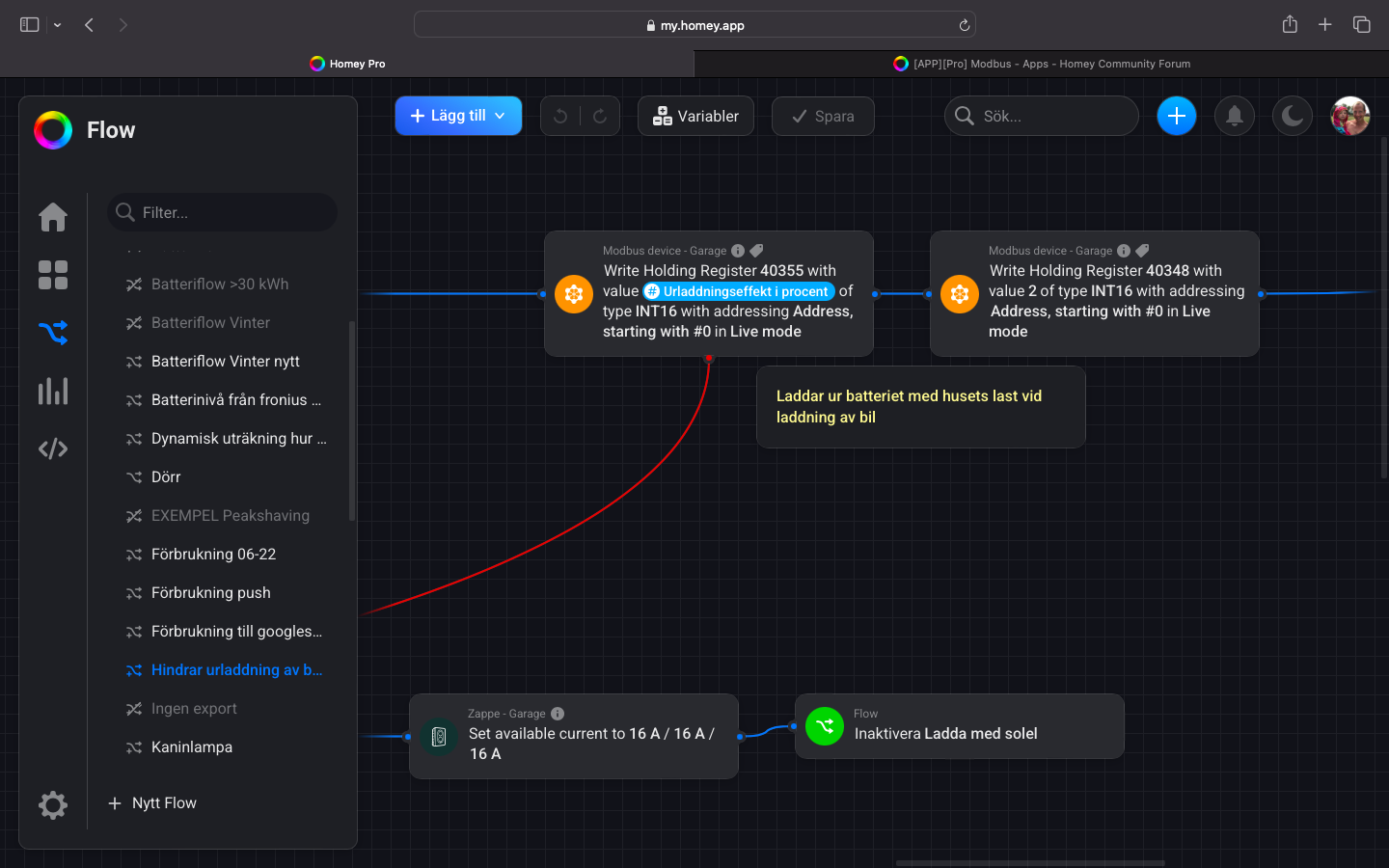
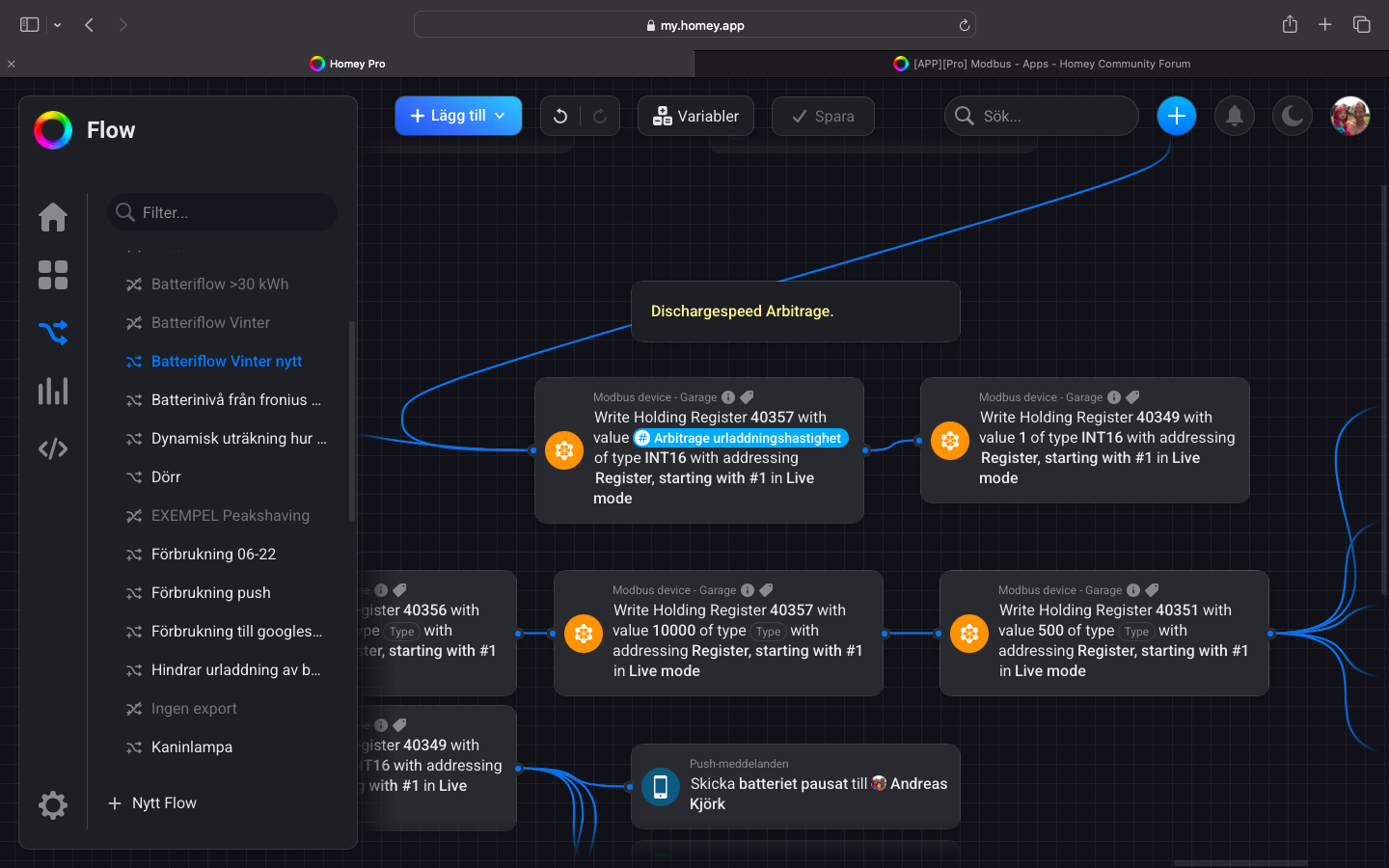

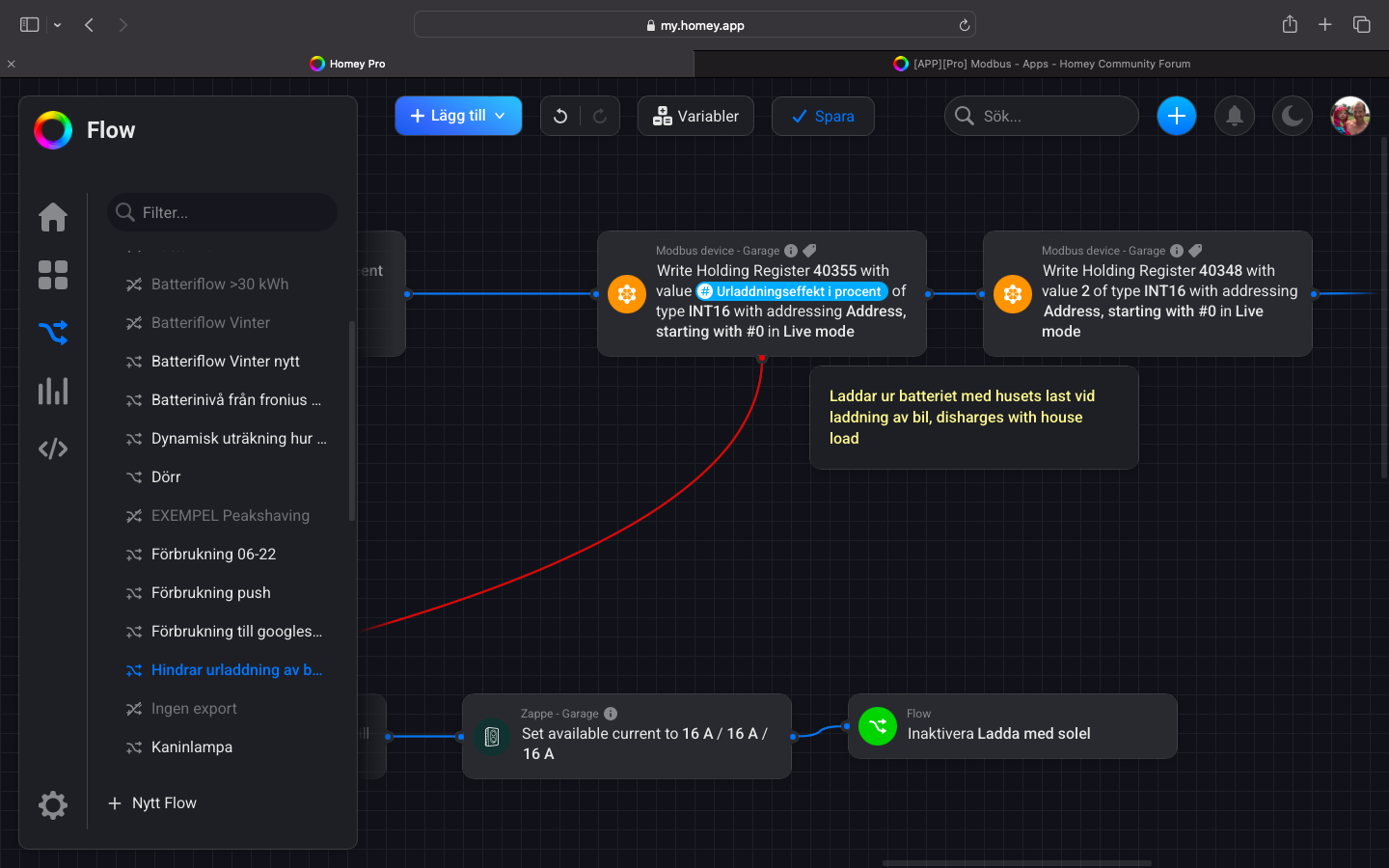

Is it possible in your flows that register 40349 should be set to 1 and at the same time?
Or in other words: Is it possible, that one flow sets the register to 1 and after that a secone flow sets it to 2? That will overwrite the “1” from the first flow.
If both - charge and discharge rates - should be active together, then you have to set both boolean flags with value “3”.
Example for decimal/binary representation:
1 = 0001
2 = 0010
3 = 0011
I needed this to add a discharge rate for car charging from grid (to avoid discharging battery too much) and perhaps activate battery charging at cheap price in parallel.
I’ll add some screenshots later…


I would like to use this app to read (and maybe write) my Nilan Compact P / Air 9 heatpump.
I have connected a modbusdevice to the master (compact P inside unit)
I also have a manual from Nilan with information about the registers, but I can’t get anything readable from the device
I have a Nilan application that reads all values, and I also tried to use ModbusTool
When I try to readout sensor T6 I get

with modbustools 20003 returns 0
Nilan software reports

So the modbus tools reports the correct value (x 10) under “Values order 4321” (note; the temp in the Nilan software was -1.4 on the exact moment Modbustool got the value 14)
But in Homey I can’t get a reading that seems like the temperature

I tried all options in the flowcard, but it’s either 0 or these extremly small numbers
Some info from the Nilan Modbus manual


Some temperature sensors

When I try another setting (20200, a on/off setting) I can read a 0 or 1 (in Modbustool) depending on the setting in the heatpump in Modbustool so that works, it returns this:
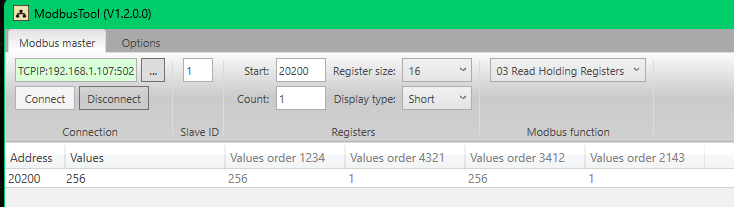
The “normal” value is 256, is that a factor I need to use?
I can also read this in Homey

(or a 0 when I change the setting)
That works!
Temperatures (and other non boolean value) are a challenge. Any help?
edit: modbus settings that might be important?

First of all: I’m very happy with this app, it works great!  Already bought 2x a beer for the dev.
Is it possible to address individual bits inside a word / int (2 byte / 16 bit) variable?
I have different 2 byte variables where each bit has a separate function. So that variable is actually a merge of 16 bits (position 0 - 15).
Many thanks 
To your question: The register can only be read or written with the value, not single bits.
In this case, the value is an integer that is used to store several bits.
The only way is to read the register first, then add/substract the integer value for the bit, then write it back.
But it’s an interesting idea.
I can end up in a long answer
In this screenshot, you are reading an “Input Register”. Using input register in Homey in right.
It seems the 20292 is an Address, not a Register, so use “addressing Address #0” in the flow.
Addresses are starting with 0, the corresponding resister (for documentation/manuals) is just the address+1.
You are reading 3 registers (Count=3). It it right? Such numbers are normally stored in a single register. But based on the order 4321, the wanted (smallest Byte) is stored in first register
What is Endianness? Big-Endian vs Little-Endian Explained with Examples
So I think you should use a LE-type like INT-LE to read a Little-Endian value.
And use INT16-LE instead of Float. Most devices are using integer values with a fixed multiplicator (14 as value, *10 as multiplicator). Some devices have a separate register where you can read the multiplicator from.
Using INT16–LE should return the “14” (I hope).
There you are reading a “Holding Register”. You also have to use “Holding Register” in the flow card. And ist should also be INT16-LE based on the Byte order 4321.
I was afraid of that, haha.
Yes, it saves a lot of data by combining 16 bits into a single INT. I want to transfer more than 250 boolean states between my Siemens PLC and Homey (for lights, window switches, etc.). My PLC can only send and receive INTs, but on that side, it’s easy to combine 16 bits into one INT using a library function. This is also the way I usually handle communication with other Modbus devices.
Would this be something you’d consider?
