Adhoc you could use a Homeyscript flowcard to calculate your INT value.
For the future I can check if I can add it to the app. This would need two new flow cards to read/write a bit from/into a holding register.
@RonnyW okay, thanks for the help. I have a few things working now (reading a few temperature sensors from the master and slave).
INT16 wih address #0 seems to give me the correct values, with a 10x factor.
I have a bit difficulties with the connection; the Nilan software (windows client) can run 24/7 without problems, but the connection from the Homey Modbus app is not stable; after not so long I’m nog getting updates anymore.
I’m using two devices as heatpumpdevices (app Device Capabilities) that are updated with the Modbus app (Compact P indoor unit, Air 9 outdoor unit)

At first I had the master always connected, but after an hour or so it stopped working. So now I have the master on “manual” and I reconnect the device in the flow every minute. Also I get the values serial instead of parallel (don’t know if that makes a real difference).
But still, after some time I’m not getting updates anymore.
When I restart the Modbus app it starts working again, so now I also restart the app every hour (that doesn’t even seem enough)
What can I try to make it more reliable?
edit: I updated the flow so that when de “connect device” and 1 of both Read Input Register (1 for Air 9, 1 for Compact P) return an error the app is restarted. Then it is only restarted when it fails, hopefully this is fairly stable
Hi. I have problem. Not with the app but with my smartmeter.
When i charge my battery from grid or discharge to grid to sell when prices are high for example my smartmeter loses connection.
The past week i have followed how everything works and every time i charge it loses connection and same when i discharge.
All other time it works fine until i charge och discharge.
I have a Fronius smartmeter. Anyone with the same problem?
New test version 0.10.1:
- Added flow card to read/write a holding register bitwise.

Read a single Bit from an integer register or write a single Bit into it.
@Maurice : FYI and to try. Please let me know if I you find some bugs  I only could test with a 2-bit register.
Nice! I will test it asap, thanks! 
Reading is going well for all 16 bits, to improve performance I read every second the whole INT16 to check if there is a change since last time. If there is a change I read all 16 bits one by one, this works well.
For writing some strange things are happening. If I write for example bit 6 TRUE, later on FALSE. I keep receiving TRUE and FALSE on all bits before the 6th bit (so bit 1, 2, 3, 4, 5 and 6) in a random order. Right now all bits in that register are FALSE for more than 5 minutes and I keep receiving dancing bits  The trigger is a 5 second clock.
Can you please check the flow card in test mode? Then you get the bytes that would have been written as result token. Just to check the written value is right in your case.
I checked some examples writing and deleteting a bit and all is right. At least for the byte/INT16 that would have been written. The app just writes INT16 (like it reads INT16).
But that should be the same like writing the INT16 value directly.

Hi everyone. Who knows the right modbus register fir Huawei Luna to charge, discharge or stop discharging? I want to prevent the battery from discharging when electricity prices are low and start again in the morning when it is getting more expensive.
did you check below (also there are some registers for the value ) and the modbus docs, you can find them on the internet or some home assistant github repo.
      if (type == 'storage_force_charge_discharge') {
        const storage_forceRes = await client.writeSingleRegister(47100, value);
        console.log('storage_force_charge_discharge', storage_forceRes);
      }


      if (type == 'remote_charge_discharge_control_mode') {
        const controlmodeRes = await client.writeSingleRegister(47589, value);
        console.log('remote_charge_discharge_control_mode', controlmodeRes);
      }
Another question. With Fronius ECA activated. Is it posible to stop the discharge via modbus when car is charging. It works without ECA activated.
It seems like ECA is controlled remotley via api.
I haven’t tried Fronius ECA because it’s subscription based.
And I have seen some forum posts that it’s not perfect yet.
Do you have a Fronius Wattpilot?
If yes, this can be controlled in the Wattpilot app (allow discharge and set limits and activate boot).
If not, then you have to use your current charge power, substract from current usage and set a limit. I’m using a fixed limit (about 600W) when charging from Grid to not use the battery more than for average house usage.
But I can’t say it ECA is overwriting such Modbus settings.
Its not ready in sweden but im trying it now. But when ECA is activated my flows with modbus app is not working. The flows works but my inverter does not respond to them.
I wonder if i can set modbus to a higher priority in my inverters settings.
Hm, It could be that they are blocking manual settings in this case.
Bwt. Where can you activate ECA? I haven’t found it yet in Solarweb app.
I got it today in sweden. Its under settings. Try change your language to english. It seems like it was problems with the translation in sweden att first.
I have modbus working quite a bit now in combination with my Nilan Compact P and Air9 Heatpump system.
The only real issue that I can’t seem to fix is that the connection to the modbus - or the modbus app - is quite unstable.
My flow updates data from the modbus to Homey every minute with an active connect/disconnect at start/end of the flow (since keep alive surely doesn’t work)
However, up to 10-30 times a day the connection cannot be made (or a value cannot be read).
I created a workaround that when the connection errors out the modbus app is restarted. To do this not too much I also implemented a counter that only restarts the modbus app when 3 times (1 per minute) no connection could be made, but that does not help; when I change it to 5 times, it will just “not connect” 5 times and then restart the modbus app. I could set it to 10, that way I have no updates for 10 minutes.
And this happens 10-30 times a day at least. I don’t think setting it to 1 try (instead of 3) makes a difference
A restart fixes the connection. Also, my modbus device has a good connection since a windows modbusclient has no connection issues. The issue seems to be in the app or Homey
Often a restart is needed again within 5-10 minutes.
Any ideas?
Might be bad connection, but my Homey has good Wifi coverage and the modbus is connected by UTP cable.
Hello,
I’m hoping someone can help me a bit to start working with this app 
I’ve an Oekofen Pellet heating that supports Modbus TCP. I’ve configured it as Device 1 and looks like it is connecting. But I can’t read any register, so probably I’m doing something wrong.
I’ve made some screenshots, can anyone get me started with this ? I would be very gratefull

Screenshot of the register manual:

Screenshot of the error i’m getting:
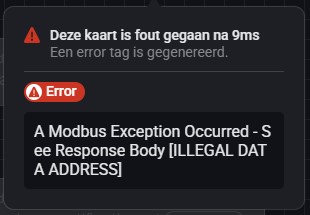
Thanks!
Jan
Are you sure that are Input Register and not Holding Register?
You can try the Holding Register flow card instead.
And the register range has a prefix in most cases like 40xxx instead of your small numbers. Please check your manual if you have to add such a range prefix.

The 40xxx was an example from Fronius.
Do you have an URL to the manual?
PS: This one?
It’s not so much information about Modbus…
No details about
- is it using register or address?
- is it using offset for different register types (the thousands prefix)
- what register type is used (inpout/holding register)
Hi,
I have 2 Manuals in PDF, I just placed them on my hosting since there not on a website of Okofen:
I don’t now what type or register/address it is. Doesn’t look that clear in the manual for me ?
