Great app! Donation well deserved 
Hi @evdpol ,
This looks great ! Love to get this working since the official m-air app is  … I have 6 times an SRK25ZS-WF but non of them is discovered . I have added all to the m-air app and the IN option is enabled .
Any idea ?
Thanks
Michel
Anybody else has issues connecting to the airco’s since homeys update to 12.0.0? When i reconnect the airco or relaunch the app i cant get it to work.
Restart homey after updat and all WiFi connected apps are running very well
I tried, but it didnt help unfortunately. After restarting the homey i have also tried to reinstall the app and tried to connect them again. I succeeded with 1, but not the others. They dont show up when i try to add them. Smart m air still works.
Exactly the same here . Only got 1 of the 6 airco’s in , and now after the update nul nada noppes .
If anyone tells me where to find the logs I can share it
Thanks
Hi Robin
Thanks for creating this app!
Question: I can not select in homey in cooling or heating.
I can set temperature but not select to cool down or heat up.
Can you help?
@robertklep The airco is shown via homekitty thanks.
I can chose in home app cool heat auto of but it does not turn in or off the airco.
When the airco is turned on via the m air app, It is on in Homey but not in home.
There is indeed communication: changing the temp in home actually changes the airco temp. and the actual room temp is showde in home. Any thoughts?
Thanks
Can you create an issue for this here? It will ask for certain information that I need to be able to determine why it’s not (fully) working.
Is it possible to get the (power-) usage data?
I see it in the MHI-app but cannot find it here.
First of all thanks for the effort building this app, much appreciated. But since some time the app stops responding on input from homey (for example turning on or change temp). The app is correctly connected because it does show the correct information (for example, if I change the temp. in the smart air app itself it also show correctly in homey).
So I removed the app, reinstalled it and set it up again. Then it works for maybe a couple of ours and stops again responding on input changes using homey. Both Homey (2016) and the MHI are in the same 2.4ghz network. I send you a diagnostic report: c48b8819-f872-416d-ac3a-fdfb60f7d22a
Thank you for this app; it’s running very smoothly on my end. I was wondering if it would be possible to set the temperature lower than 18 degrees. We use this in our holiday home and would like to set it to 15 degrees during the week (this is more or less related to the “Leegstaand pand” see page 20: https://www.mhi-mth.co.jp/en/products/pdf/Smart_M-Air_AppManual-Dutch_updated_r1.pdf)
All I can see, is that it the network connection is lost at some point. This is a known issue with all available WF-RAC integrations. Unfortunately, there is no (known) solution to this.
I looked into this, but when the “Leegstaand pand” mode is active, it loses the ability to set the normal temperature. The temperature is also limited when enabled. The thermostat capability changes functionality at this point.
I will think about how this can be implemented without losing current functionality…
Unfortunately, no.
Today I has discovered than the 3D airflow mode stopped after a setpoint change. To prevent this problem change first setpoint and switch off and on the 3D airflow mode
As far as I’m concerned this isn’t a problem. Although I understand that complete freedom in choosing the temperature is a plus. For me and possibly others the option of only low temperatures is also fine. So being able to switch the “Leegstaand pand” mode on and off and therefore make the lower temperatures available would be a very welcome update for me!
What do you mean with setpoint? Which capability are you referring to? When you change the horizontal or vertical position, it disables 3D airflow as this influences the positions, right?

Hi Gerard,
This does not happen with my airco(s), but I am making some changes to the app because I see some weird behaviour. One of my aircos just randomly turns off once in a while, so I went debugging this evening and I made some changes to prevent this.
I hope these changes will solve your problem, once the new version is released.
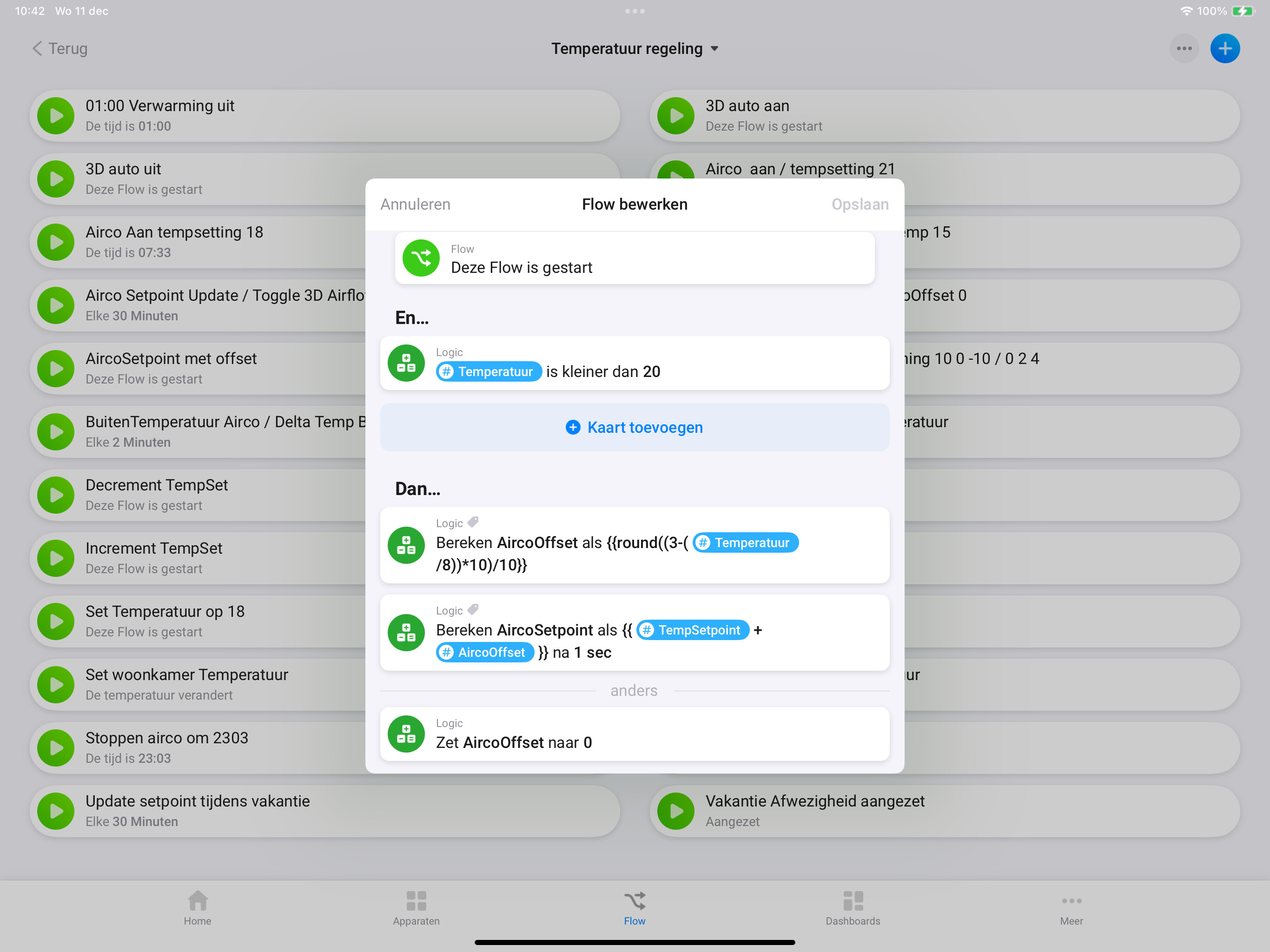
Pure out of interest, what model / type airco are you using for that flow?
And, are you sure a valid “AircoSetpoint” is sent to the device? (integer / float with maximum 1 decimal)? I see the “round” function, but just checking…
Edwin, bedank voor je reactie.
Om te beginnen heb ik in de wifi router alle wifi units die met Homey samenwerken een vast IP adres instelling gegeven. Dit geldt ook voor homey.
Jouw app werkt hier prima. Ik heb de airco firmware geüpdatet naar de laatste stand.
Je kunt hierdoor de temperatuur instappen van 0,5 graden instellen.
Voor de temperatuur instelling gebruik ik een stooklijn formule die als offset bij de gewenste temperatuur wordt in gesteld.
Hierbij mijn foto’s.