I’ve made a diagnostics report, I got this: 2129783b-a533-46a3-bf71-66d3299988cd. Do I need to upload the report somewhere? EDIT: What I’ve just noticed is that whether I log in with the default nethome account or my own, the key and token change with every retry to retrieve them, I don’t think that’s supposed to happen?
Hi.
Just got 3 Midea AC’s (heat pumps) installed today.
All three add fine to the SmartHome (midea) app. But I can only add two of them to Homey.
What I have discovered is that the third AC (the one I can not add to Homey) has a different firmware.
When I try to add it to Homey, it does get discovered, but when I press continue after it has retrieved the token and key i get “Error while adding device”.
Can you please help me @mteutelink ?
Edit:
I figured it out. Used this tool to get the key and token:
Great work on this app thanks so much for building it! Would it be possible to add the Fan mode for Porta Split? The existing modes (Eco, Boost, and Heat) work great but I’m missing the Fan mode
Edit: Nvm it’s already supported just a bit hidden. Amazing work 
Hi Mark, is the EU-OSK103 supported ?
I see the unit but cannot add it.
created a debug report 6421CD11

For some reason my 5 airconditioners are not recognized as such in Homey Pro, but as thermostats. Can I change this?
Hello, I have 10 Senville mini split
while on Midea air app I can add 3 devices to Homey and other 7 got Error while adding device.
so I add other 7 to Smarthome still get the same Error.
I tried removed and re add 7 device back to Midea app still get Error while adding device.
Any advice on this?
Thank you
Hi, sound like I got the same problems as yours.
could you please help me or teach me how to use the tool that you post the link?
I download it but don’t know how to use it.
Thank you
There is a description on how to use it on the same page. Just a couple of commands if I remember correctly.

I can’t teach you because I don’t remember how I did it. I just improvised based on the information on the page. Pip is part of python if I’m not mistaken and you need to install that first. Ask AI. It will most likely help you way better than I can 
I’ve tried no Ai or google search or youtube on how to install pip step by step on PC.
I still don’t get it why I can get 3 devices to add and other 7 can not. same wifi
3 devices can add is on version 1.0.8 and other 7 is version 4.0.4
the app wouldn’t let me update it thought it said already the lastes version installed
Thank you
https://www.xda-developers.com/how-install-pip-windows/
Download the latest version of Python from python.org and install it
Select “Customize installation”, to ensure pip is enabled as an optional feature, and hit Next and proceed with the installation.
Enable the “Add python.exe to PATH” checkbox.
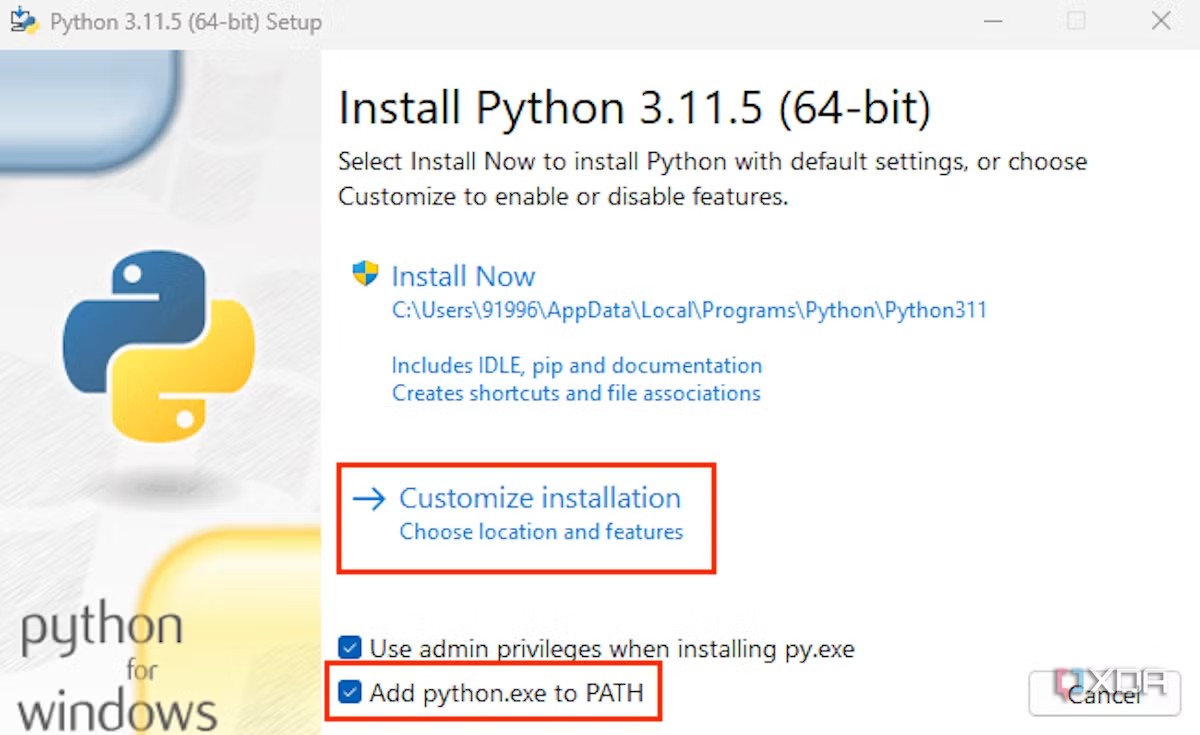
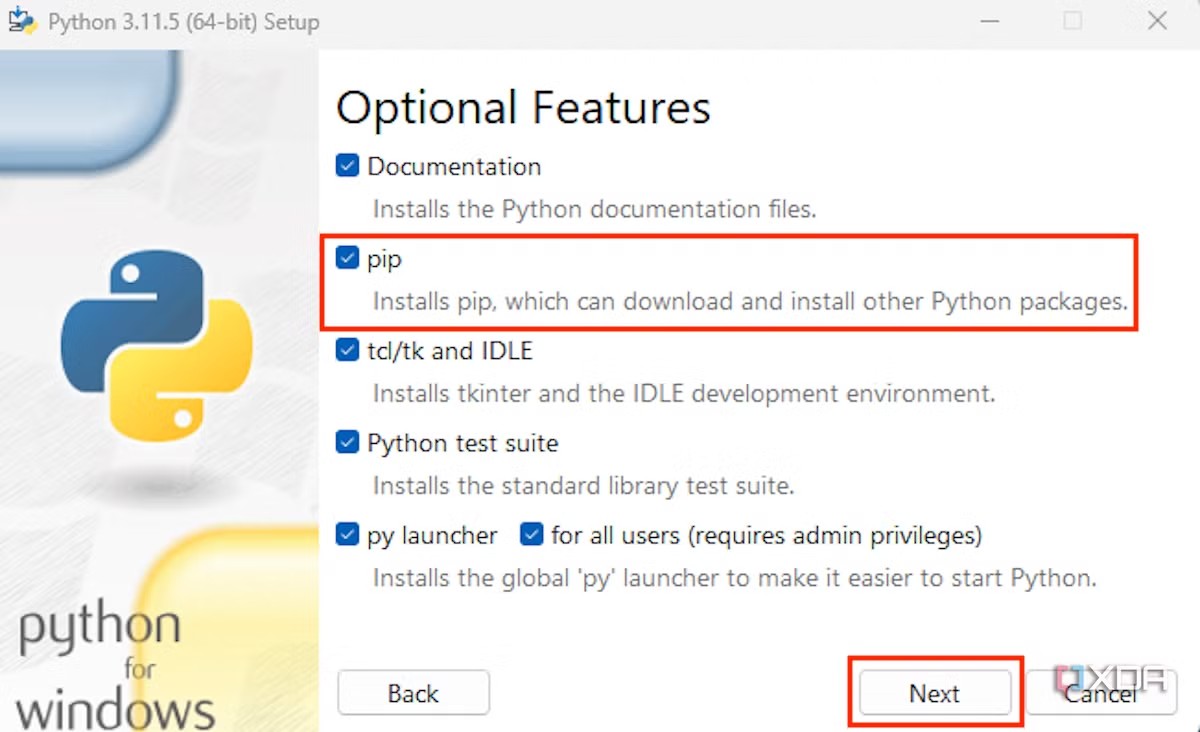
(Found with duckduckgo.com “how to install pip on windows”)
Thank you so much Peter for your replies.
I’ve tired your step install Python and then install PIP. Hold shift key -Right click on Midea beautiful air folder to go to PowerShell.
in the page it told me to run these command to get the device status and Token/Key
run this command with my Midea Air, Nethome plus, and MsmartHome email and password account.
To get tokens used to connect to appliances via local network
midea-beautiful-air-cli discover --account 123456789@gmail.com --password 123456789 --credentials
I got it to show device ID, model, serial number, device status.
but it doesn’t show or tell me the Token and Key.

I also tried other command but it doesn’t show or tell me the Token and Key.
Could you please help me get the Token/key?
Thank you very much for your help Peter
Hello,
I have 10 mini split with US-OSK105. I got 3 to successfully paired with Homey pro.
I’ve tired many step suggested in the forum but I just can’t get other 7 to pair with Homey.
So, I order EU-OSK105 1 from China, 1 from Australia, 1 from Croatia none of these 3 pair with Homey either. I also have tried turn off the main power. I also tired update the firmware. I also have tired swapping the USB between mini split.
So, could someone please help me get other 7 to pair with Homey.
Or if someone want to sell the USB of US-OSK105 or EU-OSK105 that paired with Homey I would like to buy 7 of them.
Thank you
error colde error while adding device
62e7d454-e86e-4046-b6ac-806d62dd3e0c
Thanks! I have successfully added 3 air conditioners to Homey. To get the token and key, I used the following command in PowerShell: PS C:\WINDOWS\system32> C:\Users\XXXX\AppData\Roaming\Python\Python313\Scripts\midea-beautiful-air-cli.exe discover --account “XXXXX@gmail.com” --password “XXXXX” --credentials
Is there a chance of adding other midea device types too? Like Washing Mashine, Dishwasher etc?
Hi,
That would be difficult. I do not have access to these other devices.
With kind regards,
Marc
