Super, zou geweldig zijn. Ik kan het zelf namelijk niet proberen en debuggen. De code werkt bij mij naar behoren.
Ok. Dat betekent dat het inloggen lokaal met een bekende token en key dus goed gaat. De functionaliteit om de token en key via de cloud op te halen gaat dus waarschijnlijk fout. Bij de midea-beautiful-air kun je inloggen zonder en met proxy. Ik zal eens onderzoeken wat het verschil is.
Mijn code gaat ervan uit dat je zonder proxy inlogged. Misschien moet ik die wat aanpassen, maar dat is vanaf mijn plek moeilijk te testen.

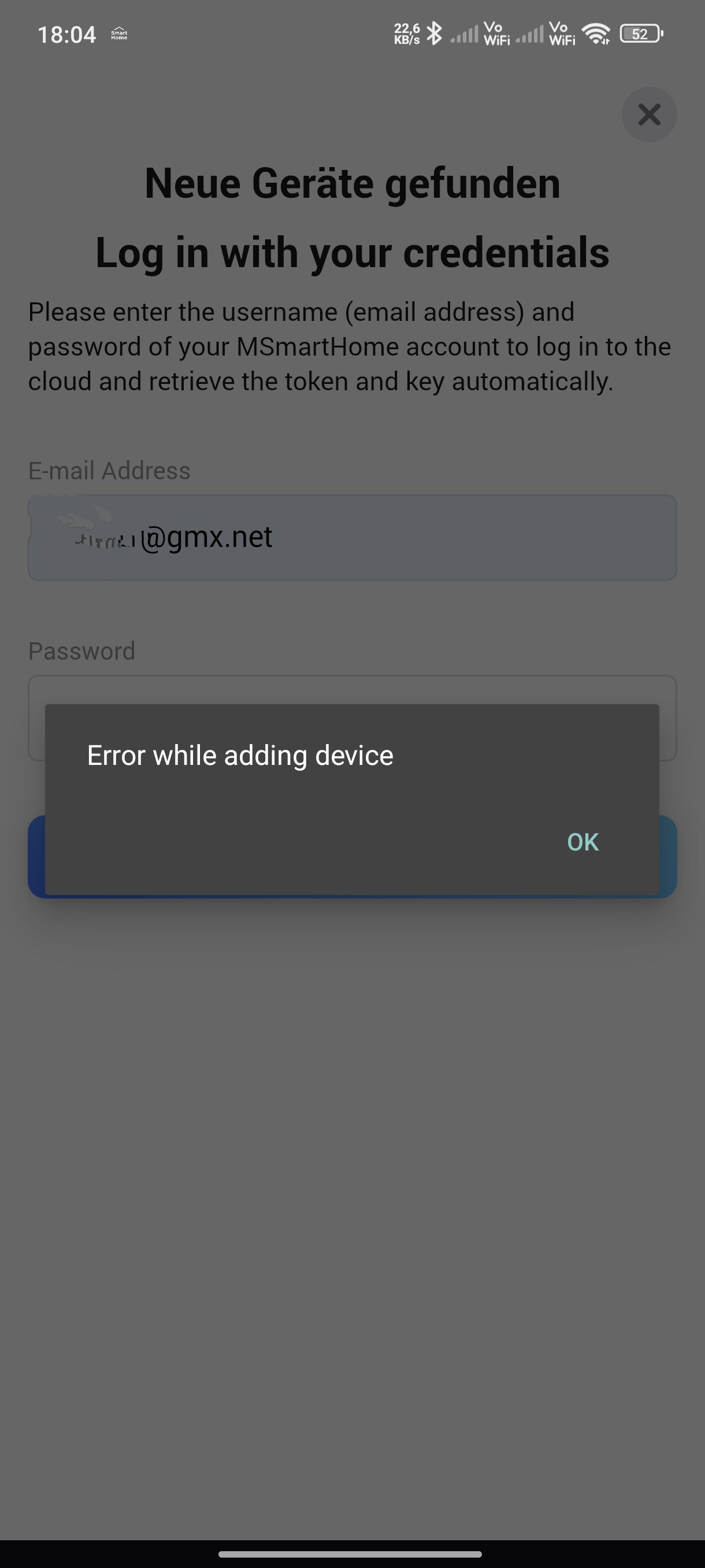
Thank you for this. It works like a charm, but what a hassle. I have spent half a day getting this to work because the email and password login fails.
I wonder how Midea can seriously state that the Homey-integraton works. We are in the middle of March 2025, and this was no easy task.
Actually, it is not an official Midea integration. It was done by me (I have 4 Midea airco’s) and the integration was a huge amount of work. Figuring out how it works (thankfully a lot of other people had the same problem and did a lot of research which helped me a lot). Testing however was the most difficult, because I can only test it with my own airco’s. There seems to be problems logging in, but I cannot test that from my home.
Can you explain the reason for the hassle and how it started to work at the end?
Thanks,
Marc
Perhaps I was not sufficiently clear. The (seemingly official, I may be wrong) Midea-integratoin fails to get the token and key from the cloud when logging in with Smart Home credentials (e-mail and password).
Your solution worked wonders allowing me to retrieve the token and key via the terminal, and although I have no previous experience doing this, I was thoroughly impressed that it worked in the end.
Okay, I was misinformed about the official part. A dealer told me, that Midea had an integration for Homey. I didn’t notice that it was a private venture.
Even more reason to be impressed.
I have yet to test it thoroughly but it appears to work like.a charm.
Ah okay,
I am wondering which tool you used to retrieve the token and key from the terminal? I would like to know how to Improve the app.
Thanks in advance
Marc
I used these steps, as per the post above.
before that I had spent two hours trying to login with e-mail and password.
- Removed my Midea ACs from the MSmartHome app;
- Added them tot the Midea app;
- Installed the following package: GitHub - nbogojevic/midea-beautiful-air: Python client for accessing Midea air conditioners and dehumidifiers (Midea, Comfee, Inventor EVO) via local network
- Ran the following command: midea-beautiful-air-cli discover --account ACCOUNT_EMAIL --password PASSWORD --credentials
- Added the devices using the token/key combination
Hello,
When I saw that you had created an app, I immediately bought three EU-OSK105 sticks for my air conditioners. However, the login is not working for me either; I get an error when retrieving tokens, just like several others mentioned above. Is there already a solution for this?
De moeite van het proberen waard. Maar, kan iemand mij dit uitleggen? De Midea app is toch vervangen door MSmartHome? En hoe werkt dan het installeren van zo’n package?
If you could please keep the conversation in English as much as possible, then more people will be able to participate and help you. Please translate your post into English, otherwise it will be deleted in three days to keep the thread in just one language as stated in the forum rules Welcome to the forum!
Please do also check out the categories in other languages:
If you need help, because depending on the trust level of your account, you may have limited permissions, please PM me or another moderator or reply to this post.
Sorry hoor, maar ik zie veel meer in het Nederlands voorbij komen. Ook van de ontwerper in deze. Mijn Engels is niet goed en ik kan me daar niet in uiten. En waarom zal mijn bericht na 3 dagen verwijderd worden, terwijl de rest van het Nederlands blijft staan?
Ok,
I am currently finishing a fix. This will be released this week.
Thanks
Because of the shutdown of MSmartHome’s token API service, NetHome Plus is used for token and key retrieval. A NetHome Plus account is not specifically necessary; it is possible to use a default account and password instead. These are pre filled in.
Please test and let me know.
Awesome. Works great. You made my day! Thank you so much!
Hi! First of all thanks for all your work, I’ve been trying several things now over the past week but I’ve not been able to add my Midea AC’s to Homey. I used the MSmartHome app, and I was not able to retrieve the key’s through the app, I got an error whenever I inputted my Midea credentials and it would refuse to add the AC’s (though it detected both of them in the Homey app). After reading this thread I’ve migrated one of the units to Nethome Plus and made an account, now when I try to add the AC’s I can see them both, select the right one, input my credentials and after that I do see a token and a key in the textboxes, but when I try to add them it still gives me an “Fout bij het toevoegen van een device” error. Am I missing a step?
In fact, migration from MSmartHome to NethomePlus is not strictly necessary. If you do not have a NetHomePlus account, then I am using a default account to find the token and key. Please put Debug Level to DEBUG and try to create a diagnostic report.
Marc
