It seems (to me) the BLE app is a bit flawed. In v 2.x.x the port number showed up as 28xyz whereas in 1.x.x it was 30000 and I made no changes.
The last incarnation of the Marstek app seems to work well when enbling / setting a port.
It seems (to me) the BLE app is a bit flawed. In v 2.x.x the port number showed up as 28xyz whereas in 1.x.x it was 30000 and I made no changes.
The last incarnation of the Marstek app seems to work well when enbling / setting a port.
Generic request: would it be possible to show no values, or an alarm, in case there is no API data received for some time, say 15 minutes?
The unit is switched off now for 2 days but one wouldn’t notice from the app. A Modbus app displays an alarm in this situation.
High
In copy past the code
Again problemen, code before problemen
95a2b359-991c-4bff-b996-8f499802d3a2
Aftershave reinstalling batterij v3
93170c59-afcb-48ec-b141-0db4284f99b9
Strange my other v2 does not has That problem
I placed a seperate router with fixed ipadresses, this is perhaps a solution if power shuts down ore the router restarts
It doesn’t look like this app is being actively maintained?
I try to keep things solved as soon as possible, are you having problems?
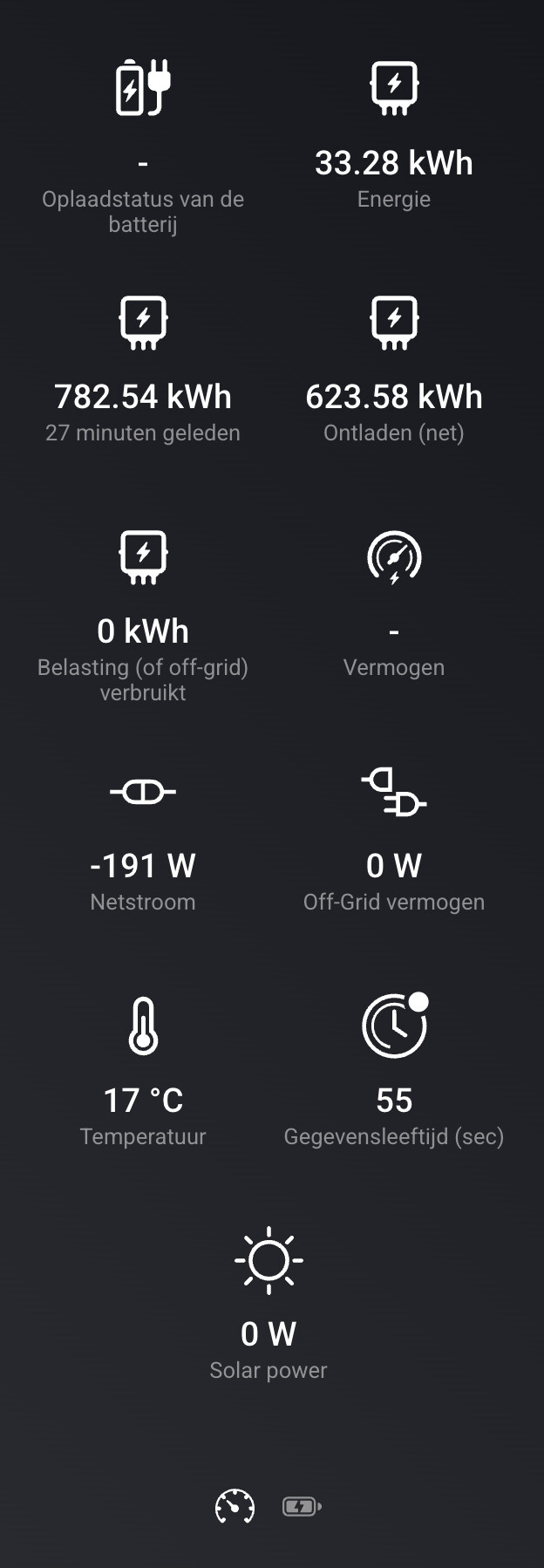
Goedemiddag, ik heb de Marstek Venus D en daarbij werkt de EN-kaart in homey niet van. De oplaadstaus van de batterij is …… geeft geen waarde. Zou je dit kunnen oplossen?
I opened a PR that improves polling and has some fixes.
Thank you for the contribution, and sorry that I’ve not responded yet. I’m currently abroad and was not able to take a look at the PR yet. I’ll check it out coming days and merge + release when needed. Thanks!
Hi,
I have been the owner of two V3 units for a few weeks and have started integrating them into Homey. So far this has been successful and everything seems to be working, except for the measurements. These show a very high value, while in the Marstek app they do not (and of course they cannot be that high). See the screenshot:
I did some investigation and found that in a firmware update the calculation in the API was changed. Is it possible to have this investigated further and, where possible, resolved so that the energy dashboard shows the correct values?
Thanks for te reply!
Hi Steven, thank for the report. Can you let me know what firmware version you have and what Venus model? Note that ‘Opgeladen’ and ‘Ontladen’ are cummulative, so these grow over time. Does the Marstek app report 1/10th of “Energie”?
Hi, i will send you a PM with all the info 
I have the same problem with my Venus E V3 that I have been using for 2 days now. The values displayed appear to be a factor of 10 too high.
Here’s the energy history according to the app over the past 24 hours.
It’s clear that the values for Energy, Discharge, and Charging are 10 times too high.
It would be great if this could be corrected in the Marstek app.
I have a Marstek Venus E V3 battery with firmware V144.2.
January 5, 2026
5-1-2026
It seems some firmware versions have different values; I’m working on a new version that (hopefully) detect the firmware and apply a correction factor. I’ll additionally add a setting per battery so you can control the factor.
Will the missing Charging Status and Power also be included?
Today I received the message that an update was available. I installed V156 on all 3 my Marstek Venus E’s (V1 and V2) and now command SET to manual does enable Manual mode but does not create the schedule. The existing modes are enabled and used. Befor eteh update I could create schedules like this and every time the old schedules were deleted. Now the old ones are maintained but the mode is just enabled.
Hello,
I am reporting a synchronization issue between Homey and my Venus E (v2) batteries (Firmware v154). While the “Manual Mode” command is received, the specific parameters (Time/Day/Power) are not being updated.
The Issue:
Behavior: When I trigger a manual charge via Homey, the battery switches to Manual mode but uses the old values stored in the Marstek App (e.g., 03:00–06:00 at 2000W) rather than the new values sent by the Homey card.
Observation: The mode switch is successful, but the time/day/power values are incorrectly interpreted or ignored by the battery/plugin.
Troubleshooting performed:
Factory reset of both batteries.
Reinstalled Homey plugin and recreated all flows/scripts.
Replaced Marstek P1 meter with a Shelly Pro 3EM due to connection stability issues.
It appears the plugin is no longer successfully overwriting the battery’s internal schedule. Could you look into whether there has been a change in how firmware v154 handles these API writes?
Thank you for the report! If possible, can you create a diagnostic report for the Homey App? it will dump some logs that might help in detecting the bug.
I’ve not released any new versions since today, so nothing happened on the Homey App. I will check them first with my v153 version. How did you get the v154 version?
Thank you for the report; strange that you also have this problem, another user reported this on v154. I’m currently on v153 without these problems. How did you get firmware v156?
If possible, can you run the latest TEST version and send me a diagnostics report after trying the flows where you try to set the manual commands?