Try the new test version its based on your registers, but make it connect through the waveshare first. See if they work (my app works with any Modbus TCP device as long as the registers are the same). Only once you confirm it works through the waveshare THEN/if you want to/ test it directly.
But just like the E v3, the D seems to have a weak TCP modbus controller so using the waveshare is probably always going to be more stable. So if it works with that one, leave it like that. The waveshare is probably multi client also so you can leave the flows you have and just run the app against the same IP.
Thanks, that doesn’t take much effort indeed  I can confirm that this connection is stable and starts immediately. So the waveshare ensures the stable connection and your app works fine with it. Also the registers match. Out of curiosity: which registers didn’t match with your app? I’d like to check them and see what they do.
you use Register 30006 as AC Power (INT16) vs my 32202 (INT32, 2 registers).
SOC-scaling op 32104 - you use it raw I used a scale like I need on the E
I did not have the MPTT registers that provide the solar info, good find there
Just checked: 32202 returns the exact same result as 30006.
Hi,
Is there any change to get the older version back somehow?
I had 1pc Venus 2 + 2pcs Venus 3 all in modbus + 1 Venus A in UDP perfectly working. After the latest update everything is a mess. None of the batteries work. I assume that the selection was changed from 4 into 2 as battery modes and my flows rely on those 4. I tried with all possible tricks to get system running, but no change. Ok its late at night here, so maybe that plays a part also.
So please if you know how to bring back earlier version, I would be more than happy.
Best regards, Marko
I dont get what you mean, nothing changed in the recent versions to the venus E driver (2 and 3) and if you used that one for the A also not for that one.
Send me diagnostic report so I can see what is failing in the logs.
Hi,
The problem seems to be that the Venus E batteries go to SOC mode all the time not the target power mode?
I was a bit tired last night trying to solve this. Batteries were aso dropped into Manual mode from Homey mode. Now they are back to Homey mode, but still the SOC mode is all I get.
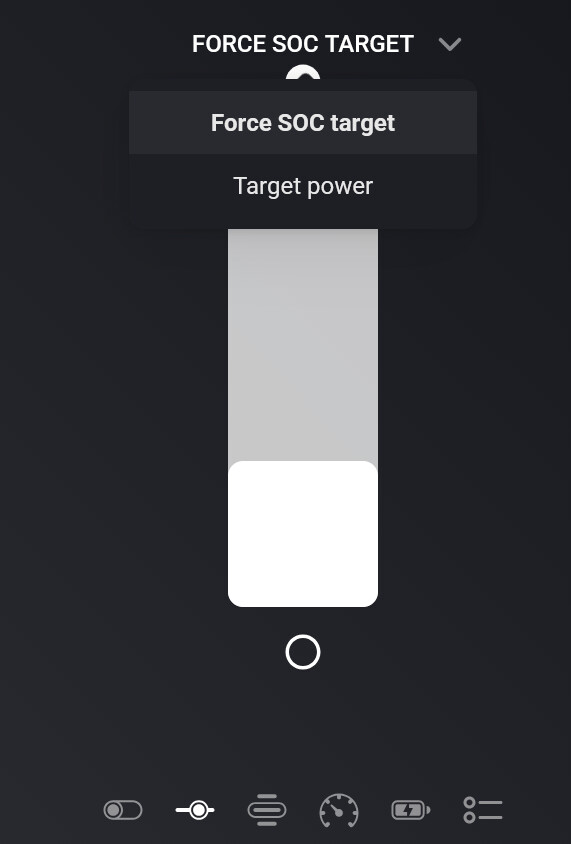
Best regards, Marko
I got all working, I have no clue what happened. I was coding the Venus A power etc to join this package during late evening as final frontier to supply power when there is none in Venus E triple… All good now, sorry for hassling..
I do think I figured out what happend:
Let me explain what was actually happening, because it is not the
control logic itself.
There was an actual bug, and it is exactly what you described: the batteries kept
falling into SOC mode instead of staying on target power.
The cause is the UI control type, not the control logic. The Homey app re-emits a
cached slider value when you simply open a device view, it does not
distinguish “the user dragged this” from “redraw this tile”. The driver treated
that echo as a real instruction, and writing the SOC-target slider has side
effects: it activates the force-SOC strategy and takes over the work mode. So
with “Force SOC target” selected as your displayed slider, just opening the
device view was enough to pull a battery that your flows were driving via
target power into SOC mode. And once there it stayed: the battery’s Modbus
register reports “no force mode” while a SOC target is running, so the driver
deliberately does not clear that state on its own, it cannot tell the
difference between “SOC target active” and “idle”.
Which explains the pattern you saw: you go in to check the batteries,
and checking them is what breaks them. The more you looked, the worse it got.
Fixed in v1.5.11:
- An unchanged SOC target arriving from the UI while target power is actively
driving the battery is now recognised as a redraw and ignored. Dragging the
slider for real always changes the value, so that still works. Flow action
cards are explicitly exempt, a flow that re-sets the same target behaves
exactly as before. - A SOC target equal to the battery’s current SOC no longer activates SOC mode
at all. That value is what the driver itself writes to cancel a previous SOC
target, and there is nothing to charge towards anyway. - Switching to Self consumption / AI Optimization / Manual now clears the force
mode label, which previously kept reading “Force to SOC target” forever while
the battery was actually running an autonomous mode.
Can you play with that version before I push it to the public?
Hi,
This migt be the case. I installed the test version and check it.
Best Regards, Marko
Hi,
I tested v1.5.11 and I can confirm the fix works.
I opened the b3 device view in the app — the one where the “Force SOC target” slider was showing as the selected control — and I didn’t touch anything, just looked and left. Before v1.5.11 this alone would have pulled the battery into SOC mode and it would have stayed stuck there.
With v1.5.11, b3 stayed exactly where it should: force_charge_mode remained target_power, target_power_mode stayed homey, and it kept charging under my flow control (Script 07, PID phase balancer) without any interruption. All three batteries stayed in target power mode throughout.
So the exact behaviour that used to break things — just looking at a battery — no longer breaks anything. This is a big relief; that SOC-mode lockup was the reason I’d been doing BLE system resets. Thank you for tracking down the actual root cause.
From my side you’re good to push it to the public.
Two questions about my setup:

My keepalive flows re-send the target power value on a short interval (the “Set the target power” action card) to keep the firmware dead-man timer alive. Since flow action cards are exempt from the redraw-suppression, these keep working exactly as before — correct?
During the lockup troubleshooting I added a second flow per battery that re-issues “Set the target power mode to Homey (force control)” every ~19–29 seconds, to force the batteries to stay in Homey mode when they kept dropping out. Now that the SOC-mode root cause is fixed in v1.5.11, is this mode-forcing flow still needed, or can I remove it? I’d rather not send that command repeatedly if it’s redundant — and I want to make sure the repeated mode-set doesn’t have any side effects in the new version.
BR. Marko
Great confirmation, thanks especially for testing the exact
scenario.
On your two questions, and the first one has a catch you’ll want to know about.
- Your target-power keepalive is NOT exempt, and it never was.
The set target power has had its own duplicate-write
suppression since v1.3.4 back in May: if the requested wattage is identical to
the current value, the driver returns without touching Modbus at all. It does
not care whether the request came from a flow, a script or the UI.
So when your PID output is stable and your keepalive re-sends the same wattage,
nothing reaches the battery. When the firmware does revert, the driver notices on its next poll and resets the target power value it holds, so your next keepalive then differs and does go through.
- Keep the mode-forcing flow for now.
It’s completely safe to leave running. When the battery is already in Homey
mode, the driver returns immediately without sending anything over Modbus — so
those every-19-seconds runs cost nothing when things are healthy. And v1.5.11
changed nothing on that path: the new force-mode cleanup only applies when
switching to self consumption, AI optimization or manual, never when setting
Homey mode. So no side effects from repeating it.

Can you send me a diagnostic report?
I have created the report and sent the code to you.
I use 3 Marstek Venus E 3.0 batteries (Version: 148.119.5).
Hope to hear from you soon.
Did you receive the report?
Hi, I received an update today—“Marstek Energy Storage has automatically updated to version 1.5.13”—and since then, my Marstek Venus V3 has been having connection issues. When I restart the app, it reads the latest data once, but after that, it runs into connection problems again.
Try the .15 from te test, I introduced a fall one register stop working issue that should be fixed in that version. Damn the v3 firmware, 
Unfortunately, the same problem on 1.5.15.
Please send me a diagnostic report, I’ll probably revert the changes again 
